Hot Take Brave for Desktop Outperforms Other Browsers in Speed and Performance

Brave
93 Replies 10,800 Views

Parkinsond

Level 67
Verified
Top Poster
Well-known
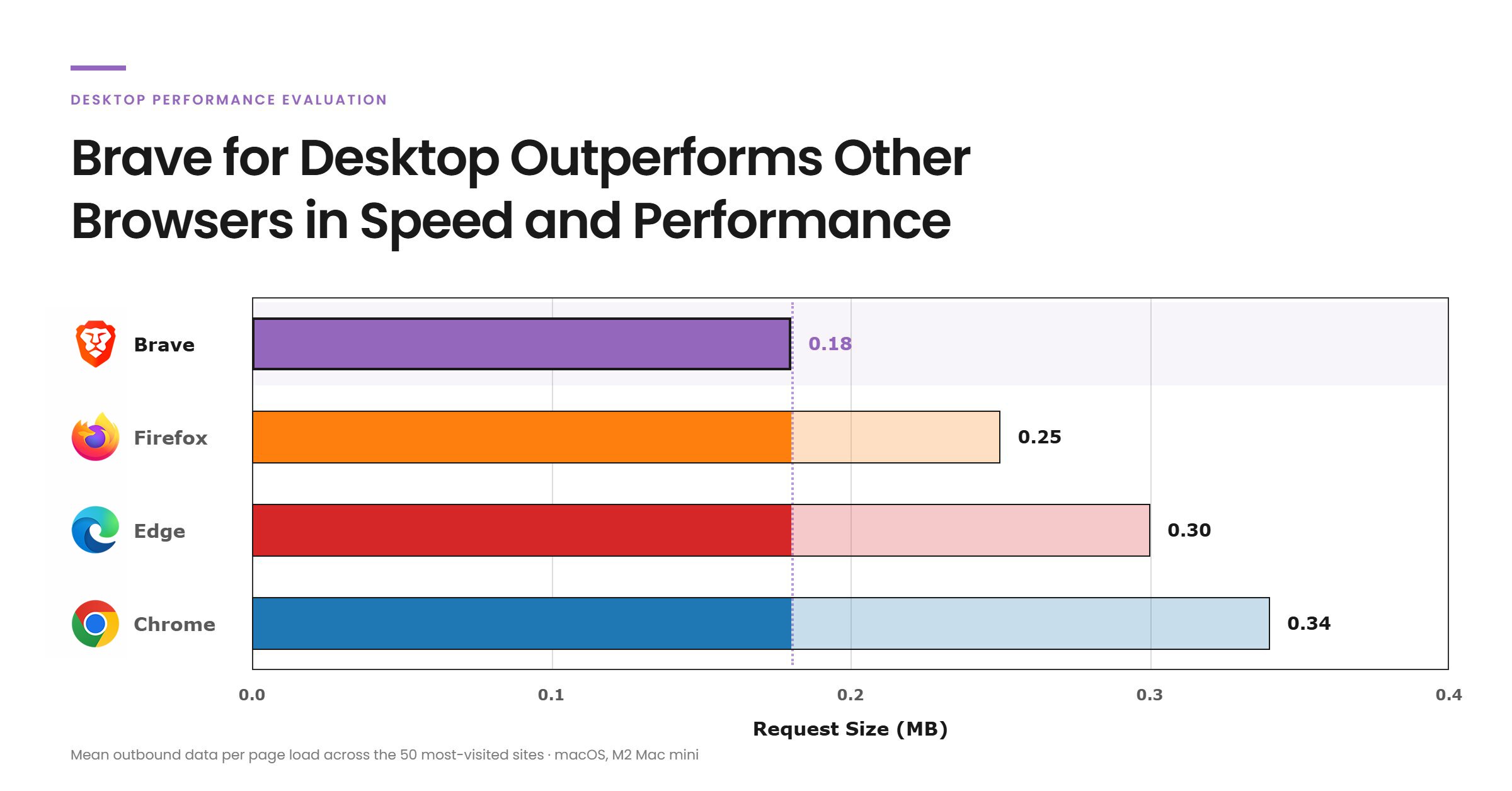
We recently ran new benchmarks comparing Brave against the three most widely used desktop browsers: Chrome, Edge, and Firefox.
We found that Brave for desktop is faster, uses less energy, consumes less CPU and memory, and transfers less data. Specifically, across all tested browsers Brave:
  • Uses on average 44% less CPU
  • Uses on average 10% less energy
  • Uses on average 28% less memory
  • Loads pages 20% faster
  • Transfers 26% less inbound data
  • Transfers 39% less outbound data
 
Chatgpt had me do some dumps of both Brave and Firefox seccomp and apparmor rules that came with the apps and compared them. Brave wins. This is not a simple diff. Chatgpt understands what those rules are about. And chatgpt was using my strict threat model.
 
Last edited:
Best for CPU and battery: Brave.
In independent laboratory tests, Brave consistently consumed the least energy of the processor, which translates into longer battery life. Compared to Chrome, it can reduce CPU load by up to 44%.

Fastest page loading: LibreWolf.
Although it starts slower, in interaction response rate tests (e.g. clicks, scrolling) LibreWolf achieved the highest scores – that means that the pages feel “more fluid” and display content faster.

The most private and economical in data: LibreWolf and Brave.
Both browsers block trackers and ads by default, which drastically reduces the amount of data transmitted (both incoming and outgoing).
LibreWolf goes a step further – it sends zero telemetry data to the manufacturer, while Chrome sends the most of it.

RAM consumption:
Here the situation is more complicated:

Firefox and LibreWolf (which is based on Firefox) often use less RAM with multiple open tabs.

However, LibreWolf has additional anti-tracking filters that can slightly increase memory consumption.

Chrome and Brave (Chromium-based) use a separate process for each card, which increases RAM consumption, but improves stability and security (the failure of one tab does not suspend the entire browser).
 
Last edited by a moderator:
It's not a surprising result, as all of it is mainly down to Brave's very good integrated adblocker.
Chrome and Edge with a good adblocker will show similar performance in most of the benchmarks shown here.
Though one thing that was very notable in the benchmark is that Firefox's CPU usage is much higher, which I have always noticed personally, and Edge was oddly slower on average than the others.
 
done by Brave themselves
1788513408966.png
 
Not much info how it was done though, on Desktop, RAM, CPU, OS?
Hot Take Brave for Desktop Outperforms Other Browsers in Speed and Performance ... on MacOS 🙃
This desktop testing was conducted on an Apple Mac Mini with an Apple M2 chip and 8 GB of unified memory, running macOS 26.5.1 (25F80).
I lost my faith in Brave long time ago, once they stopped users from really disabling Brave Rewards.
They are also secretly working with Google and make fake, umm, I mean bold claims like this article.
 
It's not a surprising result, as all of it is mainly down to Brave's very good integrated adblocker.
Chrome and Edge with a good adblocker will show similar performance in most of the benchmarks shown here.
Though one thing that was very notable in the benchmark is that Firefox's CPU usage is much higher, which I have always noticed personally, and Edge was oddly slower on average than the others.

Synthetic benchmarks show that you are most likely right its actually there below the performance of chrome and edge but close enough its in my opinion a better compromise for its native AdBlock but still brave used a bit of corporate like deception in these tests that you can see once you go to actual non AdBlock related tests the "Synthetic benchmarks"
 
Last edited by a moderator:
It seems to me that:

Brave Origin = Brave - these policies https://support.brave.app/hc/en-us/articles/360039248271-Group-Policy
Yes, i think these are not present in origin, anyway for safety purpose :

"TorDisabled": 1,
"BraveRewardsDisabled": 1,
"BraveWalletDisabled": 1,
"BraveVPNDisabled": 1,
"BraveAIChatEnabled": 0,
"BraveNewsDisabled": 1,
"BraveSpeedreaderEnabled": 0,
"BraveWaybackMachineEnabled": 0,
"BraveStatsPingEnabled": false,
"BraveWebDiscoveryEnabled": 0,
"BravePlaylistEnabled": 0,
"BraveLocalAIEnabled": false,
"BraveP3AEnabled": false,
"BraveTalkDisabled": true,

Capture d’écran du 2026-09-04 15-00-50.png
 
KEEP EXPLORING

Similar threads

Another perspective. Your next conversation.

Community
Security tip
Separate cleanup from recovery. Removing ransomware does not automatically decrypt affected files. Preserve encrypted files and the ransom note while you check recovery options.
Back
Top