Hot Take Brave for Desktop Outperforms Other Browsers in Speed and Performance

Using Vivaldi browser for the same amount of time (a full day) and browsing the same websites.

View attachment 299909
I monitored Edge for a while yesterday after seeing your post but didn't see any excessive disk writes 🤔 I offload a few folders to RamDisk so writes should be higher than average but even then it was quite normal for me. I will try to monitor again tonight as version 153 has been released.
The size of Edge install is 800+ MB, not 3 GB because files of Edge, Edge WebView and the rest are hardlinked.
 
I monitored Edge for a while yesterday after seeing your post but didn't see any excessive disk writes 🤔 I offload a few folders to RamDisk so writes should be higher than average but even then it was quite normal for me. I will try to monitor again tonight as version 153 has been released.
The size of Edge install is 800+ MB, not 3 GB because files of Edge, Edge WebView and the rest are hardlinked.

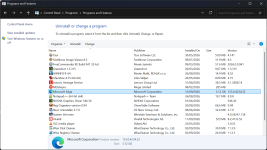
I’m currently testing Microsoft Edge and so far nothing weird has come up. The “tab sleeping” feature doesn’t hibernate to disk as I suspected, so I don’t think the issue lies with the Chromium browser. It’s clearly in the Brave browser, as I tested it for two days and the results matched what’s shown in my screenshot. Regarding Microsoft Edge’s size, how much does it show in your “Programs and Features” menu? Here’s mine:

1789135744741.png
 
The “tab sleeping” feature doesn’t hibernate to disk as I suspected
That is good to know.
how much does it show in your “Programs and Features” menu? Here’s mine:
Where is this "Programs and Features" menu? I can't find it 😶
Anyway, this info doesn't know how to count hardlinked file so it shows a higher value. I shared a WizTree screenshot before where you can see the "Allocated" size value. That is the actual space taken by the folders. Other info is incorrect.
 
That is good to know.
Yes, my test with Microsoft Edge ended yesterday with normal disk writes, so there's nothing suspicious about it. I probably noticed the writes because it was the first run after clearing the cache (I don't remember, I'm just guessing), or maybe all my extensions got updates at once (because I don't usually use Microsoft Edge as my main browser), but it's better than Brave browser, so I uninstalled Brave browser.
Where is this "Programs and Features" menu? I can't find it 😶
At the bottom of the full image 😁

1789228494257.png
Anyway, this info doesn't know how to count hardlinked file so it shows a higher value. I shared a WizTree screenshot before where you can see the "Allocated" size value. That is the actual space taken by the folders. Other info is incorrect.
I asked ChatGPT AI about this yesterday, and it asked me to check two folders. The first was the Microsoft Edge folder in Program Files, and the second was the Microsoft Edge folder in App Data. The first folder was 2 GB and contained both the current and previous versions of the browser, while the second was 1.22 GB. I'm not sure why Microsoft Edge is behaving this way on my device; I might need to reinstall it. 🤷‍♂️
 
Yes, my test with Microsoft Edge ended yesterday with normal disk writes, so there's nothing suspicious about it. I probably noticed the writes because it was the first run after clearing the cache (I don't remember, I'm just guessing), or maybe all my extensions got updates at once (because I don't usually use Microsoft Edge as my main browser), but it's better than Brave browser, so I uninstalled Brave browser.

At the bottom of the full image 😁

View attachment 299945

I asked ChatGPT AI about this yesterday, and it asked me to check two folders. The first was the Microsoft Edge folder in Program Files, and the second was the Microsoft Edge folder in App Data. The first folder was 2 GB and contained both the current and previous versions of the browser, while the second was 1.22 GB. I'm not sure why Microsoft Edge is behaving this way on my device; I might need to reinstall it. 🤷‍♂️
1789232361740.png
 
At the bottom of the full image
Ah, Control Panel! 🙂 I haven't been there in a while. Even the Windows Start Menu search doesn't know what Programs and Features is.
I asked ChatGPT AI about this yesterday, and it asked me to check two folders. The first was the Microsoft Edge folder in Program Files, and the second was the Microsoft Edge folder in App Data. The first folder was 2 GB and contained both the current and previous versions of the browser, while the second was 1.22 GB. I'm not sure why Microsoft Edge is behaving this way on my device; I might need to reinstall it. 🤷‍♂️
Did you check in File Explorer? If so, File Explorer won't show you the actual size. As I said, check on WizTree to be sure. It is more reliable.
Your Edge should be fine if you have one older version or maybe two. After Edge received version 153, I have the backup of 152. Once Edge WebView is updated to 153, the old backup will be auto-deleted.
Chrome downloads a 450+ MB installation file when there's an update and in my experience, this file is not deleted automatically. Microsoft Edge doesn't seem to download such a big update file. It is much smaller. It is inside the EdgeUpdate folder.
Regarding AI's analysis of the File Explorer vs WizTree disagreement,
1789236127053.png
 
Did you check in File Explorer? If so, File Explorer won't show you the actual size. As I said, check on WizTree to be sure. It is more reliable.
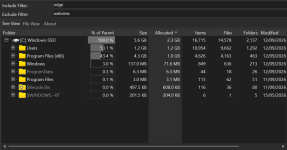
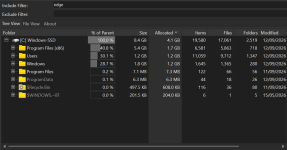
I checked now using WizTree, and these are the results when searching for the Microsoft Edge browser, as well as when excluding WebView:

1789237692004.png1789237762721.png
Your Edge should be fine if you have one older version or maybe two. After Edge received version 153, I have the backup of 152. Once Edge WebView is updated to 153, the old backup will be auto-deleted.
Yes, Microsoft Edge browser on my device has now been updated to version 153, and a backup of version 152 was also kept.
Chrome downloads a 450+ MB installation file when there's an update and in my experience, this file is not deleted automatically. Microsoft Edge doesn't seem to download such a big update file. It is much smaller. It is inside the EdgeUpdate folder.
Yes, I noticed that. Even Brave and Vivaldi browsers contain this folder, and only HiBit Unstaller program deletes it as a junk file.
 
I checked now using WizTree, and these are the results when searching for the Microsoft Edge browser, as well as when excluding WebView:

View attachment 299955View attachment 299956

Yes, Microsoft Edge browser on my device has now been updated to version 153, and a backup of version 152 was also kept.

Yes, I noticed that. Even Brave and Vivaldi browsers contain this folder, and only HiBit Unstaller program deletes it as a junk file.
You don't need to exclude WebView. The way you searched also included the size of the profile folder which is going to vary a bit from system to system. Though Microsoft said they add further compression to Edge cache than what Chromium already does by default/they use a different compression algorithm to begin with.
So the size of the cache folder should be smaller. I verified that it is, in fact true a while ago, while comparing it to Chrome. I haven't checked lately.

It is better to browse folders in WizTree by yourself for a better understanding, even though searching is beneficial too in certain circumstances.
778d2e47-7cd5-46bd-89dc-3ca1284461b2.png
 
I checked now using WizTree, and these are the results when searching for the Microsoft Edge browser, as well as when excluding WebView:

View attachment 299955View attachment 299956

Yes, Microsoft Edge browser on my device has now been updated to version 153, and a backup of version 152 was also kept.

Yes, I noticed that. Even Brave and Vivaldi browsers contain this folder, and only HiBit Unstaller program deletes it as a junk file.
Mine occupied only 1.5 because I have uninstalled and reinstalled Edge, deleting the backup
 
  • Like
Reactions: lokamoka820
You don't need to exclude WebView. The way you searched also included the size of the profile folder which is going to vary a bit from system to system. Though Microsoft said they add further compression to Edge cache than what Chromium already does by default/they use a different compression algorithm to begin with.
So the size of the cache folder should be smaller. I verified that it is, in fact true a while ago, while comparing it to Chrome. I haven't checked lately.

It is better to browse folders in WizTree by yourself for a better understanding, even though searching is beneficial too in certain circumstances.
View attachment 299958
Thank you very much. The corresponding contents and sizes in your screenshot are identical to my Microsoft Edge in "Program Files (x86)" folder, so I believe there is no error in my browser installation.
 
  • Love
Reactions: SeriousHoax