
NextDNS might have blocked downloading json file to enable it. I have it disabled as well, no policies, just a few dozens of flags and all "features" disabled.It must be a policy.


Open MalwareTips from your Home Screen or desktop. Follow discussions, find answers and pick up where you left off.
If you cannot find an install option, update your browser or use its bookmark option to keep MalwareTips close.
After installation, open the app and sign in. Enable push notifications in Preferences if you want alerts. On iPhone and iPad, push requires a Home Screen web app and iOS or iPadOS 16.4 or later.
Sign in to manage notificationsInstallation is optional. Your notification settings stay under your control.
 Thread starter
russ0408
Thread starter
russ0408
NextDNS might have blocked downloading json file to enable it. I have it disabled as well, no policies, just a few dozens of flags and all "features" disabled.It must be a policy.

*only Brave. No other Chromium browser hides settings behind Group Policy in order so they could charge for them. Brave being the only one.If you want to get the most out of a Chromium-based browser, sooner or later you’ll need to use policies, flags, and the Chromium command line.

Perhaps, then, even in this case there are users whose browsers are configured to be “less cautious about potential unwanted changes.”NextDNS might have blocked downloading json file to enable it. I have it disabled as well, no policies, just a few dozens of flags and all "features" disabled.
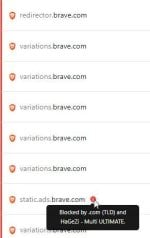
View attachment 300260
*only Brave. No other Chromium browser hides settings behind Group Policy in order so they could charge for them. Brave being the only one.
In order to make browser clean, you have to use Group Policy or pay for Brave Origin. I'm still yet to see the web browser that requires you to pay in order to get rid of their "features" entirely. I know using Group Policy is free, but not everyone has knowledge to do so and these people have to pay.I didn't quite understand what you meant.
Anyway, if I understood correctly, even Edge users,if they want to survive,need to follow the instructions I wrote earlier.
In order to make browser clean, you have to use Group Policy or pay for Brave Origin. I'm still yet to see the web browser that requires you to pay in order to get rid of their "features" entirely. I know using Group Policy is free, but not everyone has knowledge to do so and these people have to pay.
Regarding Edge, I haven't used it for a long time, but back when I did open it briefly, everything you didn't want you could disabled in the settings. Even if that changed, I still can't put Edge and Brave in the same category because Edge is entirely free.
It's not that I don't like it. It's just I disagree with their policies which is practically scamming their users multiple ways.If you insist on using a browser that you don't like...
And that's exactly what I did; I'm exclusively using Firefox. Brave is still installed but it's more for testing if something works or not.the solution is simple, in my opinion......switch browser.
Perfect.It's not that I don't like it. It's just I disagree with their policies which is practically scamming their users multiple ways.
And that's exactly what I did; I'm exclusively using Firefox. Brave is still installed but it's more for testing if something works or not.


The Enable Sponsored Ads toggle was introduced in the Brave 1.96.x release cycle (milestone: 1.96.x - Release). The feature was first tracked in July 2026, with the Desktop, Android, and iOS sub-tasks all opened around September 7, 2026. A follow-up "Learn more" link shipped in v1.97.33 (Nightly) on September 14, 2026.
So it's brand new — just landed in the 1.96 stable release a few weeks ago.
Q: Does Enable Sponsored Ads off -- effectively stop sponsored ads
Yes — that's the whole point of the toggle. It's designed as a global kill switch for all of Brave's own sponsored ad surfaces:
New Tab Page sponsored images
Notification ads (desktop/mobile)
Brave Search sponsored results
From the issue that introduced it (#57204), the stated purpose is to "Enable/Disable all opt-out Brave ads types" with a single switch. There's even a follow-up PR (#39809) that specifically clears existing ad data when you toggle it off, so it's not just "stop showing new ones" — it wipes the local ad state too.
It's not a new ad surface — the ads were already there, just scattered across multiple sub-toggles (NTP background, notifications, etc.) with no single "turn it all off" switch. The enhancement is the consolidation into one global toggle, plus the data-clearing behavior when you flip it off.
The one wrinkle is that it's on by default, so for most users it's not a visible change at all — it just gives you a cleaner place to go if you decide you're done with Brave's own sponsored ad surfaces.
What the toggle controls (all off when you flip it):
NTP sponsored background images
Brave Search sponsored results
Notification ads (though those also require Rewards on)
Any future Brave-owned ad surface they add under the same umbrella
What it does NOT touch:
Shields — still blocks third-party trackers and ads on sites you visit, regardless of the toggle
Rewards — if you had it on, you'd still earn BAT for viewing ads; the toggle just stops the sponsored ad formats. (Though with Rewards off, this is moot for you.)
Brave Search itself — the search engine, results, and all non-sponsored content
Everything else — sync, password manager, AI features, extensions, the browser
It's a narrowly scoped opt-out of one revenue stream.
The toggle is welcomed by the privacy crowd as a small improvement — it's just that the thing it controls is on by default, so the core complaint persists.
There were many subjects discussed a few I agree fully
1. Escaping Chrome sandbox risk
I agree with Marko the risk for average users is overhyped. Most escapes posted are PoC lab conditions.
2. Habit of software (browsers) to upgrade users for their convienance usually leading to more data collection.
I agree with Sampei, your best bet is to use policies and takevthe hassle for chanhing settings for granted.

That's not the point. If there's an option for something, it should do what it says and not only pretend to do something.It's ridiculous to switch browsers just for this.
I believe that most DNS servers, if they have a list like HaGeZi's, block that link.
Members who viewed this thread in the last 5 minutes

