Vivaldi is my top choice as well.Vivaldi is my top choice.
Edge is a close second because it's integrated with MS ecosystem.


Open MalwareTips from your Home Screen or desktop. Follow discussions, find answers and pick up where you left off.
If you cannot find an install option, update your browser or use its bookmark option to keep MalwareTips close.
After installation, open the app and sign in. Enable push notifications in Preferences if you want alerts. On iPhone and iPad, push requires a Home Screen web app and iOS or iPadOS 16.4 or later.
Sign in to manage notificationsInstallation is optional. Your notification settings stay under your control.
Vivaldi is my top choice as well.Vivaldi is my top choice.
Edge is a close second because it's integrated with MS ecosystem.

Vivaldi is too overwhelming for me. I like ability to customize the browser, but Vivaldi is plainly terrible in customization. Yes, you can change way more things than in other Chromium-based browsers but the Vivaldi's settings section is hell. You have a billion options and not a single description what each option does. Most if them only take effect after restarting so I find myself restarting the browser a million times before I could set it up. And by the time I reach half of the settings, I gave up on Vivaldi.Vivaldi is my top choice as well.

Vivaldi is too overwhelming for me. I like ability to customize the browser, but Vivaldi is plainly terrible in customization. Yes, you can change way more things than in other Chromium-based browsers but the Vivaldi's settings section is hell. You have a billion options and not a single description what each option does. Most if them only take effect after restarting so I find myself restarting the browser a million times before I could set it up. And by the time I reach half of the settings, I gave up on Vivaldi.
If Brave implements Brave Origin and restricts me from disabling crap, I'll have to move to Vivaldi as there aren't many secure Chrome alternatives.

I agree that Vivaldi took some time to learn, but I really like it ever since I did learn.

You mean gfx.webrender.layer-compositor-use-composition-surface ? Or maybe my ESR version still doesn't have this option yet.Update: if anyone you don't have it on, I recommend you to enablegfx.webrender.layer-compositorinabout:configfor better Firefox performance.

Update: if anyone you don't have it on, I recommend you to enable gfx.webrender.layer-compositor in about:config for better Firefox performance.

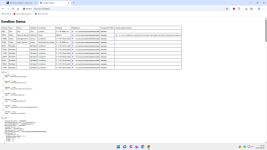
From your screenshot (chrome://sandbox), your Chromium-based browser is running a fairly typical multi-process sandbox on Windows, with the most exposed processes (Renderers) at the strongest settings shown in your table.It's easy, here's how:
View attachment 294347
@Bot
Can you analyze my sandbox status in detail, for the benefit of other forum members?
It's just keeping the ledger honest. Brave isn't a privacy charity, it's an ad-tech company that figured out the smartest way to corner the market is to block everyone else's ads first. They aren't "saving" the internet, they're just acting as the middleman for a different revenue stream (BAT). It's a useful tool if you configure it right, but people need to realize they're swapping Google's surveillance for Brave's curated garden, not stepping out of the ecosystem entirely.So it comes down to how you want to pay: the only free things in the world are fresh air & rain the rest we pay for somehow, life is an endless stream of choices
Not every Chromium-based or Gecko-based web browser is updated regularly. When Chromium releases security update, Chrome is the first one to get patched (same goes for Gecko and Firefox), then it's Brave and rest of the company. Some browsers might get patched after a week, some after a month, others might ignore the release completely and implement next one. All three scenarios leave you vulnerable to security threat and hacking attacks.
Your ESR version doesn't support it yet.You mean gfx.webrender.layer-compositor-use-composition-surface ? Or maybe my ESR version still doesn't have this option yet.
Yeah, that's it. I mean you could get Firefox even faster with Betterfox, but I tend not to mess these settings a lot and only change what I'm familiar with.

then Edge, then Vivaldi, then Opera (and may be Yandex but I'm not certain as it does not show its chromium version), then intermittent updates for the remaining; some get updated every two major versions of chromium.and rest of the company
So far so good. I added my favorite extensions without any problems. Webpages are loading as quickly as Brave with the F-Secure extension installed. Made some Settings changes, some Toolbar changes, and a Theme changeYeah, that's it. I mean you could get Firefox even faster with Betterfox, but I tend not to mess these settings a lot and only change what I'm familiar with.
How's Firefox serving you so far?
Requires an old PC to notice the difference; capable ones will boost the performance of any browser.Webpages are loading as quickly as Brave
I wouldn't touch Yandex Browser and Edge with a stick. Literal spyware, both of them. Regardless of their release schedule.then Edge, then Vivaldi, then Opera (and may be Yandex but I'm not certain as it does not show its chromium version), then intermittent updates for the remaining; some get updated every two major versions of chromium.

For sure. Chromium is better optimized for old devices. On newer there shouldn't be much difference.Requires an old PC to notice the difference; capable ones will boost the performance of any browser.
All are spies; no exceptions.I wouldn't touch Yandex Browser and Edge with a stick. Literal spyware, both of them
All of them collect data. The only difference is some lets you disable it entirely, others not so much. Some tie collected data to installation ID, some to hardware ID which is a huge no-no.All are spies; no exceptions.
What matters how my collected data are processed.
Members who viewed this thread in the last 5 minutes


![[correlate]](/data/avatars/s/79/79653.jpg?1556985072)