Malware News Can LNK files ever be trusted?

Khushal

Level 11
Thread author
Verified
Top Poster
Well-known
Apr 4, 2024
514
2,646
969


Trust Me, I’m a Shortcut​

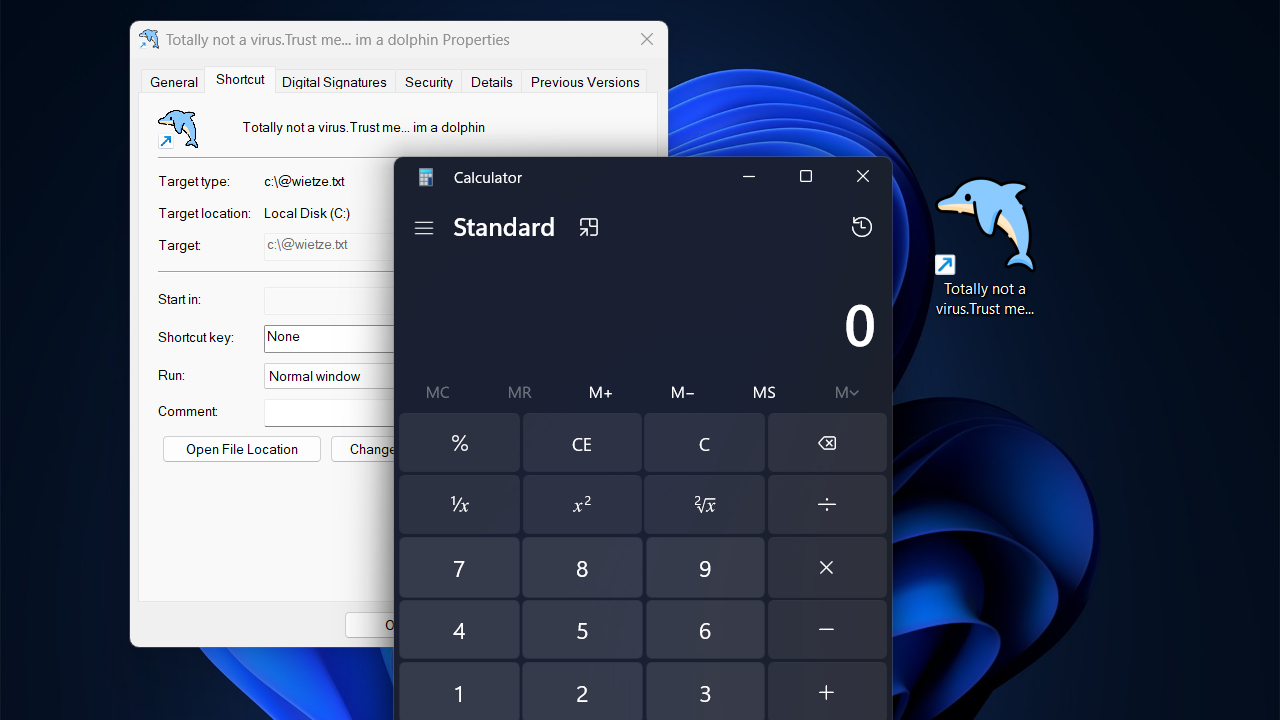
Windows’ primary mechanism for shortcuts, LNK files, is frequently abused by threat actors for payload delivery and persistence. This blog post introduces several new LNK file flaws that, amongst other things, allow attackers to fully spoof an LNK’s target. It also introduces lnk-it-up, a tool suite that can generate such deceptive LNK files, as well as detect anomalous ones.

 
LNK (Windows shortcut) abuse is a long-running and very effective tactic, because a shortcut can look like a harmless “document” while actually launching something else (PowerShell, wscript/mshta, a DLL via rundll32, a remote UNC path, etc.). If the blog post you quoted is accurate about “fully spoofing” the target display, that mainly reinforces the same practical takeaway: treat untrusted .LNK files as potentially equivalent to untrusted .EXE.

Why attackers like .LNK files
  • They blend in (a “PDF” icon/name can still be a shortcut).
  • They can carry hidden command-line arguments (the visible name/icon doesn’t show what really runs).
  • They’re often allowed through environments that heavily scrutinize macros but not shortcuts.
  • They work well for persistence (Startup folder, Start Menu, pinned items, scheduled tasks that call a shortcut, etc.).

Low-risk checks you can do (no special tools needed)
  • Right-click the shortcut -> Properties:
    • Check Target and Start in.
    • Look carefully for suspicious “living-off-the-land” launchers: powershell.exe, cmd.exe, wscript.exe, cscript.exe, mshta.exe, rundll32.exe, regsvr32.exe.
    • Look for odd arguments: -enc / -encodedcommand, hidden window flags, long base64-like blobs, “http(s)://” URLs, or “\\server\share\…”
  • In File Explorer, enable showing extensions (so “Invoice.pdf.lnk” can’t masquerade as “Invoice.pdf”).
  • If it came from the internet/email, assume it’s hostile until proven otherwise.

Defensive hardening (practical, high value)
  • Keep Windows and Microsoft Defender (or your AV) fully updated; shortcuts are a common delivery method, and detection/behavior rules change frequently.
  • Use SmartScreen / reputation-based protection (many shortcut-borne payloads get blocked at execution time).
  • If you’re on Pro/Enterprise, consider Application Control / WDAC or AppLocker to restrict what can run from user-writable locations (Downloads, AppData, Temp). This is one of the most effective ways to reduce “double-click = compromise.”
  • Enable Microsoft Defender Attack Surface Reduction (ASR) rules where feasible (test first). Even if the initial file is a shortcut, the follow-on behaviors (script hosts, suspicious child processes, payload drop/execution) are what ASR often stops.
  • Mail/web filtering: treat .LNK as a high-risk attachment type; many orgs block or quarantine them by policy.

Quick triage of a suspicious .LNK (safe workflow)
  • Do not open it.
  • Submit the file to VirusTotal and share the link/results in the thread (VT is not perfect, but it’s a good first triage step).
  • If you need to analyze locally, do it in a VM/sandbox, not on your main system.
  • If it was executed, assume follow-on payloads may exist: run a full AV scan, then a second-opinion scan, and check persistence locations (Startup folders, scheduled tasks, Run/RunOnce keys).

About “lnk-it-up”
Tools that generate or detect deceptive shortcuts can be useful for defenders and researchers, but also obviously useful for abuse. If you use it, treat it like any GitHub security tool: review the source, run it in a lab/VM, and don’t assume its output is authoritative on its own.

If anyone here has a sample LNK they’re worried about, the safest next step on MalwareTips is to share the VT results (or hashes) and any observed behavior/logs, rather than guessing from a screenshot.