Solved Cannot install a program. Error message!

Status
Not open for further replies.

Andrew999

Level 24
Thread author
Verified
Top Poster
Well-known
Forum Veteran
Dec 17, 2014
1,363
11,263
2,268
Briefly explain your current issue(s)
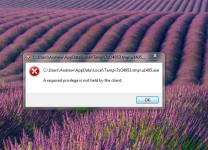
I go to download something and it pops up with this
Steps taken to resolve, but have been unsuccessful
dont know
I try to install something and it does this
 

Attachments

  • Capture.PNG
    Capture.PNG
    649.7 KB · Views: 568
According on various research information, adjusting the permission /ownership may not guaranteed to work so the best way is locate that file and transfer to another local drive like 'D' or USB which available then try to run.

Or transfer to another folder of C drive that should work well.

As always, try to run that via administrator.
 
  • Like
Reactions: Venustus
Upvote 0
How can you be disappointed? It's doing what it is supposed to be doing.

Application Whitelisting
http://www.secureaplus.com/Main/application_whitelisting.php

"After the initial scan it will never fail to detect and block any malware, even if it is freshly created and released. You will always get prompted if an untrusted application is trying to run in your computer.

You get full control of what application to trust for absolute threat protection. It's also smart enough to learn preferences and not prompt you from already trusted sources. It's fast and lightweight so you won't really notice it work its magic till it needs to inform you."​

Did you change any settings, as you should have seen a prompt for the untrusted file.

You also didn't mention you used the program, here or in your config thread.

 
  • Like
Reactions: Oxygen
Upvote 0
How can you be disappointed? It's doing what it is supposed to be doing.

Application Whitelisting
http://www.secureaplus.com/Main/application_whitelisting.php

"After the initial scan it will never fail to detect and block any malware, even if it is freshly created and released. You will always get prompted if an untrusted application is trying to run in your computer.

You get full control of what application to trust for absolute threat protection. It's also smart enough to learn preferences and not prompt you from already trusted sources. It's fast and lightweight so you won't really notice it work its magic till it needs to inform you."​

Did you change any settings, as you should have seen a prompt for the untrusted file.

You also didn't mention you used the program, here or in your config thread.

I did a start up scan and I am pretty sure it asked me to whitelist the file and I did and I found out I had to rightclick the file and click trust file
 
  • Like
Reactions: frogboy
Upvote 0
Status
Not open for further replies.