Stevo36

New Member
Both Chome and IE11 open with the homepage
Code:
http://www.safesear.ch
they initially show
Code:
www.rangemerry.com/focus/
for less than a second before redirecting to
Code:
www.safesear.ch
.

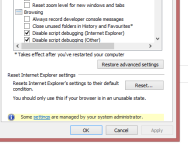
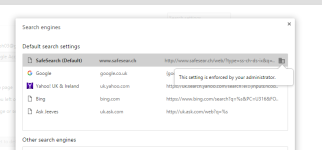
Some settings in both IE and Chrome are unable to be changed like the search engine in Chrome for example which sets its controlled by an administrator despite my account being an administrator account.
 

Attachments

Last edited by a moderator:
Hello,

They call me TwinHeadedEagle around here, and I'll be working with you.


Please download Zemana AntiMalware and save it to your Desktop.
  • Install the program and once the installation is complete it will start automatically.
  • Without changing any options, press Scan to begin.
  • After the short scan is finished, if threats are detected press Next to remove them.
Note: If restart is required to finish the cleaning process, you should click Reboot. If reboot isn't required, please restart your computer manually.​
  • Open Zemana AntiMalware again.
  • Click on
    4zu6vb.jpg
    icon and double click the latest report.
  • Now click File > Save As and choose your Desktop before pressing Save.
  • The only left thing is to attach saved report in your next message.
 
Both IE and Chrome now open without safesear.ch as the hompage but I can't change the search engine setting on Chrome and sme IE settings are locked out, see attached.
 

Attachments

  • Capture.PNG
    Capture.PNG
    15.3 KB · Views: 2
  • Capture2.PNG
    Capture2.PNG
    35.1 KB · Views: 2
That's strange. Zemana should be fixing that too.

FRST.gif
Scan with Farbar Recovery Scan Tool

Please re-run Farbar Recovery Scan Tool to give me a fresh look at your system.
  • Right-click on
    FRST.gif
    icon and select
    RunAsAdmin.jpg
    Run as Administrator to start the tool.
    (XP users click run after receipt of Windows Security Warning - Open File).
  • Make sure that Addition.txt option is checked.

    2873ryc.png

  • Press Scan button and wait.
  • The tool will produce two logfiles on your desktop: FRST.txt and Addition.txt.
Please attach report into your next reply.
 
FRST.gif
Fix with Farbar Recovery Scan Tool

icon_exclaim.gif
This fix was created for this user for use on that particular machine.
icon_exclaim.gif

icon_exclaim.gif
Running it on another one may cause damage and render the system unstable.
icon_exclaim.gif
​

Download attached fixlist.txt file and save it to the Desktop:

Both files, FRST and fixlist.txt have to be in the same location or the fix will not work!

  • Right-click on
    FRST.gif
    icon and select
    RunAsAdmin.jpg
    Run as Administrator to start the tool.
    (XP users click run after receipt of Windows Security Warning - Open File).
  • Press the Fix button just once and wait.
  • If for some reason the tool needs a restart, please make sure you let the system restart normally. After that let the tool complete its run.
  • When finished FRST will generate a log on the Desktop, called Fixlog.txt.

Please attach it to your reply.
 

Attachments

Recently browsing

Members who viewed this thread in the last 5 minutes

Back
Top