Advanced Security Capitán Awesome Debian 13.5(trixie) Security Config 2025

Last updated
May 19, 2026
How it's used?
For work or educational use
Operating system
Linux
Other operating system
MX Linux 25.2 "Infinity"
On-device encryption
Other full-disk drive encryption software
Log-in security
    • Basic account password (insecure)
Security updates
Allow security updates and latest features
Update channels
Allow stable updates only
User Access Control
N/A - Linux / Mac / Other operating system
Smart App Control
N/A - Linux / Mac / Other operating system
Network firewall
Enabled
Real-time security
AppArmor
Firewall security
Built-in Firewall for Mac/Linux
About custom security
Open Snitch,Lynis,Fail2Ban,FireJail and its GUI
Periodic malware scanners
Clam Av(very rare use),Chkrootkit,rkhunter
Malware sample testing
I do not participate in malware testing
Environment for malware testing
N/A
Browser(s) and extensions
Ulaa,LibreWolf
Secure DNS
N/A
Desktop VPN
Windscribe VPN (Free)
Password manager

Ente Auth, KeePassXC​

File and Photo backup
Déjà Dup
Subscriptions
    • None
System recovery
Timeshift
Risk factors
    • Working from home
    • Buying from online stores, entering banks card details
Computer specs
N/A
Notable changes
Added Ente Auth,Synaptic Package Manager,Déjà Dup,Timeshift,VeraCrypt,KeePassXC,LibreWolf,Gear lever,Windscribe VPN,DaVinci Resolve
What I'm looking for?

Looking for maximum feedback.

I tried Ulla; it worked well, and it's the fastest to launch on my Windows 11 HDD system compared to Edge, Chrome, Firefox, Brave, and Vivaldi, but I prefer Vivaldi for its customization and overall feel.
Yes Ulaa is fastest in windows11 & Linux and Ad & trackers blocking is great as well and one thing I like the most is very fast to give updates(patches).
 
Last edited:
Yes Ulla is fastest in windows11 & Linux and Ad & trackers blocking is great as well and one thing I like the most is very fast to give updates(patches).
Yes, the ad-blocking also worked well on general websites, YouTube, and 🏴‍☠️ websites. The settings navigation is a bit tricky; you may miss some settings if you don't go through all the features. I really liked Ulaa; I would use Ulaa as my primary browser if I ever dropped Vivaldi.

I just noticed; it's Ulaa, not Ulla.
 
Last edited:
@Captain Awesome, According to Gemini, Ulaa uses its own ad-blocking engine, which is excellent, and effective open-source filters for the ad blocker. The password manager in Ulaa is not the Chromium password manager, but it's Zoho Vault (their password manager) built into the code; you don't need to install the Zoho Vault extension in Ulaa. The Zoho Vault free version is fully functional, except for password sharing, compared to other third-party password managers. Ulaa uses Zoho's ZIA AI for malware/phishing protection, not Google Safe Browsing.
 
@Captain Awesome, According to Gemini, Ulaa uses its own ad-blocking engine, which is excellent, and effective open-source filters for the ad blocker. The password manager in Ulaa is not the Chromium password manager, but it's Zoho Vault (their password manager) built into the code; you don't need to install the Zoho Vault extension in Ulaa. The Zoho Vault free version is fully functional, except for password sharing, compared to other third-party password managers. Ulaa uses Zoho's ZIA AI for malware/phishing protection, not Google Safe Browsing.
This is why I trust ZOHO. Ulaa is my primary browser, I remove brave for this one. Thanks for the info. I meet with ZOHO team in TamilNadu(HQ).I like their Work ethic. ZOHO Mail also use Zoho's ZIA AI for malware/phishing protection.
 
I plan to test Ulaa for a few days and see if it's an excellent replacement for Chrome on our kids' devices. What Zoho apps/services are you using?
ZOHO MAIL,ARATTAI,Zoho oneauth,zoho notebook,Zoho OfficeSuite,Zoho OCR Scanner,Zoho Classes Student,Zoho Webinar.

Basically everything that match and some time outperfomed foreign companies.
 
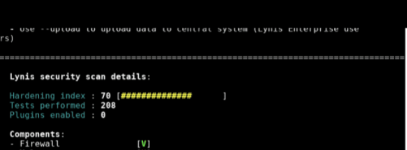
post your lynis hardening score ;)
My very old 2010 loptop score:70(on Default settings)
Screenshot_20260526-091236.Gallery.png
 
Last edited:
ZOHO MAIL,ARATTAI,Zoho oneauth,zoho notebook,Zoho OfficeSuite,Zoho OCR Scanner,Zoho Classes Student,Zoho Webinar.

Basically everything that match and some time outperfomed foreign companies.
I tried Ulaa on Windows and on an Android phone. I don't like that Ulaa installs a separate update assistant, which runs in the background and appears in the task tray on Windows. It appears Ulaa doesn't run the update check, like other browsers, when you access the "About" section; otherwise, you can disable the update assistant/task scheduler entry. Ulaa didn't block YouTube ads on Android.

It seems Zoho also offers free MDM up to 25 devices.
 
I tried Ulaa on Windows and on an Android phone. I don't like that Ulaa installs a separate update assistant, which runs in the background and appears in the task tray on Windows. It appears Ulaa doesn't run the update check, like other browsers, when you access the "About" section; otherwise, you can disable the update assistant/task scheduler entry. Ulaa didn't block YouTube ads on Android.

It seems Zoho also offers free MDM up to 25 devices.
Ulaa's built-in ad blocker may fail on YouTube because YouTube actively uses server-side ad insertion and strict anti-adblock scripts. While Ulaa blocks standard website trackers and pop-ups, YouTube constantly changes its code to bypass these blockers.
  • Update Filter Lists: Click the Shield icon in your address bar, go to Advanced Settings, and click Update filter.
  • Check Privacy Settings: Make sure your Ulaa privacy protection level is set to Extreme rather than Standard, as Standard allows some non-intrusive content (like YouTube videos) to load normally.
Ulaa uses a separate background update assistant primarily to enforce its strict "24-hour security patch policy" and to support enterprise deployments.
While popular browsers like Chrome and Edge also use hidden background update services (Google Update and Microsoft Edge Update), Zoho's implementation with the Ulaa Update Assistant is highly visible because it sits aggressively in your Windows system tray and runs checking routines as frequently as every 5 minutes.
The specific structural and strategic reasons why Zoho chose this framework include: Enforcing Ultra-Fast Security PatchesMost mainstream browsers take anywhere from 3 to 6 days to test and push a critical security patch to users. Zoho promises a 24-hour security patch policy. If a high-severity zero-day exploit is discovered, Ulaa cannot afford to wait for you to casually open your browser or manually click the "About" page. The standalone assistant runs independently to force-download the patch instantly in the background.
Unlike Chrome or Firefox, which might poll a remote update server once or twice a day, Ulaa's background helper is strictly hardcoded to check for updates every 5 minutes if it senses it isn't currently running. Zoho designed it this way so that critical stability patches, zero-day security updates, and changes to their built-in tracking filter lists are deployed instantaneously to users rather than queuing up over days.

Yes, that's correct! Zoho offers a highly generous free MDM tier, but it is typically branded under their enterprise IT division.
 
Last edited:
Debian is love
Literally, and the story behind its name serves as strong evidence of this.
Debian got its name from Ian Murdock the creator of the Debian distribution. He named the distribution after his girlfriend Debra Lynn by combining her name and his into "Debian."
 
Ulaa's built-in ad blocker may fail on YouTube because YouTube actively uses server-side ad insertion and strict anti-adblock scripts. While Ulaa blocks standard website trackers and pop-ups, YouTube constantly changes its code to bypass these blockers.
Ulaa for Windows blocks YouTube ads successfully, even on "Standard" ad-blocking mode. Overall, I like Ulaa and would prefer it over mainstream browsers.

Have you used Zoho Vault?