


Captain Awesome's Configuration
- Thread starter Captain Awesome
- Start date
You are using an out of date browser. It may not display this or other websites correctly.
You should upgrade or use an alternative browser.
You should upgrade or use an alternative browser.
- Last updated
- Dec 31, 1969
- Windows Edition
- Pro
- Security updates
- User Access Control
- Always notify
- Real-time security
- NoVirusThanks EXE Radar Pro(Lock-down),Shadow Defender,Unchecky,MCShield(Paranoid Mode),Sandboxie(license).
- Firewall security
- Microsoft Defender Firewall
- Periodic malware scanners
- Emsisoft Emergency Kit 11,Kaspersky Rescue Disk 10,Zemana AntiMalware Free,Malwarebytes Anti-Malware Free,Crystal Security (Portable),VirusTotal Uploader 2.2,Hitman Pro
- Malware sample testing
- I do not participate in malware testing
- Browser(s) and extensions
- Google Chrome+uMatrix
- Maintenance tools
- CCleaner,TFC(Temp File Cleaner)
- File and Photo backup
- Aomei Backupper Free,Portable HDD 1TB
- System recovery
- Aomei Backupper Free
- Computer specs
- https://malwaretips.com/threads/captain-awesomes-gaming-pc.60048/

Hi @Captain Awesome. I liked your configuration, and your username too which placed a grin on my face!
See?>
For enhanced privacy, activate the third party cookie blocker in Chrome.
When using Internet Explorer, browse while using a sandboxed (virtualized) environment www.sandboxie.com which is a free program providing an effective precaution originally developed for just that purpose; and the reason "-ie" was added to the end of sandbox(-ie)!
Thank you for allowing me share, and thanks for sharing your own very impressive choices!
See?>
For enhanced privacy, activate the third party cookie blocker in Chrome.
- Click the Chrome menu
on the browser toolbar.
- Select Settings.
- Click Show advanced settings.
- In the "Privacy" section, click the Content settings button. Select "Block third-party cookies and site data"
- After this you'll see in the address bar whenever a cookie is being blocked.

- Optionally, you may also mark the circle "Keep site data only until you close the browser".
- After this you'll see
When using Internet Explorer, browse while using a sandboxed (virtualized) environment www.sandboxie.com which is a free program providing an effective precaution originally developed for just that purpose; and the reason "-ie" was added to the end of sandbox(-ie)!
Thank you for allowing me share, and thanks for sharing your own very impressive choices!
I am already know the trick,but thanks for advice.For enhanced privacy, activate the third party cookie blocker in Chrome.
- Click the Chrome menu
on the browser toolbar.
- Select Settings.
- Click Show advanced settings.
- In the "Privacy" section, click the Content settings button. Select "Block third-party cookies and site data"
- After this you'll see
in the address bar whenever a cookie is being blocked.- Optionally, you may also mark the circle "Keep site data only until you close the browser".
I installed Kaspersky Password Manager and used Sandboxie for many years and now Shadow Defender is my choice.
Yes, infact it is one of the best ads blocker, and it doesn't take slow down your browsingMainly because of avoid annoying ads.
Added:MCShield and TFC(Temp File Cleaner)
Trying Adguard(14 days Free).
Removed: Kaspersky IS 2016 MR1
Added:ESET Smart Security 9,LastPass Free.
You can see my setting of ESET Smart Security 9 below my config
Added:ESET Smart Security 9,LastPass Free.
You can see my setting of ESET Smart Security 9 below my config
Last edited:
Re added:Kaspersky Internet Security 2016 MR1
Removed: Eset Smart Security9.Because i am done with the trial.Eset is a good protection but bit lack in phishing blocking.
Removed: Eset Smart Security9.Because i am done with the trial.Eset is a good protection but bit lack in phishing blocking.
Removed:KIS 2016 MR1.Return of KSN Sync Issue in patch (c)
Added:ESET Smart Security 9(HIPS-Interactive Mode & Personal Firewall-Interactive Mode+Tweaking Advance Options in IDS) for Max Protection.
Added:WinPatrol Plus
Added:ESET Smart Security 9(HIPS-Interactive Mode & Personal Firewall-Interactive Mode+Tweaking Advance Options in IDS) for Max Protection.
Added:WinPatrol Plus
Last edited:

Very nice addition! I am a huge fan of HMP.AAdded:HitmanPro.Alert
Avast! Free Antivirus 2016(Max)+WFC(licensed)+Appguard(licensed)
I
illumination
This is my recommendation for you..
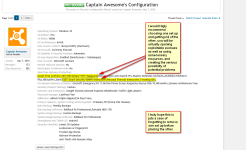
I have removed one setup as you said.

Umm. I really enjoy Malwarebytes Anti-Exploit but sadly I have heard that it causes conflicts with HitmanPro.Alert so it might be for the best to remove one of them.
I don't see anything.Umm. I really enjoy Malwarebytes Anti-Exploit but sadly I have heard that it causes conflicts with HitmanPro.Alert so it might be for the best to remove one of them.
A
Alkajak
I don't see anything.
Okay but he is correct, it is a conflict. It could potentially open up your system to vulnerabilities instead. Keep one. I recommend keeping just HMP.A.
You may also like...
-
 Advanced Plus Security Devjit’s Gaming PC 2026
- Started by devjitdutta2025
- Replies: 44
-
 Advanced Plus Security Aries91's Security Configuration 2026
- Started by aries91
- Replies: 14
-
 Security News Almost Secure Blog: Backdoors in VStarcam cameras
- Started by Gandalf_The_Grey
- Replies: 2
-
 App Review QuickHeal Total Security 2026
- Started by Shadowra
- Replies: 13
-
