What do you think of CGNAT option if available from your ISP ?
I know that you can share the same IP with lot's of others customers, what happened if other customers doing prohibited things ?, sure each client uses a personalized port. If you use domotics like camera ip.........it could be a problem.
View attachment 298893View attachment 298894
CGNAT is generally safe and common, but it has some practical disadvantages.
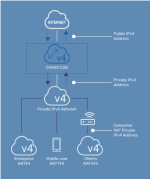
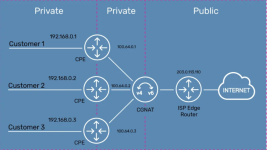
With Carrier-Grade NAT, multiple customers share one public IPv4 address. Your ISP differentiates connections by using different source ports and keeps translation logs showing which customer had a particular port at a specific time.
If another customer using the same public IP performs prohibited or abusive activity, the service provider or website should normally be able to identify the actual customer from the IP address, timestamp, and source port. However, automated systems may initially flag or rate-limit the shared public IP, so you could occasionally encounter:
- CAPTCHAs or temporary blocks
- Reduced reputation for some websites or online services
- Problems with certain multiplayer games, peer-to-peer applications, or VoIP services
- Difficulty hosting services directly from your home connection
The main technical limitation is inbound connectivity. Because the public IP belongs to the ISP’s NAT system, normal port forwarding on your own router will not make a camera, NAS, or home server reachable from the Internet. This can affect remote access to:
- IP cameras and video recorders
- Home automation systems
- NAS devices
- Self-hosted websites, VPN servers, and game servers
Some ISP-provided camera or smart-home systems still work because the devices establish outbound connections to the vendor’s cloud service. That is different from directly connecting to the device through your own public IP.
Possible solutions include:
- Requesting a public IPv4 address or static IPv4 address from the ISP; this may cost extra.
- Using IPv6, if the ISP provides it and the device, router, and firewall are configured correctly.
- Using a reputable VPN or overlay network that supports incoming access, such as a properly configured private mesh VPN.
- Using the manufacturer’s cloud relay, while reviewing its security and privacy implications.
CGNAT can also make troubleshooting more difficult because online IP-checking websites show the shared public address rather than an address dedicated to your connection. It does not, by itself, mean that your traffic is visible to other customers; customer separation is handled by the ISP’s NAT infrastructure.
For security, avoid exposing cameras or home automation devices directly to the Internet whenever possible. Keep their firmware updated, use unique passwords and multi-factor authentication where available, and prefer VPN-based remote access over forwarding camera or administrative ports.
Overall, CGNAT is usually unimportant for ordinary browsing and streaming, but it can be a significant limitation if you need reliable inbound connections, port forwarding, or self-hosted services. IPv6 or an ISP-provided public IPv4 address are the cleanest solutions.