Carsten ibsen security configuration

  • Thread starter Thread starter ForgottenSeer 55474
  • Start date Start date
Status
Not open for further replies.
F

ForgottenSeer 55474

Thread author
Hey here is my Configuration,sorry if it is not good enough,i have done it as good as i can.
My AV is Bitdefender Total Security 2017:)
Sorry I forgot:Revo Uninstaller,under utilitieso_O
My realtime Protection is both Bitdefender and Malwarebytes,sorry
 
Last edited by a moderator:
Consider some type of system & data backup solution.
You could probably do away with SAS.
Two browsers would be sufficient.
Is your real time protection Bitdefender Total security along with MBAM 3?
You can edit your config to reflect these changes.
Thanks for sharing your config :)
 
I have been told so many times word what is "Backup" it is the first thing todo and you have if accident happend easy way "rollback" image to clean condition again.
Then thinking about security. You have in my opinion pretty good configuration. I assume you don't have SSD drive, because as you know you don't need Auslogics Disc Defrag Professional , as SSD don't fragment like HDD.

Stay safe :)
 
Consider some type of system & data backup solution.
You could probably do away with SAS.
Two browsers would be sufficient.
Is your real time protection Bitdefender Total security along with Malwarebytes Anti-Malware 3?
You can edit your config to reflect these changes.
Thanks for sharing your config :)
SAS is awesome. I love it. Its from the old school...
Why you dont like it?
 
Last edited:
You should set smartscreen to max. I recommend you set updates to Automatic but what you have is fine too. :)
Windows SmartScreen can only be Enabled or Disabled.

Unless disabled by OP, it's on by default for the OS and can be configured for the browser, when customizing settings and privacy.

Windows SmartScreen for OS and IE/Edge have separate settings.
 
Great config overall, but do consider backing up - both your entire system, and individual files. Especially individual files (they can easily get lost, as there are so many ways for that to happen).

Backing up your system is done with so-called "system imaging" software. System images are files containing your entire system, and they can be used to restore your entire system to its exact state, as it was when you created the system image.

Here are some recommended applications for this task (Windows Backup and Restore should suffice):
OR
OR
 
@carsten ibsen Awesome config. Nice tips are already covered above.
You did reflect your changes (added BTS), but in description.
Please add it to the appropriate thread fields.
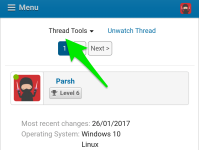
Select THREAD TOOLS 21 February 2017 125455 GMT+0530.png
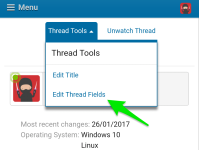
And then select EDIT THREAD FIELDS
21 February 2017 125534 GMT+0530.png
Now you can add BTS to RealTime protection. And so on :)
 
Status
Not open for further replies.