


CCleaner Problem
- Thread starter MrExplorer
- Start date
You are using an out of date browser. It may not display this or other websites correctly.
You should upgrade or use an alternative browser.
You should upgrade or use an alternative browser.
- Status
- Not open for further replies.
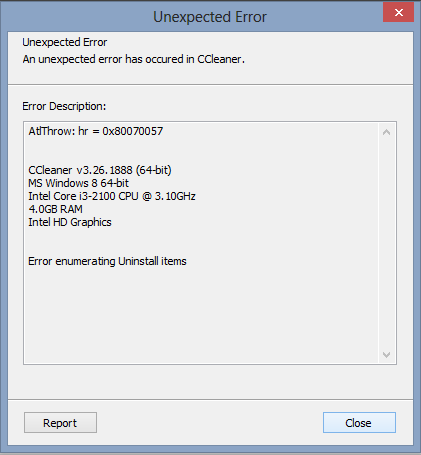


McLovin said:How does this message come up, i.e when scanning for cookies or clearing or what?
i was just looking for my startup it showing an error
MrXidus said:
i uninstalled & Installed again same error
Unknown said:i uninstalled & Installed again same error
Did you follow the steps in this thread?
MrXidus said:Check out this thread.
McLovin said:Unknown said:i uninstalled & Installed again same error
Did you follow the steps in this thread?
MrXidus said:Check out this thread.
where are the steps
Unknown said:where are the steps
If you actually go to that link that MrXidus has provided, you might actually be able to fix your problem. We can't just "magically" tell you what's wrong. All you have to do is read..
McLovin said:Unknown said:where are the steps
If you actually go to that link that MrXidus has provided, you might actually be able to fix your problem. We can't just "magically" tell you what's wrong. All you have to do is read..
where not able to find
Unknown said:where not able to find
Okay since you can't or have not clicked that link to read, I will screenshot what you need to know...


P
Plexx
Unknown said:where not able to find
Xidus and McLovin are referring to these:
Have you tried unticking all the options and re-ticking them one by one to see which tickbox option is causing it?
ADVICE FOR USING CCleaner'S REGISTRY INTEGRITY SECTION
DON'T JUST CLEAN EVERYTHING THAT'S CHECKED OFF.
Do your Registry Cleaning in small bits (at the very least Check-mark by Check-mark)
ALWAYS BACKUP THE ENTRY, YOU NEVER KNOW WHAT YOU'LL BREAK IF YOU DON'T.
CCLEANER, RECUVA, DEFRAGGLER AND SPECCY DOCUMENTATION CAN BE FOUND AT www.piriform.com/docs
Link to Winapp2.ini explaination
Note: one user has reported that ticking "Unused File Extensions" caused the error.
P
Plexx
Best advice will be posting on Piriform forums and tell them exactly how you get that error etc.
- Status
- Not open for further replies.
You may also like...
-
-
 Help Needed: Suspicious Activity & Possible Malware on Windows 10 PC
- Started by Thomas Ellias
- Replies: 4
-

-
Still have yahoo search bar problem after following all MalwareTips steps
- Started by ciarank41
- Replies: 14
