Battle Chrome vs. Firefox vs. Edge in 2026 — Which Browser Should Home Users Trust?

Which Browser Do You Trust Most in 2026?

  • 🟢 Google Chrome – Convenience First

  • 🟠 Mozilla Firefox – Privacy Warrior

  • 🔵 Microsoft Edge – Windows Powerhouse

  • ⚪ Other (Brave, Opera, Safari, Vivaldi, etc.)


Results are only viewable after voting.
Compare list
Chrome vs. Firefox vs. Edge in 2026
Platform(s)
  1. Any platform
I have a question about Microsoft Edge. Although it is based on Chromium, is it independent of its updates? I ask because I did not find any mention of the Chromium version it is based on in its release notes, unlike the release notes for Brave (Upgraded Chromium to 145.0.7632.109) or Vivaldi ([Chromium] Update to 144.0.7559.220 ESR (includes security fixes from 145.0.7632.109)).

What about Microsoft Edge?
 
No, Edge is not independent: it’s built on Chromium and receives its security patches and fixes, though Microsoft integrates them into its own release cycle. The difference is that they don’t highlight the Chromium version number in the notes, but the critical updates do arrive. 🔒
 
I get it from its settings

Screenshot_23-2-2026_174113_settings.jpeg


At least it shows it in settings; Yandex does not.
 
I get it from its settings

View attachment 295877

At least it shows it in settings; Yandex does not.
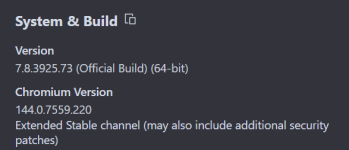
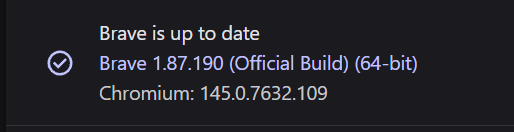
This is not a Chromium version, but only a Microsoft Edge version. Here is an example of what the Brave and Vivaldi browsers display in the “About” section of their settings:

Screenshot_9.pngScreenshot_10.png
 
I noticed that some flags are not available in Microsoft Edge either, while they are available in both Brave and Vivaldi browsers, which led me to think that it is a modified version of Chromium.
All Chromium forks are modified versions one way or another, adding or subtracting certain features and different forks will expose different flags.
 
Just out of curiosity, do other Chromium-based browsers have the ability to save PDFs directly to Google Drive?

https://www.av-comparatives.org/wp-content/uploads/2025/12/avc_sum_2025.pdf

Only Chrome natively offers the option to save PDFs directly to Google Drive. In other Chromium‑based browsers (Edge, Brave, Vivaldi, etc.), that integration isn’t available, and the alternative is to use an official Google Drive extension or upload the file manually. 📄☁️🔧
 
Only Chrome natively offers the option to save PDFs directly to Google Drive. In other Chromium‑based browsers (Edge, Brave, Vivaldi, etc.), that integration isn’t available, and the alternative is to use an official Google Drive extension or upload the file manually. 📄☁️🔧
Agree, you would have to install the extension, which I personally won't do in Brave (another extension). I would just select the download file path to my GDrive folders, if desired.

Screenshot 2026-03-03 100115.png
 
Last edited:
Barring any unforeseen circumstances, Chrome 146 should be released tomorrow:

Chromium Dash

I am curious to see if the policy I have already set up to encrypt the Chrome 146 cache has any impact on performance.
If so, I will not adopt the policy.;)

Absurd policy that can only be applied via the cloud.
Uninstalled.

P.S.

Chrome 146 is out, so update now.;)
 
The following are my thoughts if I were to describe each browser:
  • Microsoft Edge is like the government; whether you like it or not, it is here to stay, and you have no control over it. It acts as though everything it does is for you, but its actions give the opposite impression; ignore it.
  • Google Chrome is the devil; only God knows what's going on in its engine or how it handles your data, stay away from it.
  • Mozilla Firefox is like a bad girl; even if it betrays you occasionally, it will usually make you happy, so stick with it.
 
The following are my thoughts if I were to describe each browser:
  • Microsoft Edge is like the government; whether you like it or not, it is here to stay, and you have no control over it. It acts as though everything it does is for you, but its actions give the opposite impression; ignore it.
  • Google Chrome is the devil; only God knows what's going on in its engine or how it handles your data, stay away from it.
  • Mozilla Firefox is like a bad girl; even if it betrays you occasionally, it will usually make you happy, so stick with it.
I use all three on the laptop in a loose form of compartmentalization.
 
I've spoken plenty in defense of Brave, which has its pros and cons—I was mostly enamored with the powerful adblocker and tracking protection. Now that I've switched to Linux on my desktop, however, I'm set up on vanilla Chromium. I use Control D for ad/tracker blocking, tightly integrated with my Linux setup using the properly configured DNS forwarding proxy. Latency and performance are good.

Fortunately, it auto-updates through my package manager with a repository managed by Fedora. Updates will require manual installation on Android.

It's just the open-source base of Chrome:
  • No "usage statistics" or "crash reports"
  • No RLZ tracking token
  • Much fewer pings
  • No Google account integration, just treated as an anonymous user
It's been great. The browser is extremely clean and fast. It only requires a little extra configuration to get it right.
 
I've spoken plenty in defense of Brave, which has its pros and cons—I was mostly enamored with the powerful adblocker and tracking protection. Now that I've switched to Linux on my desktop, however, I'm set up on vanilla Chromium. I use Control D for ad/tracker blocking, tightly integrated with my Linux setup using the properly configured DNS forwarding proxy. Latency and performance are good.

Fortunately, it auto-updates through my package manager with a repository managed by Fedora. Updates will require manual installation on Android.

It's just the open-source base of Chrome:
  • No "usage statistics" or "crash reports"
  • No RLZ tracking token
  • Much fewer pings
  • No Google account integration, just treated as an anonymous user
It's been great. The browser is extremely clean and fast. It only requires a little extra configuration to get it right.

If you value speed, I'd recommend adding uBoL in Basic filtering mode.
Essentially, you won't have the extension, and filtering will be handled entirely by the browser:

uBOL operates entirely declaratively, meaning no permanent process is required for filtering. The browser handles CSS/JS injection for content filtering, ensuring that uBOL does not consume CPU or memory resources while blocking content. The service worker process is only active when interacting with the popup panel or options pages.

In my opinion, the biggest problem with DNS-level filtering,aside from the usual issue of the ineffectiveness of cosmetic filtering,is that it doesn’t block URL tracking parameters:

Test cases for brave/brave-browser#4239

Good luck with your new browser.;)
 
If you value speed, I'd recommend adding uBoL in Basic filtering mode.
Essentially, you won't have the extension, and filtering will be handled entirely by the browser:


In my opinion, the biggest problem with DNS-level filtering,aside from the usual issue of the ineffectiveness of cosmetic filtering,is that it doesn’t block URL tracking parameters:

Test cases for brave/brave-browser#4239

Good luck with your new browser.;)
Yes, indeed, I decided to add uBlock Origin Lite as a finishing touch. Thank you.

Overall, I'm happy with my replacement for Brave's unique benefits. I've moved on. Chrome/Chromium has a simple, timeless design that works. It's nice not to have too many frills.
 
Last edited by a moderator:
Edge fails to clear cookies for months, I reported it and reported it and I gave up, it was clearly done on purpose. Just like before, temporarily fixed, now happening again.
I have tested Edge; checked cookies in settings immediately after relaunch; it was compeletely empy, but in few seconds cookies of microsoft and google were added.
So technically speaking, Edge does not fail to clear all cookies on exit.
 
On Windows :
Ungoogled Chromium
Edge or Chrome (policy + flags are mandatory for me)
On Linux :
Edge or Chrome (policy in etc/opt/edge/policies/managed/*.json + flags are also mandatory)
Ungoogled Chromium
Firefox

PS: Yes for edge sometimes aggressive cookies stay after relaunch, depends where edge stored them (even with the policy "ClearBrowsinDataOnExit", that is not the same thing than "ClearCookiesOnExit" which doesn't exist, but my all-in-one Linux script Cleaner delete all edge history include cookies.
 
Last edited:
On Windows :
Ungoogled Chromium
Edge or Chrome (policy + flags are mandatory for me)
On Linux :
Edge or Chrome (policy in etc/opt/edge/policies/managed/*.json + flags are also mandatory)
Ungoogled Chromium
Firefox

PS: Yes for edge sometimes aggressive cookies stay after relaunch, depends where edge stored them (even with the policy "ClearBrowsinDataOnExit", that is not the same thing than "ClearCookiesOnExit" which doesn't exist, but my all-in-one Linux script Cleaner delete all edge history include cookies.
Cookie are not staying, they are reloaded on Edge launch; I saw them myself getting inside an empty cookies list inside settings immediately after relaunch.