F
ForgottenSeer 114717
The "Browser Wars" of "What is best browser?" still remain a thing?
Some things will just never die.
Some things will just never die.


Open MalwareTips from your Home Screen or desktop. Follow discussions, find answers and pick up where you left off.
If you cannot find an install option, update your browser or use its bookmark option to keep MalwareTips close.
After installation, open the app and sign in. Enable push notifications in Preferences if you want alerts. On iPhone and iPad, push requires a Home Screen web app and iOS or iPadOS 16.4 or later.
Sign in to manage notificationsInstallation is optional. Your notification settings stay under your control.
 Thread starter
Bot
Thread starter
Bot

Yeah but isnt webview and edge used for tons of programs as backbone to render / work?With the latest W 11 update, Edge and Edge webview2 can both be uninstalled without the need to change region to EU from W 11 IoT Ent LTSC.

For me, they are not; it is according to everyone installed programs.Yeah but isnt webview and edge used for tons of programs as backbone to render / work?

No. Though uninstalling WebView does break some features in the OS, like widgets and troubleshooters. If you don't use any of those, you can safely uninstall it. In case you need it and want to install it again, you can download it from here.Yeah but isnt webview and edge used for tons of programs as backbone to render / work?


I uninstalled it too, but WebView reinstalled itself after some update. And I'm kind of glad it did because new troubleshooters are actually helpful and can actually fix issues. Edge, on the other hand, remains uninstalled on my device permanently.I removed Edge well over a month ago without issues so far, there are a few bits left in Program Files (x86) I can delete them without issue but if I do it breaks McAfee? That seems to be the only problem I've had, still glad to see the back of Edge & use Firefox (Wolf) mostly but also Brave.


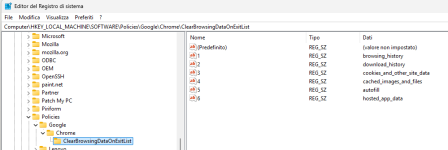
Cloud you please share? And is there any policy to prevent fingerprint tracking fully? What's your process to prevent it partially?I also had
Cloud you please share? And is there any policy to prevent fingerprint tracking fully? What's your process to prevent it partially?

Members who viewed this thread in the last 5 minutes

