

The MalwareTips app
Your community, one tap away.
Open MalwareTips from your Home Screen or desktop. Follow discussions, find answers and pick up where you left off.
- Home Screen access
- Optional push alerts
- Your community
You're ready to explore.Explore what's new
Installation instructions
iPhone & iPad
- Open MalwareTips in Safari and tap Share. You may need to open the Page Menu first.
- Choose Add to Home Screen. If it is not listed, use Edit Actions to add it.
- Keep Open as Web App enabled if shown, then tap Add.
Android
- Open MalwareTips in Chrome or another browser that supports app installation.
- Open the browser menu and look for Install app, Install and create shortcut, or Add to Home screen.
- Choose Install and confirm. Wording varies by browser.
Desktop
- Chrome: use the install icon in the address bar, or the menu under Cast, save and share.
- Edge: open the menu, then More tools, Apps and Install this site as an app.
- Safari on Mac: choose Share or File, then Add to Dock. Firefox on Windows: look for the web apps button in the address bar.
If you cannot find an install option, update your browser or use its bookmark option to keep MalwareTips close.
Keep up with your conversations
After installation, open the app and sign in. Enable push notifications in Preferences if you want alerts. On iPhone and iPad, push requires a Home Screen web app and iOS or iPadOS 16.4 or later.
Sign in to manage notificationsInstallation is optional. Your notification settings stay under your control.
You are using an out of date browser. It may not display this or other websites correctly.
You should upgrade or use an alternative browser.
You should upgrade or use an alternative browser.
CIS 10 stable released
-
 Thread starter
Janl1992l
- Start date
- 165 Replies
- 45,368 Views
- Status
- Not open for further replies.
5
509322
Disable Program Compatibility Assistant in services.msc if it blocks driver install.
5
509322
Janl1992l,
Whats your OS And you didn't get driver prob with the stable release install?
If Program Compatibility Assistant service is running, then it will block the install of the unsigned drivers. Some people have disabled it.

D
Deleted member 2913
Here PCA service is running & set to automatic And I didn't had driver prob with beta that some users had.If Program Compatibility Assistant service is running, then it will block the install of the unsigned drivers. Some people have disabled it.
I am yet to try the stable.
5
509322
Here PCA service is running & set to automatic And I didn't had driver prob with beta that some users had.
I am yet to try the stable.
Windows 10
D
Deleted member 2913
Yes, Win 10 64 ProWindows 10
5
509322
Yes, Win 10 64 Pro
I have W10 Pro. I have to disable PCA otherwise the drivers are blocked. If I unblock them, CIS10 still causes BSODs.
D
Deleted member 2913
You mean stable version?I have W10 Pro. I have to disable PCA otherwise the drivers are blocked. If I unblock them, CIS10 still causes BSODs.
I may try stable version today & update here.


5
509322
You mean stable version?
I may try stable version today & update here.
Stable.

D
Deleted member 2913
I installed the stable CFW just now on Win 10 64 Pro And no driver prob here.Stable.
I had CFW installed on my MS SP4 since this morning, set it up and using without issue on my Win 10 64-bit system
Last edited:
S
Sr. Normal 2.0
I'm not sure I downloaded the free version because it's comes with 30 days subscription.
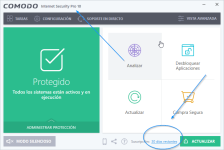

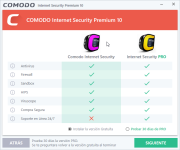
It's because you downloaded the internet security which is the paid program. Just grab the firewall version.I'm not sure I downloaded the free version because it's comes with 30 days subscription.
View attachment 127953
D
Deleted member 2913
If I remember correctly with beta & if its still the same install steps with stable then with suite i.e CIS install, there is a step with free/pro install & pro is selected by default, you need to select free to install free.I'm not sure I downloaded the free version because it's comes with 30 days subscription.
View attachment 127953
S
Sr. Normal 2.0
If I remember correctly with beta & if its still the same install steps with stable then with suite i.e CIS install, there is a step with free/pro install & pro is selected by default, you need to select free to install free.
I'm just a stoopid who does not know read. Sorry for the inconvenience and thank you.
- Status
- Not open for further replies.
Recently browsing
Members and guests who viewed this thread in the last 5 minutes


