

The MalwareTips app
Your community, one tap away.
Open MalwareTips from your Home Screen or desktop. Follow discussions, find answers and pick up where you left off.
- Home Screen access
- Optional push alerts
- Your community
You're ready to explore.Explore what's new
Installation instructions
iPhone & iPad
- Open MalwareTips in Safari and tap Share. You may need to open the Page Menu first.
- Choose Add to Home Screen. If it is not listed, use Edit Actions to add it.
- Keep Open as Web App enabled if shown, then tap Add.
Android
- Open MalwareTips in Chrome or another browser that supports app installation.
- Open the browser menu and look for Install app, Install and create shortcut, or Add to Home screen.
- Choose Install and confirm. Wording varies by browser.
Desktop
- Chrome: use the install icon in the address bar, or the menu under Cast, save and share.
- Edge: open the menu, then More tools, Apps and Install this site as an app.
- Safari on Mac: choose Share or File, then Add to Dock. Firefox on Windows: look for the web apps button in the address bar.
If you cannot find an install option, update your browser or use its bookmark option to keep MalwareTips close.
Keep up with your conversations
After installation, open the app and sign in. Enable push notifications in Preferences if you want alerts. On iPhone and iPad, push requires a Home Screen web app and iOS or iPadOS 16.4 or later.
Sign in to manage notificationsInstallation is optional. Your notification settings stay under your control.
You are using an out of date browser. It may not display this or other websites correctly.
You should upgrade or use an alternative browser.
You should upgrade or use an alternative browser.
Serious Discussion Cloudflare Gateway Free Plan
- Thread starter rashmi
- Start date
VPN and DNS
482 Replies
58,064 Views
F
ForgottenSeer 116559
WARP was based exclusively on the well-known WireGuard until a few years ago. The upgrade to MASQUE and moving beyond legacy VPN protocols is exciting.
With MASQUE, it's now running on an extremely future proof IETF-standardized framework directly integrated with the latest web technologies (HTTP/3 over QUIC) and post-quantum cryptography algorithms. Cloudflare calls it "the future of fast, secure, and stable Internet proxying."
With MASQUE, it's now running on an extremely future proof IETF-standardized framework directly integrated with the latest web technologies (HTTP/3 over QUIC) and post-quantum cryptography algorithms. Cloudflare calls it "the future of fast, secure, and stable Internet proxying."
I meant Gateway with WARP doesn't intercept (prevent bypass) with secure DNS enabled in browsers. I understand the mode will prevent bypass if the secure DNS service used in browsers is there in Cloudflare's Secure DNS (blocked) category.Yes and No. It intercepts all traffic (including the browsers) and directs it to CloudFlare. Next, Cloudflare checks the URL of DOH and allows it, so the DOH in the browser can check the domain. If you block in the Cloudflare the domain of NextDNS (used in the web browser), all domains will be blocked in the web browser.
@LinuxFan58, If I remember correctly, you also customize the Cloudflare block page. I tested "Workers & Pages" under Compute & AI in the Cloudflare Dashboard for the "URL redirect" option of the block page. With Google Gemini's help, I created an HTML file and uploaded it to "Pages" in Workers & Pages, which provides a URL for the URL redirect option.
Here is a simple block screen I created for our kids' systems.
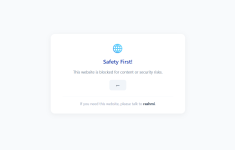
Here is a simple block screen I created for our kids' systems.

F
ForgottenSeer 123960
Exactly what I stated above.Well that’s why, WARP relies on kernel mode traffic redirection/interception which the browser simply can’t bypass.
I played with it very briefly just now but it seems very convoluted.
I mean surely I can define IP ranges…
I will need a quick start guide…
WARP Result. PASS (Conditional). Because WARP is a virtual network adapter, that packet to 192.0.2.14 must travel through the WARP tunnel. Cloudflare can then block that specific IP at their gateway (if using Zero Trust/Gateway settings).
Post in thread 'Cloudflare Gateway Free Plan' Serious Discussion - Cloudflare Gateway Free Plan

Andy Ful
From Hard_Configurator Tools
Verified
Honorary Member
Top Poster
Developer
Well-known
Forum Veteran
I meant Gateway with WARP doesn't intercept (prevent bypass) with secure DNS enabled in browsers. I understand the mode will prevent bypass if the secure DNS service used in browsers is there in Cloudflare's Secure DNS (blocked) category.
Did you mean that after bypassing DNS in the web browser also Cloudflare WARP + Zero Trust is bypassed?
If so, then no. Zero Trust checks the URL while connecting to it.
I tested Gateway with WARP, but I forgot to block Secure DNS service providers in Cloudflare Gateway. I had the "Adult" category blocked in Cloudflare Gateway, but I could access adult websites with Secure DNS (Google) enabled in Chrome while connected to Gateway with WARP. On Android, I got a "Private DNS issue" message with it set to "Third-party provider—NextDNS" and could access adult websites on "Auto" while connected to Gateway with WARP.Did you mean that after bypassing DNS in the web browser also Cloudflare WARP + Zero Trust is bypassed?
If so, then no. Zero Trust checks the URL while connecting to it.

Does anyone else's WARP when enrolled into Zero Trust keeps reverting to Gateway with WARP?
I use Gateway with DoH pretty much always as I don't always need WARP. After some time, app simply reverts to Gateway with WARP despite I had previously selected Gateway with DoH.
I use Gateway with DoH pretty much always as I don't always need WARP. After some time, app simply reverts to Gateway with WARP despite I had previously selected Gateway with DoH.
Andy Ful
From Hard_Configurator Tools
Verified
Honorary Member
Top Poster
Developer
Well-known
Forum Veteran
I tested Gateway with WARP, but I forgot to block Secure DNS service providers in Cloudflare Gateway. I had the "Adult" category blocked in Cloudflare Gateway, but I could access adult websites with Secure DNS (Google) enabled in Chrome while connected to Gateway with WARP. On Android, I got a "Private DNS issue" message with it set to "Third-party provider—NextDNS" and could access adult websites on "Auto" while connected to Gateway with WARP.
I tested on the same phishing URL:
OpenDNS (in browser) + Cloudflare WARP Zero Trust:
Only OpenDNS (in browser):
It seems that on my computer, WARP works as I posted.
@SeriousHoax, Would you add identity-based ad blocking for Cloudflare Zero Trust WARP in the script from your personal branch?
Andy Ful
From Hard_Configurator Tools
Verified
Honorary Member
Top Poster
Developer
Well-known
Forum Veteran
@Andy Ful, I tested OpenDNS and GoogleDNS in Chrome + Gateway with WARP, and I could access adult websites. The internet didn't work when I blocked both DNSs in Cloudflare Gateway, which is effective for parental control. The outcome was the same for Gateway with DoH.
Could you post the URL of the adult website allowed by OpenDNS + Gateway with WARP, but blocked by OpenDNS? I can check it in my config.

I read about WARP and one of the benefits mentioned is IP masking. So I am curious what the reasons were for members using ZT to install WARP.
@Marko :), I'm currently testing the WARP client, using both GwD and GwW modes. It's not my primary DNS app, but I have noticed no mode changes.
Update: I asked Gemini and it immediately told me what was the issue.
Service mode in device profile was set to Gateway with WARP as this is the mode always WARP starts with. I set it to Gateway with DoH and it works for now.I also noticed that I lost ability to update WARP when enrolled in Zero Trust. Turns out
Allow updateswas disabled as well.
Last edited:
Andy Ful
From Hard_Configurator Tools
Verified
Honorary Member
Top Poster
Developer
Well-known
Forum Veteran
I read about WARP and one of the benefits mentioned is IP masking. So I am curious what the reasons were for members using ZT to install WARP.
With WARP, ZT can also work outside the web browser. So for example, if malware tries to use a domain to download something, the domain can be checked by ZT and blocked.
Andy Ful
From Hard_Configurator Tools
Verified
Honorary Member
Top Poster
Developer
Well-known
Forum Veteran
Here is a nice article about the malware reliance on DNS:

 www.huntress.com
Comprehensive DNS Protection Guide - Stay Ahead of Cyber Threats | Huntress
Learn how DNS protection strengthens your cybersecurity posture. Discover best practices, setup tips, and the importance of regular updates to safeguard against evolving threats
www.huntress.com
Common Threats Blocked by DNS Protection
(...)
Malware distribution frequently relies on DNS to download malicious payloads. When users accidentally click on infected attachments or visit compromised websites, DNS protection can prevent the malware from reaching its download server.
Command-and-control communications are essential for many types of malware. Once installed, malware typically tries to communicate with remote servers to receive instructions or exfiltrate data. DNS protection can sever these communications by blocking access to known C2 domains.
DNS tunneling is a technique attackers use to hide malicious traffic inside legitimate DNS queries. Advanced DNS protection services can detect and block these sophisticated attacks.
Cobalt Strike’s DNS beacon is designed to blend in with normal DNS traffic, allowing attackers to communicate with compromised hosts even in tightly monitored networks.
This technique is powerful because it takes advantage of DNS’s ubiquity and trust. To a casual observer, the traffic looks like routine domain lookups, but in reality, it is covert malware communication. Because DNS is almost always allowed through firewalls, these malicious queries often bypass perimeter defences unnoticed.
DNS Protection vs. Antivirus/EDR
Antivirus and Endpoint Detection and Response (EDR) solutions focus on detecting and removing malicious software after it reaches your endpoints. They're crucial for catching threats that manage to penetrate your other defenses.
DNS protection works upstream from these tools. By blocking malicious domains, it prevents malware from being downloaded in the first place. This reduces the load on your endpoint security tools and provides an additional layer of protection.
The combination is particularly powerful: DNS protection prevents many threats from reaching your endpoints, while antivirus/EDR solutions catch anything that slips through.
You should check the WARP settings for your profile and the global WARP settings for your preferences.Yeah. Whenever I restart Windows, WARP immediately launches in WARP mode instead of the last selected. I'm not sure how to fix that.
Update: I asked Gemini and it immediately told me what was the issue.Service modein device profile was set toGateway with WARPas this is the mode always WARP starts with. I set it toGateway with DoHand it works for now.
I also noticed that I lost ability to update WARP when enrolled in Zero Trust. Turns outAllow updateswas disabled as well.
Gateway with WARP allows bypass from secure DNS in browsers; this means Gateway with WARP does not intercept or redirect browsers' secure DNS traffic to resolve them. Users can simply enable secure DNS in browsers to bypass Gateway with WARP. The Cloudflare content categories "adult," "nudity," and "pornography" block ok.xxx, ok.porn, and maxim.com.Could you post the URL of the adult website allowed by OpenDNS + Gateway with WARP, but blocked by OpenDNS? I can check it in my config.
Recently browsing
Members who viewed this thread in the last 5 minutes
You may also like...
-

- R
-

-

-
F
- News Archive
- ForgottenSeer 116559
- · 3