Cloudflare's 1.1.1.1 DNS Passes Privacy Audit, Some Issues Found

Is the certificate that Sodrum uses a self signed certificate? I got the right download right? Getting a UAC prompt.

I don't think the .exe is signed off on (yet). Nevertheless, I scanned it w/HitManPro and submitted it to Jotti. Still, this is why I don't link directly to the .exe. It says "unknown publisher" on the UAC prompt, right? Yeah, have to be careful.

Thanks very much, security123. (y) There are conflicting ideas on whether to disable IPv6 or not. I certainly will not do this, but I did try it in the past because a few years ago there were those claiming it was a security risk, blah, blah. However, when I did so, I was getting a lot of connection errors and vague problems. Never again!
 
Last edited:
I don't think the .exe is signed off on (yet). Nevertheless, I scanned it w/HitManPro and submitted it to Jotti. Still, this is why I don't link directly to the .exe. It says "unknown publisher" on the UAC prompt.
Yeah it is self signed, but just wanted to make sure. I scanned it with multiple scanners and did a VT check. Always take a pause when I get a prompt.

1585771766990.png
 
Thanks very much, security123. (y) There are conflicting ideas on whether to disable IPv6 or not. I certainly will not do this, but I did try it in the past because a few years ago there were those claiming it was a security risk, blah, blah. However, when I did so, I was getting a lot of connection errors and vague problems. Never again!
You're welcome
Yes I know such sites with "pro / hacker" tips and some blogs with that misinformation.
They just don't know what ipv6 is and trust some random guys who say they need disable that.
In the end, the user doesn't know why stuff break (again)
 
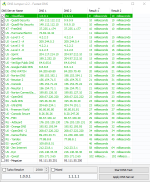
Yes, it should- and better be the same as manually. I had to double-check under Network and Sharing Center, yes, it's the same inputs. I find DNS Jumper to be so much more convenient with fewer chances of mistakes, esp. if you want to test various DNSs one after the other. If one likes to manually input the numbers... um OK. :D

I agree with you on finding DNSJumper more convenient than navigating to Microsofts DNS settings and is easier when you want to change the DNS. You can also easily add personal favourite DNS providers that are not listed. I was using the latter before trying DNSJumper. DNSJumper doesn't use much in the way of resources.
 
Despite the issues, i'm glad with Cloudflare results. It was better than i expected... It had some flaws but they weren't critics and they seem committed to be clear about them.
Some of the data is collected and kept for security reasons. All DNS servers keep some data to protect themselves and their infrastructure. Nevertheless, I'll keep using 1.1.1.1 because it's more private than other competitors.

Logging is not the problem, since it is mostly done to deal with DDoS and such, but the problem is, whether the company admits it properly.

At first they say, they they do not log, then they admit, that they somewhat do, but they will never sell that data (but use it themselves?).
Lets be honest, DNS servers are costly, they would not do it for free (look at OpenDNS). Cloudflare is making profit from CDN network.
I wouldn't call them liars. Sure, auditors found that some data is still collected, but as examination results say, they kept their promise. So what if they temporarily have my IP address, they're not tying it to DNS queries, meaning they don't know who visited what.

Personal I'm happy enough with my ISPs DNS, but I'm also on VPN 24/7.

The audit itself. Well, great that it was done IMO but I'm not over impressed with the fact that they obviously lied and then downplayed it wasn't too serious anyway as the numbers was so extremely low. Don't lie in the first place as otherwise it will either they like it or not hurt their brand and that brand is worth, a lot.
Even though my ISP's are fastest (1ms response time), I'm not using them. They used the fail A LOT in the past and they still don't support DNSSEC; I simply don't trust them.

By the way, when you're using VPN, you're not using DNS servers from your ISP. You're using DNS servers from your VPN.
 
I agree with you on finding DNSJumper more convenient than navigating to Microsofts DNS settings and is easier when you want to change the DNS. You can also easily add personal favourite DNS providers that are not listed. I was using the latter before trying DNSJumper. DNSJumper doesn't use much in the way of resources.

DNS Jumper is good but i've found Netsetman better - less clicks to switch DNS from the system tray.

If you want secure DNS outside of configuring it with a browser, then YogoDNS is even better,. You can enable system-wide DoH with any provider that offers it and, even better, set different DNS providers for different domains. It's not as quick to switch between providers as Netsetman, though.
 
Some of the data is collected and kept for security reasons. All DNS servers keep some data to protect themselves and their infrastructure. Nevertheless, I'll keep using 1.1.1.1 because it's more private than other competitors.


I wouldn't call them liars. Sure, auditors found that some data is still collected, but as examination results say, they kept their promise. So what if they temporarily have my IP address, they're not tying it to DNS queries, meaning they don't know who visited what.


Even though my ISP's are fastest (1ms response time), I'm not using them. They used the fail A LOT in the past and they still don't support DNSSEC; I simply don't trust them.

By the way, when you're using VPN, you're not using DNS servers from your ISP. You're using DNS servers from your VPN.

Reasonable explanation imho
 
Gave DNSJumper a shot. Personally I prefer the GRC DNSbench. I don’t need software to change DNS settings as I don’t do that often and usually use my router as the source for DNS resolution. Anyway, 1.1.1.1 bounces between being the fastest and falling to the middle of the pack for me. I like it, and may give it a shot again. Though with my browsing habits caching generally has me covered.
 
Personally I prefer the GRC DNSbench.
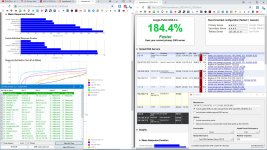
I like the old namebench 1.3.1, by default it tests 250 queries, but you can pick as many as you want. 2 queries are hardly enough for a proper result. In my report 9.9.9.9 has the fastest individual response, but the slowest mean response. A single webpage does ~30 DNS requests, so every ms counts.
 

Attachments

  • capture_04032020_101203.jpg
    capture_04032020_101203.jpg
    393 KB · Views: 237
I like the old namebench 1.3.1, by default it tests 250 queries, but you can pick as many as you want. 2 queries are hardly enough for a proper result. In my report 9.9.9.9 has the fastest individual response, but the slowest mean response. A single webpage does ~30 DNS requests, so every ms counts.
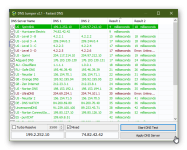
Interesting, thanks for sharing. For comparison I've shared my DNSJumper results.
 

Attachments

  • DNSJumper Novatech_2020.04.03_09h54m11s_001_.png
    DNSJumper Novatech_2020.04.03_09h54m11s_001_.png
    52.5 KB · Views: 265
I like the old namebench 1.3.1, by default it tests 250 queries, but you can pick as many as you want. 2 queries are hardly enough for a proper result. In my report 9.9.9.9 has the fastest individual response, but the slowest mean response. A single webpage does ~30 DNS requests, so every ms counts.
Level 3 almost always comes out fastest for me. With 9.9.9.9 close behind. Both actually do better than my isp.
 
No as this will cripple down your internet features and doesn't make sense as ipv6 exist for many many years and is the future we go.

Also most sites already use ipv6 but they still use ipv4 as fallback
I disabled IPv6 at my ISP endpoint since it slow downs everything and increases latency but I guess that's an ISP specific problem
 

You may also like...