App Review Comodo 2025 Containment Variations

It is advised to take all reviews with a grain of salt. In extreme cases some reviews use dramatization for entertainment purposes.
Content created by
cruelsister
Didn't Comodo fix the minor issues with default containment? For instance, a malicious program could change the wallpaper or create a text file on the desktop. As far as I know, there hasn't been a single known breach of default containment. Containment or restriction levels don't matter unless users actively engage with containment or analyze and respond to programs running within it. The "Block" action is preferable for most users, as it maintains usability and avoids any negative consequences.
 
  • Like
Reactions: simmerskool
I don't get the point of testing something with default-deny approach. It will obviously block all known or unknown code unless the code uses an exploit (executing payload in an unusual way or even getting system level privileges by taking advantage of AVs attack surface)
 
I don't get the point of testing something with default-deny approach. It will obviously block all known or unknown code unless the code uses an exploit (executing payload in an unusual way or even getting system level privileges by taking advantage of AVs attack surface)
The tests confirm the effectiveness of containment, with no leaks or bypasses. Compatibility issues or bugs may arise because of Windows major builds or Comodo updates, which can affect containment. It is beneficial that she regularly tests Comodo to ensure it works perfectly and effectively.
 
Running Beta v12.3.2.8124 on Windows 11, 23H2. My Restriction level on Unrecognized files has just been set to "Restricted". because I'm curious to see if it is a safe level without crippling the restricted application. Maybe I'll reel this in to a lower level if need be. Setup is similar to the cruelsister variation:

  1. Deleted built-in vendor list and just went with only those on my device (already running processes). These are mostly Microsoft, and Comodo vendors but also a few for browsers and a few other utilities I run.
  2. Disabled: Enable Cloud Lookup
  3. Disabled: HIPS
  4. Disabled VirusScope
  5. Auto-containment settings similar except Unrecognized files set to run Restricted at Restriction level = Restricted
  6. Some modification of existing Firewall Rulesets and added my own one as well. Most likely more to come.

  1. I'm running this with MS Defender enhanced with Andy Ful's WHHL (Windows Hybrid Hardening Light) and Configure Defender utilities
  2. Some Comodo-related Whitelist path exceptions were required in this utility in SRP and WDAC options
So far everything seems to be working as advertised with no buggy behavior. I was supposed to be bored and weary of these types of security utilities, but my interest for various reasons is re stoked again.
 
Last edited:
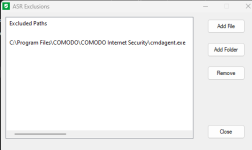
A corrector: The only exception rule it seems I need in Andy Ful's tools is in ConfigureDefender when "High" setting is used, then an ASR Path exception is required:

Configure Defender ASR exclusion for Comodo.png

Nothing required in WHHL. Thanks to @rashmi as well for directing me to the latest stable version 12.3.3.8140
 
  • Like
Reactions: kylprq and rashmi