I installed Comodo using my usual configuration and setup, and I tested the latest Windows 11 updates on one of our SSD systems. The updates installed successfully. This exercise was my last test regarding the Windows updates and Comodo issue. I have encountered no problems while using Comodo alone.


The MalwareTips app
Your community, one tap away.
Open MalwareTips from your Home Screen or desktop. Follow discussions, find answers and pick up where you left off.
- Home Screen access
- Optional push alerts
- Your community
You're ready to explore.Explore what's new
Installation instructions
iPhone & iPad
- Open MalwareTips in Safari and tap Share. You may need to open the Page Menu first.
- Choose Add to Home Screen. If it is not listed, use Edit Actions to add it.
- Keep Open as Web App enabled if shown, then tap Add.
Android
- Open MalwareTips in Chrome or another browser that supports app installation.
- Open the browser menu and look for Install app, Install and create shortcut, or Add to Home screen.
- Choose Install and confirm. Wording varies by browser.
Desktop
- Chrome: use the install icon in the address bar, or the menu under Cast, save and share.
- Edge: open the menu, then More tools, Apps and Install this site as an app.
- Safari on Mac: choose Share or File, then Add to Dock. Firefox on Windows: look for the web apps button in the address bar.
If you cannot find an install option, update your browser or use its bookmark option to keep MalwareTips close.
Keep up with your conversations
After installation, open the app and sign in. Enable push notifications in Preferences if you want alerts. On iPhone and iPad, push requires a Home Screen web app and iOS or iPadOS 16.4 or later.
Sign in to manage notificationsInstallation is optional. Your notification settings stay under your control.
You are using an out of date browser. It may not display this or other websites correctly.
You should upgrade or use an alternative browser.
You should upgrade or use an alternative browser.
Advice Request COMODO blocks Windows Updates with error 0x80070005
- Thread starter TheMalwareMaster
- Start date
Comodo
226 Replies
32,168 Views
Share practical recommendations that address the author's needs.

I have also tried windows update healing in the past but it did not solve the issue completely. You had to do it each time a new update comes outYou have a few solutions to try. If you want to delete the %windir% rule, temporarily use a custom configuration as explained here:
I would strongly recommend to not remove it from the standard rules that get installed by CIS.
I strongly recommend asking the Comodo staff before posting such a strong recommendation.
It is an open question whether this rule can bring more gain than trouble.
Edit.
There are some cons of temporarily deleting the HIPS rules with pipes. They cannot be recovered manually, because the rule editor does not accept pipes!
The awkward solution is exporting the Comodo configuration and then importing it with a custom name. After activating the imported configuration, the rule with a...
You can also try the last solution:
What is "Helen" for error-0x80070005?
The solutions posted in this thread are strange. I do not have an idea why they work. So, I tried something closer to standard procedure.
I used VirtualBox VM (Windows 11 Home 25H2) + Comodo Firewall (Proactive config + HIPS OFF) + Microsoft Defender (default settings) to install the latest Preview Update (KB5070311) (26200.7309). The update failed as usual with error 0x80070005. Instead of using the solutions mentioned in this thread, I did as follows:
- Windows restart.
- Windows Updates healing.
- Windows restart.
- Windows...


Andy Ful
From Hard_Configurator Tools
Verified
Honorary Member
Top Poster
Developer
Well-known
Forum Veteran
I have also tried windows update healing in the past but it did not solve the issue completely. You had to do it each time a new update comes out
It is possible. Anyway, it would be good to try the solutions mentioned in this thread to see if they work on your computer. This can help the Comodo staff identify the problem. So far, the issue seems to be somehow related to the Windows Updates on Windows 24H2/25H2 + Microsoft Defender (probably some other AVs) + Comodo Firewall (or CIS with disabled AV).
Last edited:

Using my suggested setup EXACTLY (even with with WD) enabled should resolve Update issues. The problem many have may be due to user added "tweaks' which can have unintended consequences.the issue seems to be somehow related to the Windows Updates on Windows 24H2/25H2 + Microsoft Defender
Andy Ful
From Hard_Configurator Tools
Verified
Honorary Member
Top Poster
Developer
Well-known
Forum Veteran
Using my suggested setup EXACTLY (even with with WD) enabled should resolve Update issues. The problem many have may be due to user added "tweaks' which can have unintended consequences.
Is it Proactive setup + HIPS OFF? No other tweaks, and update fails.
I believe she is talking about her setup. It appears to be proactive, having disabled HIPS while also enabling the optional protection level. She has suggested her setup previously.Is it Proactive setup + HIPS OFF? No other tweaks, and update fails.
Advice Request - COMODO blocks Windows Updates with error 0x80070005
Have you tested configuring Microsoft Defender and Comodo to ignore each other?
Andy Ful
From Hard_Configurator Tools
Verified
Honorary Member
Top Poster
Developer
Well-known
Forum Veteran
I inspected the video. The Proactive + HIPS OFF setup is less restrictive than @cruelsister's settings. In theory, the difference should be insignificant.
However, in theory, the solutions for the update error should not make any difference, but they somehow work.
So I restored the VM and configured CF exactly as in the video. Currently, the system is updating: KB5072033 (26200.7462).
Update.
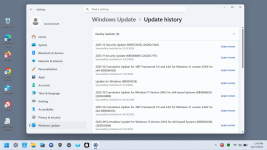
Here is the result (update failed):

However, in theory, the solutions for the update error should not make any difference, but they somehow work.
So I restored the VM and configured CF exactly as in the video. Currently, the system is updating: KB5072033 (26200.7462).
Update.
Here is the result (update failed):
Last edited:
Andy Ful
From Hard_Configurator Tools
Verified
Honorary Member
Top Poster
Developer
Well-known
Forum Veteran
CF with disabled MD?The KB5072033 (26200.7462) update installed successfully on my real system using my usual Comodo configuration. However, I had Containment set to block, the Firewall set to block requests, and VirusScope disabled.
View attachment 293786
Andy Ful
From Hard_Configurator Tools
Verified
Honorary Member
Top Poster
Developer
Well-known
Forum Veteran
Yes, based on your various tests, it appears there is a conflict between Defender and Comodo. I might test again if I think of something; otherwise, simply testing with Defender enabled seems pointless.CF with disabled MD?
Last edited:
Andy Ful
From Hard_Configurator Tools
Verified
Honorary Member
Top Poster
Developer
Well-known
Forum Veteran
Yes, based on your various tests, it appears there is a conflict between Defender and Comodo. I might test again if I think of something; otherwise, simply testing with Defender enabled seems pointless.
The strange thing is that this conflict happens only on some machines and does not happen on others with the same CF and MD setup.
I must check if it will happen after a disk cleanup with cleaning previous Windows installations.
Update.
After the cleanup, the update failed anyway with the same error.
Last edited:
My memory is that your tests did not show successful Windows updates with Defender enabled. @cruelsister is the only one who has reported no issues with Defender enabled, I guess.The strange thing is that this conflict happens only on some machines and does not happen on others with the same CF and MD setup.
Andy Ful
From Hard_Configurator Tools
Verified
Honorary Member
Top Poster
Developer
Well-known
Forum Veteran
My memory is that your tests did not show successful Windows updates with Defender enabled. @cruelsister is the only one who has reported no issues with Defender enabled, I guess.
All my tests in VM with CF + MD failed, except when the tweaks mentioned in this thread were applied.
Removing the %windir%\*| entry of Important Files/Folders also worked in my testing VM.
So currently, we have three working solutions:
The HIPS rule...
So currently, we have three working solutions:
- Disabling MD.
- Disabling in MD the option "Dev drive protection" and adding the system drive (usually C: ) to MD Exclusions.
- Removing the %windir%\*| entry in Important Files/Folders (HIPS >> Protected Objects >> Protected Files).
The HIPS rule...

What is "Helen" for error-0x80070005?
The solutions posted in this thread are strange. I do not have an idea why they work. So, I tried something closer to standard procedure.
I used VirtualBox VM (Windows 11 Home 25H2) + Comodo Firewall (Proactive config + HIPS OFF) + Microsoft Defender (default settings) to install the latest Preview Update (KB5070311) (26200.7309). The update failed as usual with error 0x80070005. Instead of using the solutions mentioned in this thread, I did as follows:
The solutions posted in this thread are strange. I do not have an idea why they work. So, I tried something closer to standard procedure.
I used VirtualBox VM (Windows 11 Home 25H2) + Comodo Firewall (Proactive config + HIPS OFF) + Microsoft Defender (default settings) to install the latest Preview Update (KB5070311) (26200.7309). The update failed as usual with error 0x80070005. Instead of using the solutions mentioned in this thread, I did as follows:
- Windows restart.
- Windows Updates healing.
- Windows restart.
- Windows...
However, I have an old NUC computer, where with the same CF + MD setup, all updates are successful on Windows 25H2 (upgraded from 24H2). We have users who do not experience issues with CF + MD, some who encounter update issues from time to time, and users who have this issue with all preview/security updates pushed by Microsoft on Windows 25H2.
Last edited:
Personally I have WD enabled as I see no valid reason to disable it (except it is a pain when I plug in a malware infected USB). I never had an issue with any Windows updates nor have any of those I shepherd reported such to me.
The issue with this topic is the ASSUMPTION that only Comodo is the culprit, and nowhere are any issues that non-Comodo users have with Windows updates discussed:
kb5072033 update failed
So perhaps the issue may lie elsewhere.
The issue with this topic is the ASSUMPTION that only Comodo is the culprit, and nowhere are any issues that non-Comodo users have with Windows updates discussed:
kb5072033 update failed
So perhaps the issue may lie elsewhere.
F
ForgottenSeer 114717
Ooooffff. Such words are a hanging offense amongst the anti-COMODO hive-minded vigilante mob here.Only a handful have troubles with Comodo—guess that's what happens when you don't salute Melih's brilliance, cherish Comodo's charm, and adore the sweetest 242 million Comodo users—the firewall of fandom and HIPS of fate block your path and even Windows updates!
I do not use COMODO because it just has too many problems in my estimation, but at the same time I dislike when people hate on it or bash it without acknowledging that the software has limitations imposed by its business model. Even though I disagree, I support their right to express their perspective(s) because many of the points about the software are correct.
I also dislike when certain people "promote" it without providing the full context and all the necessary detail so that the reader or viewer is right proper informed. Same here - even though I disagree, I support their right to express their perspective(s) and they should not be labelled as "immoral fanatics."
Either way though, ultimately, I don't care. All I care about is what the software owner is legally obligated to do. I do not care about any ethical or moral arguments.
For those that do use COMODO and it works for them, they are satisfied - then that is wonderful for them.
Andy Ful
From Hard_Configurator Tools
Verified
Honorary Member
Top Poster
Developer
Well-known
Forum Veteran
So perhaps the issue may lie elsewhere.
Currently, all three factors are involved: Windows Updates, Comodo Firewall, and Windows Defender.
There is no visible problem if any of those factors is absent. On my VM, the issue can be solved by tweaking any of those factors.
The issue is present only on some machines. So far, the Comodo staff has been unable to reproduce it.
Last edited:

Antig
Level 2
@Andy Ful
I enjoyed following your tests,but I have to say that ever since I used the cruelsister Comodo plus MS Defender in Windows 11pro I NEVER had a problem with ANY update.
I always apply MS updates manually,not automatically,and i often use Privazer to keep the disk as clean as possible and reinstall a Macrium image when I make a mistake or download something not convincing me completely.
I enjoyed following your tests,but I have to say that ever since I used the cruelsister Comodo plus MS Defender in Windows 11pro I NEVER had a problem with ANY update.
I always apply MS updates manually,not automatically,and i often use Privazer to keep the disk as clean as possible and reinstall a Macrium image when I make a mistake or download something not convincing me completely.
Andy Ful
From Hard_Configurator Tools
Verified
Honorary Member
Top Poster
Developer
Well-known
Forum Veteran
@Andy Ful
... I have to say that ever since I used the cruelsister Comodo plus MS Defender in Windows 11pro I NEVER had a problem with ANY update.
You are not alone. I do not doubt that there are many such users. As I already mentioned, this is also a case on one of my machines. Using (or not using) @cruelsister's settings has nothing to do with this error.
Windows Updates are tricky. Sometimes it is hard to understand why they fail on some machines.
Edit.
For me, it is only an intriguing theoretical problem. I simply do not understand why the solutions found in this thread (by me and others) would work at all.
Last edited:
Recently browsing
Members who viewed this thread in the last 5 minutes

