
A big thanks to all you guys, it has been a pleasure to come back on this forum and find many people available to test this issue that I had since March 2025 with no solution 


Open MalwareTips from your Home Screen or desktop. Follow discussions, find answers and pick up where you left off.
If you cannot find an install option, update your browser or use its bookmark option to keep MalwareTips close.
After installation, open the app and sign in. Enable push notifications in Preferences if you want alerts. On iPhone and iPad, push requires a Home Screen web app and iOS or iPadOS 16.4 or later.
Sign in to manage notificationsInstallation is optional. Your notification settings stay under your control.

I suggested that you attempt my suggested setup for CF and not sure if you tried it:A big thanks to all you guys, it has been a pleasure to come back on this forum and find many people available to test this issue that I had since March 2025 with no solution

I also disable the Microsoft Firewall through Group Policy and Microsoft Defender with Sordum's Defender Control.
I've been using the stated setup for years; I've never experienced a problem. Sordum's Defender Control may create issues, but it has worked every time as expected for me. The developer discontinued Defender Control because some users reported they couldn't reenable Microsoft Defender, but he couldn't reproduce the issue on his systems. Defender Control states "Couldn't start Defender" when you try to reenable it; you need a system restart to enable Defender.Yes, this can change the way Windows Updates are installed. As a side effect, some failures can be avoided, but there is a risk that such a setup can trigger other problems.
The developer discontinued Defender Control because some users reported they couldn't reenable Microsoft Defender, but he couldn't reproduce the issue on his systems.
I've used it many times and still use it; I've never had an issue. The developer provides the download on Google Drive; I don't know if he updates it, but my download manager shows the date 12/24/2024.It corrupted Microsoft Defender on my computer. I solved the problem by using Avast for some time, and after upgrading to the new Windows version and uninstalling Avast, Microsoft Defender was healed.
It is ver. 2.1 from March 2022.I've used it many times and still use it; I've never had an issue. The developer provides the download on Google Drive; I don't know if he updates it, but my download manager shows the date 12/24/2024.
Will try, but I do no longer have a virtual machine, I'll need to wait for the next updateI suggested that you attempt my suggested setup for CF and not sure if you tried it:
Comodo Firewall 2025 Setup and Commentary
For this you must download CIS Premium installer, the link for which is in the video's description.
I've used it many times and still use it; I've never had an issue. The developer provides the download on Google Drive; I don't know if he updates it, but my download manager shows the date 12/24/2024.
There is a major issue with the KB5067036 update, it fails every time on install on my machine and I only have Hard_Configurator (paranoid extensions, LOLbins, Firewall checked, High Defender checked) and NOD32 installed. It's not a solely Comodo issue, there is something wrong or totally borked with this update, I've reset SRP, uninstalled and turned everything back to default and same issue with installation error. Comodo is not the only one to blame., it's happening with other setups too.Finally, the issue has been identified. It was not Firewall but AV. I ran the test twice with the same result (Install error - 0x80070005).
The reported tests show that enabling/disabling other modules (HIPS, Auto-containment, VirusScope, Firewall, Script Analysis, Website Filtering) did not cause the KB5067036 update error. But whenever one of the disabled modules was the Antivirus module, the update failed.
In fact, the issue is quite similar to that from the OP (the same update KB5067036 and the same error). In my case (last two tests), I used CIS Proactive config with disabled HIPS and AV modules, which is almost the same setup as the Comodo Firewall config in the OP. However, I did not use the silent setup, and all tests were run on the default Admin account.
I also ran two additional tests with the installed Comodo Firewall application (Proactive config with disabled HIPS), and the KB5067036 failed as in the OP.
It is strange, but all of this suggests that the active AV component's absence may be the cause of the issue in both CIS and Comodo Firewall.

There is a major issue with the KB5067036 update,

Yeah just thought I'd post my experience, it's a buggy WU and not isolated to Comodo. I've tried everything to install it, no cigar
Disabled Defender and restarted the systemI disabled Microsoft Defender and used your config (did not disable Windows Firewall) with partial success:
View attachment 292882
The update was successful. However, Defender Control could not activate Microsoft Defender.
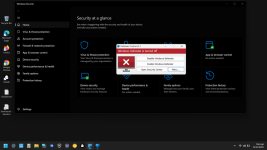
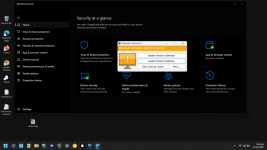
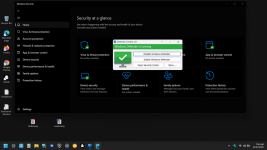
Microsoft does not want Defender to be turned off completely. Therefore, when defender is turned off, windows update or windows component is trying to repair Defender and as a result Defender may become corrupt. Of course a malicious program may also corrupt Defender completely. (If there is no different security software in windows, when Defender is turned off)
Microsoft is constantly taking new measures because it does not want Defender to be turned off. There is a possibility that Windows Defender may be corrupted among these measures. Therefore We will no longer update this program
Sordum.org Team
Here, after a reboot, Defender shows up quickly with a yellow shield. I just need to activate Defender's protection; it might be because I turn off Defender's settings manually before using Defender Control.In my real system, Microsoft Defender was somewhat corrupted after using DefenderControl. I used it several times while testing my POCs. It worked well until it did not. Microsoft Defender did not start for several minutes after reboot (up to 15 minutes). I could not restore the normal functioning.
Members who viewed this thread in the last 5 minutes


