Comodo CIS Bug fix policy

I have a question if you don't mind. I started using Comodo years ago based on reading at the time the Government couldn't circumvent it. After stumbling upon your videos a few years back and looking further into it I used Comodo firewall with your settings along with a subscription antivirus as it fit my needs. Out of curiosity, malware aside, how good does it firewall?
I'd say very good. There are self described 'experts' here who will say otherwise. You've watched the videos. They tell you more than this or that person's opinion.
 
  • Like
Reactions: Behold Eck
I have a question if you don't mind. I started using Comodo years ago based on reading at the time the Government couldn't circumvent it. After stumbling upon your videos a few years back and looking further into it I used Comodo firewall with your settings along with a subscription antivirus as it fit my needs. Out of curiosity, malware aside, how good does it firewall?
Let CS explain why she doesn't enable IPv6 filtering and recommends to leave it off...................
 
Out of curiosity, malware aside, how good does it firewall?

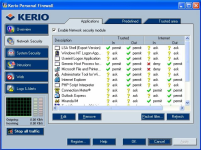
If you only care about filtering IPv4 traffic, the firewall works well. However, creating rules with some granularity is a cumbersome and time-consuming endeavor; numerous annoying mouse clicks required. Some people simply recommend to allow the application full access, but then you may as well not even use a firewall if you're going to allow an application full, unfettered network access. Perhaps the best, or one of the best firewall interfaces I've ever seen for creating application rules was Kerio pfw from many years ago...

1725577911503.png
 
Last edited:
In the real and normal world, security software is NOT based on the opinion of one or a few anonymous people on social networks, people who never present credentials about their supposed knowledge, people who are not experts as they never present protocols about their procedures (which makes any kind of universal reproduction of any test and conclusion unfeasible / unverifiable).
But you are an anonymous non-expert, whereas @cruelsister is an expert when it comes to testing Comodo (and other security solutions).

In the real and normal world, security software is based on official laboratory tests, or on expert reviews and tests, experts which are publicly known in the market, and follow professional and technical protocols in their evaluation procedures.
There are many credible, independent tests of Comodo that report that it produces top security protection results in the tests.

Reviews by Neil Rubenking (who takes payment for placement of solutions in his reviews) and owners of a webpage that provides reviews in return for payment are not credible. Rubenking is not an independent, zero conflict-of-interest tester. Plus there is zero transparency into his test procedures.
 
If you only care about filtering IPv4 traffic, the firewall works well. However, creating rules with some granularity is a cumbersome and time-consuming endeavor; numerous annoying mouse clicks required. Some people simply recommend to allow the application full access, but then you may as well not even use a firewall if you're going to allow an application full, unfettered network access. Perhaps the best, or one of the best firewall interfaces I've ever seen for creating application rules was Kerio pfw from many years ago...

View attachment 285335
Kerio was a superb firewall. I'd forgotten all about it. The earlier version to this one was also good but this version was THE best firewall interface ever built.
 
@cruelsister is an expert when it comes to testing Comodo
Being an expert can she tell us more about this IPv6 issue?
How well does CIS Firewall perform on a native IPv6 network?
Many of us want to know...
 
Being an expert can she tell us more about this IPv6 issue?
How well does CIS Firewall perform on a native IPv6 network?
Many of us want to know...
Why are you asking me? Ask @cruelsister directly, but I nevertheless can give you the answer. If Comodo does not filter IPv6 and it bothers you and others so much that it does not work, then either do not enable IPv6 on the system or just do not use Comodo. Obviously, if there is a IPv6 bug, Comodo is aware of it for years and is not going to fix it.

You either accept that the bug will never be fixed and use a workaround, or you do not. All the whining about Comodo on this forum will not give any of those doing the whining what they want.

Complaining incessantly about Comodo bugs is like beating one's own head against a wall. Comodo is what it is. It will never change. The product owner is never going to put any more resources into it than he does now. He has no incentive nor obligation to do anything with the software. It is really perplexing that some complain so much about Comodo. All that exerted emotional and mental energy complaining about it will never - ever - accomplish anything.
 
Last edited:
That sums it up very well why one must not take Comodo CIS as a serious software to protect ones precious system despite "experts" rating how good Comodo CIS is by just ignoring all the bugs, flaws and shortcomings.
Comodo can't deliver and maintain security software like all other vendors do, that's a fact.
 
That sums it up very well why one must not take Comodo CIS as a serious software to protect ones precious system despite "experts" rating how good Comodo CIS is by just ignoring all the bugs, flaws and shortcomings.
Comodo can't deliver and maintain security software like all other vendors do, that's a fact.
They've delivered one "OK" mechanism, namely containment, which is not proven to be broken, although from theoretical point of view, such a system, deeply rooted into the OS kernel, with rare updates, unfixed and undiscovered vulnerabilities, is not to be used.

Even if no in-the-wild malware has been seen bypassing containment (which from some reviews does not seem to be the case), using outdated software, specially crawling every file is not recommend, and a recipe for disaster. It goes against simple best practices, similar to not using 123456 as password or not using your phone without passcode. The disaster may happen tomorrow, after months, after years, but it will.
Thankfully, criminals are not all that interested in Comodo, due to extremely low market share.
This is why Comodo so far has managed to hide under the shadows.

The arguably "OK" mechanism is dressed in various issues, delivers low quality experience and there are many others that can do the job better.

People are using Comodo at their own risk, accepting that bugs will not be fixed.
 
Somewhere in his comments, there's definitely a heartbreaking love story hiding - it's almost as if every comment he makes carries the weight of a shattered romance, an abandoned love letter, tear-stained and forgotten, leaving a bittersweet taste in the air! 😭
 
Somewhere in his comments, there's definitely a heartbreaking love story hiding - it's almost as if every comment he makes carries the weight of a shattered romance, an abandoned love letter, tear-stained and forgotten, leaving a bittersweet taste in the air! 😭
Unrequited love. It's said to be painful and difficult to overcome.
 
Btw, even though specific firewall rules can't be made for svchost services (Dhcp, dnsserver, etc) in Comodo, it is possible to still create rules that restrict it to suit the user's requirements. Just a few of the ones I had...

Program Path or Ruleset
Action
Protocol
Direction
Source Address
Destination Address
Source Port
Destination Port
Rule Name
C:\Windows\System32\svchost.exe​
Allow​
TCP​
Out​
Loopback Zone​
Loopback Zone​
Any​
Any​
Loopback Zone​
C:\Windows\System32\svchost.exe​
Allow​
UDP​
Out​
Any​
1.1.1.1​
Any​
53​
DNS-Cloudflare​
C:\Windows\System32\svchost.exe​
Allow​
UDP​
Out​
Any​
1.0.0.1​
Any​
53​
DNS-Cloudflare​
C:\Windows\System32\svchost.exe​
Allow​
TCP​
Out​
Any​
Any​
Any​
443​
Allow out to HTTPS​
C:\Windows\System32\svchost.exe​
Allow​
TCP​
Out​
Any​
Any​
Any​
80​
Allow out to HTTP​
C:\Windows\System32\svchost.exe​
Allow​
UDP​
Out​
Any​
Any​
123​
123​
Windows Time Update​
C:\Windows\System32\svchost.exe​
Allow​
UDP​
Out​
0.0.0.0​
255.255.255.255​
68​
67​
DHCP​

Years ago I was more motivated with more time on my hands to actually restrict to IP ranges with subnets, such as Microsoft update servers, probably more important to port 80, but nowadays I can't be bothered. IPv6 is not going away, and more websites, especially the big players, are adapting it, so I that's why I wish to see a firewall filter it properly. I don't see a compelling reason to disable it, especially as a home user.
 
Last edited:
Comodo can't deliver and maintain security software like all other vendors do, that's a fact.
Comodo was developed to be a completely free software. That means the true cost to the consumer is $0 and its development is not subsidized by paying subscribers.

The product owner does not want to spend any more money on it. He already subsidizes the product at the cost of hundreds of thousands of dollars per year out of his own pocket. Plus he never had any intention of publishing Comodo to derive a profit from it. If he wanted to he certainly could, and spend millions fixing bugs that freeloaders just demand be fixed.

Why would anyone throw money at a free product to make it better because people complain about bugs? Who would do that?

Kaspersky Free is the paid version with features disabled. All the people that pay the annual subscription subsidize all the freeloaders that are too cheap to pay for a license. More importantly, the free versions are purpose-built to entice people to purchase a license. Comodo never operated on that model. That is why it was built in the first place - to not do what every other security software publisher does.

If you come to me and ask for a cheap mode of transportation, I am going to offer you a 20 year old rusty bicycle with a torn seat and a front wheel that wobbles. Don't like it? Then walk.The bicycle still works fine. That it is rusty and has problems is irrelevant. Want cheap and free - you get whatever someone is willing to give you. Either you accept it or you do not. You do not have to use it.

With all the complaints about Comodo, you don't see anybody running to MalwareTips complaining that they were infected with Comodo installed. You experience bugs? So what? Who cares? Those are your troubles. Figure it out. This is information security. That's what resourceful people do. They don't give up and they figure it out.
 
Unrequited love. It's said to be painful and difficult to overcome.
The recurring presence of "irresponsible" and "immoral" words in his comments... it feels like a cruel symphony, resounding in his ears, reminiscent of the lingering echoes of his unrequited love's melodic voice! 😢
 
  • Like
Reactions: Antig
But as I said, not even a customization in Comodo is a solution, because 20 years ago many executables began to use Svchost for comms, and with Comodo default settings the Svchost is considered “safe”, so absolutely nothing prevents a malware to use Svchost for comms. And even if you customize the Svchost (as you did in your post), at Comodo it can only be done in a generic way, for example, a simple “allow” “port: 53” (necessary for DNS) opens all comms for any malware.
Exactly!

I was about to write the same thing. Svchost is a nice comms backdoor for every running app, background process or service.
It's a major shortcomming of CIS Firewall!
 
Last edited:
Exactly!

I was about to write the same thing. Svchost is a nice comms backdoor for every running app, background process or service.
It's a major shortcomming of CIS Firewall!
Just for info. CF does sandbox svchost sub-processes of malware or untrusted files and firewall alert pops up. Source: Comodo Firewall vs Data Stealer - Cruelsister
1725728772036.png

I should have a look and compare how other AVs/FWs compare but just something I've observed in CS's CF tests. Currently looking at how to lock down Windows Firwall but given that I have the Home version of Win 11 I think my options are limited to firewall hardening blocking lolbins.
 
Would the svchost FW alert also have been shown when FW was set to safe mode as svchost is a windows trusted service?
To my knowledge trusted things (like svchost) get unlimited internet access in containment with FW set to safe mode leaking (stolen) data.

Malware aside, Comodo CIS FW can't filter svchost traffic by parent process / service.
Do you (or others) know about what other (free) FW do allow / support svchost filtering by parent process / service?
Would be very glad to know that.
 
  • Like
Reactions: Divine_Barakah