


The MalwareTips app
Your community, one tap away.
Open MalwareTips from your Home Screen or desktop. Follow discussions, find answers and pick up where you left off.
- Home Screen access
- Optional push alerts
- Your community
You're ready to explore.Explore what's new
Installation instructions
iPhone & iPad
- Open MalwareTips in Safari and tap Share. You may need to open the Page Menu first.
- Choose Add to Home Screen. If it is not listed, use Edit Actions to add it.
- Keep Open as Web App enabled if shown, then tap Add.
Android
- Open MalwareTips in Chrome or another browser that supports app installation.
- Open the browser menu and look for Install app, Install and create shortcut, or Add to Home screen.
- Choose Install and confirm. Wording varies by browser.
Desktop
- Chrome: use the install icon in the address bar, or the menu under Cast, save and share.
- Edge: open the menu, then More tools, Apps and Install this site as an app.
- Safari on Mac: choose Share or File, then Add to Dock. Firefox on Windows: look for the web apps button in the address bar.
If you cannot find an install option, update your browser or use its bookmark option to keep MalwareTips close.
Keep up with your conversations
After installation, open the app and sign in. Enable push notifications in Preferences if you want alerts. On iPhone and iPad, push requires a Home Screen web app and iOS or iPadOS 16.4 or later.
Sign in to manage notificationsInstallation is optional. Your notification settings stay under your control.
You are using an out of date browser. It may not display this or other websites correctly.
You should upgrade or use an alternative browser.
You should upgrade or use an alternative browser.
Comodo Firewall and Virtualized Browsers
-
 Thread starter
cruelsister
Thread starter
cruelsister
- Start date
- 15 Replies
- 2,534 Views

A YouTube video has been shared in this thread.
As an AI, I cannot view or analyze video content, so I am unable to determine its topic or any security implications.
If this relates to a malware, scam, or other cybersecurity issue, a text description of the concern along with any relevant logs or screenshots would allow for more useful community input.
Additional details from the original poster are needed before any further conclusions can be drawn.
Although this video topic is restricted to sandboxing browsers, the change seen in the Proactive Configuration has Security implications. Previously a sandboxed malicious file had the capability to connect out to the Network with a resulting FW alert; if C was in Silent Mode, however, the FW block would be automatic without any alert given.
But with this new build (8170) Network requests are automatically negated without regard to the mechanism used to establish such connections out. This is a very good thing as the majority of current malware are in the RAT or Stealer families- and a Stealer can't steal what they cannot send, and a RAT can't squeak if C cuts off its head.
But with this new build (8170) Network requests are automatically negated without regard to the mechanism used to establish such connections out. This is a very good thing as the majority of current malware are in the RAT or Stealer families- and a Stealer can't steal what they cannot send, and a RAT can't squeak if C cuts off its head.

New_Style_xd
Level 2
Hello. In this image, I have the firewall configuration enabled, but it still isn't working.
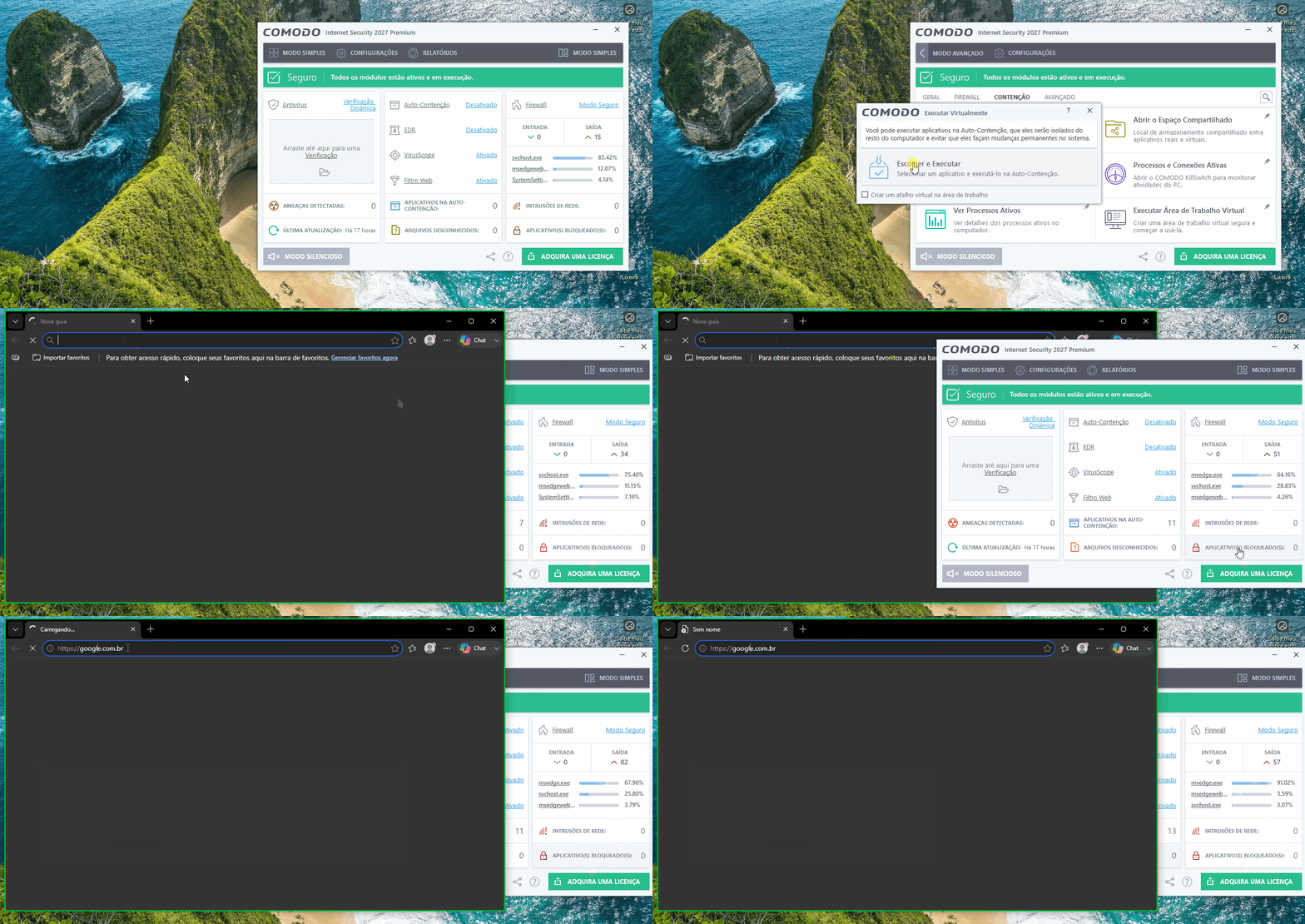

Setup PCPC setup
Containment is showing as "desativado" deactivated in your video. Can you try it with other browsers and check you don't have a firewall rule to block your browser from connecting out? Have you Reset Container?Hello. In this image, I have the firewall configuration enabled, but it still isn't working.
Last edited:
New_Style_xd
Level 2
I'll check and let you know here if there's a rule blocking it.Containment is showing as "desativado" deactivated in your video. Can you try it with other browsers and check you don't have a firewall rule to block your browser from connecting out? Have you Reset Container?
View attachment 299829
New_Style_xd
Level 2
Hi @ErzCrz
I ran the test again, just as I mentioned; there are no rules blocking the browser, but the result is the same—I don't know what to do.
Even though I watched the video from @cruelsister I can't replicate the setup on my end.
I notice she only installed the firewall, whereas mine is the full version; I just switch the profile—could that be the issue?
I ran the test again, just as I mentioned; there are no rules blocking the browser, but the result is the same—I don't know what to do.
Even though I watched the video from @cruelsister I can't replicate the setup on my end.
I notice she only installed the firewall, whereas mine is the full version; I just switch the profile—could that be the issue?
Setup PCPC setup
You can try just switching to Firewall Profile. Not sure why it isn't working for you. What tweaks have you made to each configuration?Hi @ErzCrz
I ran the test again, just as I mentioned; there are no rules blocking the browser, but the result is the same—I don't know what to do.
Even though I watched the video from @cruelsister I can't replicate the setup on my end.
I notice she only installed the firewall, whereas mine is the full version; I just switch the profile—could that be the issue?
It's odd that you are having the issues. If you have time, please consider doing the following:
1). First off, are you installing on your actual system or on a fresh VM? Second, is it Win10 or Win11?
2). If on a VM. just install the Firewall (uncheck the AV part).
3). Install the FW, reboot. After system restarts run update again (you will get a quick update and will have to reboot again).
4). After system restarts set up Comodo exactly as in the video and then run the same tests.
5) Let me know if issue persists...
1). First off, are you installing on your actual system or on a fresh VM? Second, is it Win10 or Win11?
2). If on a VM. just install the Firewall (uncheck the AV part).
3). Install the FW, reboot. After system restarts run update again (you will get a quick update and will have to reboot again).
4). After system restarts set up Comodo exactly as in the video and then run the same tests.
5) Let me know if issue persists...
New_Style_xd
Level 2
I just switch the profile and don't adjust anything; I leave it at the default setting.You can try just switching to Firewall Profile. Not sure why it isn't working for you. What tweaks have you made to each configuration?
New_Style_xd
Level 2
I'm testing this on a Windows 10 virtual machine.It's odd that you are having the issues. If you have time, please consider doing the following:
1). First off, are you installing on your actual system or on a fresh VM? Second, is it Win10 or Win11?
2). If on a VM. just install the Firewall (uncheck the AV part).
3). Install the FW, reboot. After system restarts run update again (you will get a quick update and will have to reboot again).
4). After system restarts set up Comodo exactly as in the video and then run the same tests.
5) Let me know if issue persists...
What I really want is for it to work by installing the full antivirus and simply modifying the profile—since many people have said that changing the profile alone does the trick.
I think what you suggested should work, given that only the firewall will be installed.

@New_Style_xd If I remember correctly, you were trying to run Google Chrome inside Sandboxie within a Comodo container, right? In the video, cruelsister didn’t use Sandboxie, so I’m not sure if that would make any difference.
New_Style_xd
Level 2
Based on the video she made, she tested it with three browsers—Chrome, Edge, and Firefox—using Comodo Sandboxie.@New_Style_xd If I remember correctly, you were trying to run Google Chrome inside Sandboxie within a Comodo container, right? In the video, cruelsister didn’t use Sandboxie, so I’m not sure if that would make any difference.
I believe that you are using an incorrect term- Sandboxie is a totally different application and has nothing to do with Comodo. My video used Comodo's CONTAINMENT module which can also be referred to as a Sandbox.Based on the video she made, she tested it with three browsers—Chrome, Edge, and Firefox—using Comodo Sandboxie.
As to the AV, adding this would have no impact at all on the Containment module- actually I jut tried installing the full suite and browsers were able to connect out if virtualized (identical to the video)/
My final question is when you installed Comodo in your VM, was it a FRESH install or did you already have the previous Comodo version installed and just installed the new build over the top?
New_Style_xd
Level 2
It was a clean installation.I believe that you are using an incorrect term- Sandboxie is a totally different application and has nothing to do with Comodo. My video used Comodo's CONTAINMENT module which can also be referred to as a Sandbox.
As to the AV, adding this would have no impact at all on the Containment module- actually I jut tried installing the full suite and browsers were able to connect out if virtualized (identical to the video)/
My final question is when you installed Comodo in your VM, was it a FRESH install or did you already have the previous Comodo version installed and just installed the new build over the top?
As i had some time to kill I found a fresh Win10 Vbox file:
1). I installed firefox and Chrome (Edge already installed obviously)
2). I installed and update Comodo Firewall 12.4.0.8170 (I do not install the on demand AV module as, first off, it adds nothing to protection as the FW already has an AV Cloud component; second, the on demand AV wastes space and won't detect anything not already detected by the Cloud AV (VirusScope).
3). I made sure that the Firewall Security configuration was active.
4). I enabled Containment, disabled EDR
5). From the GUI, I ran each of the 3 browsers virtually and all 3 were able to connect out to the Network.
6). Just to be sure I then first enabled proactive security (thus de-activating FW security) and ran the browsers virtually- the result was what you are getting- no network connection.
7). Same routine as above was done with internet Security configuration enabled (browser connection to the network failed).
If you have done the same on your system with different results I have no clue as to the issue.
1). I installed firefox and Chrome (Edge already installed obviously)
2). I installed and update Comodo Firewall 12.4.0.8170 (I do not install the on demand AV module as, first off, it adds nothing to protection as the FW already has an AV Cloud component; second, the on demand AV wastes space and won't detect anything not already detected by the Cloud AV (VirusScope).
3). I made sure that the Firewall Security configuration was active.
4). I enabled Containment, disabled EDR
5). From the GUI, I ran each of the 3 browsers virtually and all 3 were able to connect out to the Network.
6). Just to be sure I then first enabled proactive security (thus de-activating FW security) and ran the browsers virtually- the result was what you are getting- no network connection.
7). Same routine as above was done with internet Security configuration enabled (browser connection to the network failed).
If you have done the same on your system with different results I have no clue as to the issue.
Join the discussion
Write your reply below. You'll create a free account or log in before it's posted.
Recently browsing
Members who viewed this thread in the last 5 minutes
You may also like...
-

- R
-
M
Advice Request comodo firewall version recommendation for windows 7 sp1.
-
-

