

The MalwareTips app
Your community, one tap away.
Open MalwareTips from your Home Screen or desktop. Follow discussions, find answers and pick up where you left off.
- Home Screen access
- Optional push alerts
- Your community
You're ready to explore.Explore what's new
Installation instructions
iPhone & iPad
- Open MalwareTips in Safari and tap Share. You may need to open the Page Menu first.
- Choose Add to Home Screen. If it is not listed, use Edit Actions to add it.
- Keep Open as Web App enabled if shown, then tap Add.
Android
- Open MalwareTips in Chrome or another browser that supports app installation.
- Open the browser menu and look for Install app, Install and create shortcut, or Add to Home screen.
- Choose Install and confirm. Wording varies by browser.
Desktop
- Chrome: use the install icon in the address bar, or the menu under Cast, save and share.
- Edge: open the menu, then More tools, Apps and Install this site as an app.
- Safari on Mac: choose Share or File, then Add to Dock. Firefox on Windows: look for the web apps button in the address bar.
If you cannot find an install option, update your browser or use its bookmark option to keep MalwareTips close.
Keep up with your conversations
After installation, open the app and sign in. Enable push notifications in Preferences if you want alerts. On iPhone and iPad, push requires a Home Screen web app and iOS or iPadOS 16.4 or later.
Sign in to manage notificationsInstallation is optional. Your notification settings stay under your control.
You are using an out of date browser. It may not display this or other websites correctly.
You should upgrade or use an alternative browser.
You should upgrade or use an alternative browser.
Advice Request Comodo installing PUP?!
-
 Thread starter
Tutman
Thread starter
Tutman
- Start date
- 12 Replies
- 6,894 Views
Share practical recommendations that address the author's needs.
- Status
- Not open for further replies.


When you install it it prompts you if you want to install a bundled program, but its often missed due to many users just going all out clicking the Accept/Next button when installing software.
The file appears as soon as running the installer, I haven't clicked on anything from within the installer.When you install it it prompts you if you want to install a bundled program, but its often missed due to many users just going all out clicking the Accept/Next button when installing software.
Code:
fusion.dll
fusion.dll.tmpSource: VirtualBox VM with Windows 10.
Last edited:
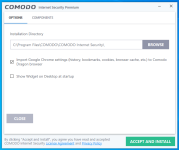
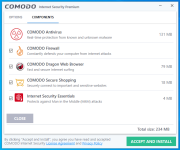
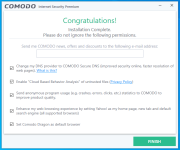
Huh, thats weird, from my experience it has sometimes not prompted you to download some extra software, but it hasnt downloaded it secretly in the background, ive also found those fusion.dll files aswell when using hitmanpro and having comodo installed on my system a year or so ago, but I never knew they were part of comodo, perhaps false positives?The file appears as soon as running the installer, I haven't clicked on anything from within the installer.
View attachment 245933Code:fusion.dll fusion.dll.tmp
Source: VirtualBox running Windows 10.
Edit; ran it in my virtual machine, its possible fusion.dll is part of the process that downloads the bundled software, but isnt malicious in on itself, its also possible comodo uses the same service that adware/bundlers use.
Edit 2: looking up the detection names possibly confirms my theory Comodo may be using the same service, FusionCore, as many other bundlers use.
Last edited:

The online installer has always had bundled software, well certainly for the last year or so. I think if you use the offline installer you won't get the other product offers. It's quite easy just to click decline or No when prompted. It's been awhile since I last installed it but I think it was just a case of declining the software offer. Maybe we'll see things change with this in upcoming versions but a couple of AVs have falsely detected the installer as PUP because of the software offers. Solution: use offline installer.

I have lost my faith in Comodo a long time ago. When you realize, that most signed malware uses Comodo certificates. 
I have lost my faith in Comodo a long time ago. When you realize, that most signed malware uses Comodo certificates.
The funny thing is it was all Norton Certificates for malware not that long ago. Anyway, we'll just have to wait and see what the future holds.

As @ErzCrz said, offline installer doesnt contain the bundled comodo stuff.
CIS Premium Offline Installer also does not contain Internet Security Essentials, which according to their FAQ, only works with Internet Explorer at this moment still (in other words, useless, unless they havent updated their version 12 FAQ)
CIS Premium Offline Installer also does not contain Internet Security Essentials, which according to their FAQ, only works with Internet Explorer at this moment still (in other words, useless, unless they havent updated their version 12 FAQ)


- Status
- Not open for further replies.
Recently browsing
Members who viewed this thread in the last 5 minutes


