App Review COMODO Internet Security Pro 2027

It is advised to take all reviews with a grain of salt. In extreme cases some reviews use dramatization for entertainment purposes.
Content created by
Shadowra
Default CIS settings use Internet Security configuration, which uses different Auto-containment rules.
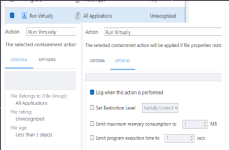
It does. Still none of those default containment rules have a set time limit but agreed, default Internet security used to have much more default blocking years ago. It's always optimal to use Proactive configuration. Below are the Internet Security Auto-Containment defaults for reference.

1785792773876.png


1785792990215-png.299214


1785793143838.png


1785793289344.png


1785793396846.png
 

Attachments

  • 1785792990215.png
    1785792990215.png
    113.7 KB · Views: 85
It does. Still none of those default containment rules have a set time limit ...

You missed this one:

1785835683846.png


This general rule can be modified by other rules, which usually remove the isolation time limit for specific popular scenarios.
Any scenario that is not included in other rules necessarily has an isolation time limit of 3 days.
 
Last edited:
You missed this one:

View attachment 299226

This general rule can be modified by other rules, which usually remove the isolation time limit for specific popular scenarios.
Any scenario that is not included in other rules necessarily has an isolation time limit of 3 days.
That's confusing. I mean it was my 2nd screenshot and while it's dealing with unknown files newer than 3 days so I get that older than 3 days since last modified or copied to the system by other means not covered by the other auto containment rules, it wouldn't be sandboxed? I guess if you ran a trusted executable that launched a dormant previously not detected piece of malware that was added to the system when protections were disabled that it would then not sandbox it and it would be down to the other protection layers to catch the malware on the system but I'm presuming that script protection would still pick this up. It still doesn't quite make sense how Limit Program Execution Time would be altered in these instances. I'll have to do some more research I think.

EDIT: I think I'm understanding now though I guess if you add the malicious file as trusted or it's in a supply-chain type attack. So maybe not as black and white under the internet security configuration whereas proactive just has the auto-containment rule of anything unknown.
 
Last edited:
I think that the isolation time limit was intended for files already present on the hard disk before the first CIS installation. In this way, CIS can avoid many false positives just after CIS installation (even if those files were unknown to CIS), except for fresh files that can still be contained. CIS cannot determine the file delivery method when there was no CIS on the computer yet. So the general isolation time limit rule still works when other rules (related to delivery methods) do not apply.
However, after CIS installation, keeping the isolation time limit for the files downloaded from the flash drive can be questionable when the same files opened from the flash drive are auto-contained with no isolation time limit.
 
Last edited:
  • Like
Reactions: ErzCrz and Khushal
Lots of talk on MT regarding Comodo, seems out of proportion to the amount of people who use it though, who actually uses it as a main AV solution though.on MT, I would find the answer intresting??

It can be out of proportion for sure, for most MT readers.
Let's consider this thread as a highly specialized one.(y)
 
@Shadowra allowed HIPS alerts; did this permit those specific actions, affecting the test results? Does Comodo behave differently with HIPS enabled compared to disabled when auto-containment is active? For instance, I use Ant Download Manager along with its browser extension. With HIPS enabled, I see a "cmd (safe) is trying to access antch (unknown)" alert when I start a browser. The extension functions properly if I allow this alert; no auto-containment alert for antch. With HIPS disabled, I see an auto-containment alert for antch when I start a browser; the extension cannot function.
 
  • Like
Reactions: Shadowra
@Shadowra allowed HIPS alerts; did this permit those specific actions, affecting the test results? Does Comodo behave differently with HIPS enabled compared to disabled when auto-containment is active? For instance, I use Ant Download Manager along with its browser extension. With HIPS enabled, I see a "cmd (safe) is trying to access antch (unknown)" alert when I start a browser. The extension functions properly if I allow this alert; no auto-containment alert for antch. With HIPS disabled, I see an auto-containment alert for antch when I start a browser; the extension cannot function.

EDR is the HIPS on the 2027 :)
It was enabled ;)
I only allow processes to run, and I block them if the HIPS flags any malicious activity.

It was retested yesterday (Comodo has fixed quite a few issues), and I'll post the results next week if all goes well ;)
 
  • Like
Reactions: rashmi