

You are using an out of date browser. It may not display this or other websites correctly.
You should upgrade or use an alternative browser.
You should upgrade or use an alternative browser.
Please provide comments and solutions that are helpful to the author of this topic.
- Status
- Not open for further replies.

D
Deleted member 178
Thread author
I add EAM processes into the CIS AV exclusions. In CIS EAM appears to be trusted file.
I add HMPA processes into the CIS AV exclusion.
I open EAM and it pops up error:
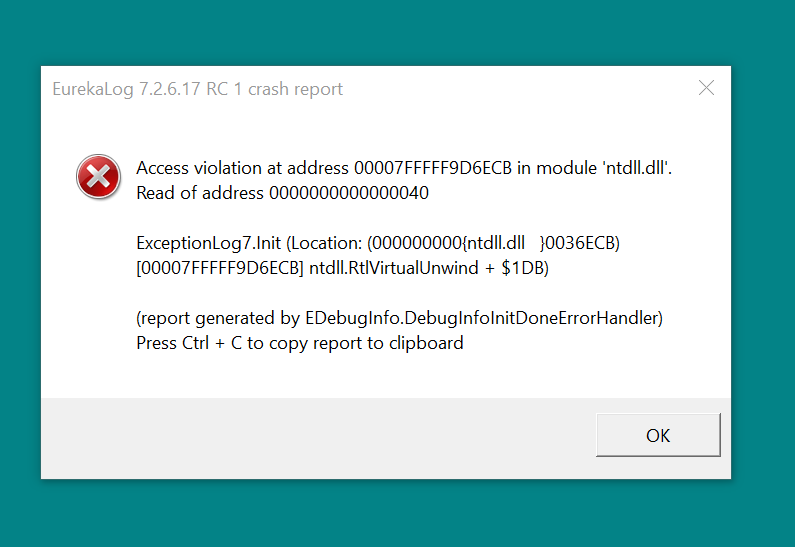
Update:
Problem resolved after I uninstall CIS. Guess the incompatibility issue. will try again ltr.
Update:
Re-attempt to install CF-only this time. Doesn't work at all. Problem still there. Uninstall CF, issue resolved. I guess there might be something wrong?
I add HMPA processes into the CIS AV exclusion.
I open EAM and it pops up error:
Update:
Problem resolved after I uninstall CIS. Guess the incompatibility issue. will try again ltr.
Update:
Re-attempt to install CF-only this time. Doesn't work at all. Problem still there. Uninstall CF, issue resolved. I guess there might be something wrong?
Last edited:
if you are doing a setup similar to @hjlbx or mine without testing each step , you will face many issues, try to reinstall with default settings.
btw, Emsisoft latest version has a anti-exploit feature, so maybe an incompatibilty issue.
I'm using default features for CIS/CF when reinstall; I even disable the Defense+,Sandbox,Virusscope - allowing only firewall. Doesnt work either. Anyway, it's okay. I'll just find substitute for my CIS.

H
hjlbx
Thread author
D
Deleted member 178
Thread author
Would there be any issue if I delete all the whitelisted application rule and then turn on learning mode back?
Felt that my list very messy, wish to clean it up.
turn training first then delete
turn training first then delete
LOL. Just curious... what would happen if it was done in reverse order?
D
Deleted member 178
Thread author
H
hjlbx
Thread author
Would there be any issue if I delete all the whitelisted application rule and then turn on learning mode back?
Felt that my list very messy, wish to clean it up.
White-listed application rules = HIPS, Sandbox and Firewall rules ?
If so, @Umbra tells it right:
1. Switch HIPS (and Firewall) to Training Mode
2. Delete HIPS, Sandbox and\or Firewall rules
Reverse above steps and you can potentially get a tidal wave of HIPS\Sandbox alerts and\or boink your system. How CIS will behave in that case depends upon running processes at that very moment, plus is dependent upon other settings. Generally not good idea to reverse above procedure if you don't know what to expect.
NOTE: Not so important to use Firewall Training Mode unless you want to capture specific IP addresses; more convenient to just use Custom Mode and at Firewall alert select "Outgoing Only."
White-listed application rules = HIPS, Sandbox and Firewall rules ?
Yes. felt previously alot of rules there stacking like nobody business. Want to clean it up and make a new one.
H
hjlbx
Thread author
Yes. felt previously alot of rules there stacking like nobody business. Want to clean it up and make a new one.
You will get lots of rules using Training Mode. It is next best thing to creating rules using Paranoid Mode. However, downside to Paranoid Mode is that it will take you 100 years to create all the rules.
TIP: Use Training Mode for a long time. The longer the better. Preferably a month. Afterwards, switch HIPS to Paranoid Mode.
Alternatively, you use Training Mode for a week, and switch to Paranoid Mode. If Paranoid Mode generates HIPS alert for Trusted application, just enable Training Mode and then select Allow in HIPS alert - in most cases it will create a generic Training Mode rule. Or you can just opt to create the specific rule via the Paranoid Mode HIPS alert (by selected "Remember my answer.").
D
Deleted member 178
Thread author
H
hjlbx
Thread author
in some case you must set some alerts as "treat as allowed" , some of them constantly changes.
You are referring to when the target path changes randomly ?
For example, tmp_12345 then tmp_xyqwoosjf, then tmp_0uphijnon38948u98u39, then tmp_1949s, etc, etc, etc
D
Deleted member 178
Thread author
no, for example some nvidia files/dll constantly change or being changed as well as "C:\Windows\System32\WerFault.exe" .
No way i allow temp files lol ^^
No way i allow temp files lol ^^
H
hjlbx
Thread author
no, for example some nvidia files/dll constantly change or being changed as well as "C:\Windows\System32\WerFault.exe" .
No way i allow temp files lol ^^
You mean when a file is modified (= changes when updated) ?
No allow temp folders, but allow writes to temp folders whose file path names change constantly... like mrtstub.exe => randomly named temp file every time it updates MRT.exe.
H
hjlbx
Thread author
Is anyone able to run IE i sandbox and if you do did you change anything because for me i added it in auto sandbox but when started it crashes.
I run IE 11 "forced" sandboxed. No crashes.
I did not create any special settings.
Did you remember to add both iexplore.exe for both Program Files and Program Files (x86) ?

Added both but still crashing when launched. I don't even get to see the gui. Weird.
Btw have this issue on 2 different configurations. One with Comodo firewall and with beta comodo cloud antivirus. I am on windows 10 so it might be that. Are you on another windows version if i may ask?
Btw have this issue on 2 different configurations. One with Comodo firewall and with beta comodo cloud antivirus. I am on windows 10 so it might be that. Are you on another windows version if i may ask?
- Status
- Not open for further replies.
You may also like...
-
 Advice Request Help: Comodo 2025 - cmdguard.sys - boot fail with newer Nvidia drivers
- Started by Something-x2
- Replies: 33
-
 Serious Discussion Data Collection Core Principles (Security Software)
- Started by Trident
- Replies: 7
-

-
Anyone Can Buy Data Tracking US Soldiers and Spies to Nuclear Vaults and Brothels in Germany
- Started by oldschool
- Replies: 1
-
Online Behavioral Ads Fuel the Surveillance Industry—Here’s How
- Started by oldschool
- Replies: 2