Advice Request compatibility problems? after windows 10 TH2

Please provide comments and solutions that are helpful to the author of this topic.
Status
Not open for further replies.

lhgamds

Level 1
Thread author
Jun 26, 2014
8
13
26
43
After updating to windows 10 TH2
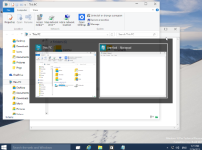
when I clicked alt+tab, I saw it's GUI changed like classic style.
I didn't know wheather it's CIS own compatibility issue or updating problems
so, I clean installed windows 10 TH2, and re installed CIS.
and it's happedned again.
is there anyone experience this issue?
 
  • Like
Reactions: Der.Reisende
It is possible that your computer hardware is not capable enough to support the graphics/animations of the new Alt+Tab screen in Windows 10.

Perhaps you could share with us some information about your computer's hardware components? Especially the processor (CPU), RAM, and your graphics card (GPU).

If you're not sure how to check for that information, try this tool:

Speccy
 
no... it's not possible...
before updating, it's function worked well...
in my case, if I turn "enable enhaced protection mode" on in HIPS setting, not only alt+tabs problem but also several win+x hotkey functions didn't work well...
 
After update to win 10 TH2 explorer.exe is using 15+% CPU

EDIT: explorer.exe cpu usage issue was related to KeyScrambler not being fully compatible with TH2, as far as I know there is an update coming for KeyScrambler users to fix these issues.
 
Last edited:
Hi, maybe you can try to change the GUI theme of Comodo manually and see what will happen.

Sorry, just now I think you mean the GUI of Comodo "changed like the classic style".

I am sorry for the misunderstanding...

I think you can try @Umbra 's suggestion. I have such experience that CFW v7 forced many of my system files into its sandbox after windows updates.:(

Wait, where is Umbra's reply? It was here just now...:confused:

I do not know why his reply disappears. But I think it is worth to try his suggestion.

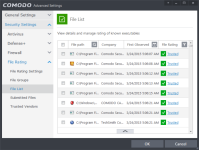
Specifically, @lhgamds , you can try to open the File List and check whether there are some system files being identified as "Unrecognized" by Comodo. If so, you can change the reputation of those files to Trusted, restart your computer and see what will happen.

file_man_filelist1.png
 
Last edited:
Well try to make all settings like HIPS (Training Mode), Sandbox behaviour to deactivate 'file source tracking' which means everything will be base on reputation and location to operate sandbox decisions.
 
Hi, maybe you can try to change the GUI theme of Comodo manually and see what will happen.

Sorry, just now I think you mean the GUI of Comodo "changed like the classic style".

I am sorry for the misunderstanding...

I think you can try @Umbra 's suggestion. I have such experience that CFW v7 forced many of my system files into its sandbox after windows updates.:(

Wait, where is Umbra's reply? It was here just now...:confused:

I do not know why his reply disappears. But I think it is worth to try his suggestion.

Specifically, @lhgamds , you can try to open the File List and check whether there are some system files being identified as "Unrecognized" by Comodo. If so, you can change the reputation of those files to Trusted, restart your computer and see what will happen.

View attachment 76693

im not sure if he talk about CIS GUI or Windows GUI.
 
  • Like
Reactions: Online_Sword
im not sure if he talk about CIS GUI or Windows GUI.
Yeah, same here, I initially thought that his Windows installation changed the theme by itself, just as Windows 7 did by changing from Aero Theme to Basic Theme when the system was low on resources.

no... it's not possible...
before updating, it's function worked well...
in my case, if I turn "enable enhaced protection mode" on in HIPS setting, not only alt+tabs problem but also several win+x hotkey functions didn't work well...
I also think you should try changing the File Rating of Windows system files in the CIS settings, from Unrecognized to Trusted (find the settings here: Advanced Settings -> Security Settings -> File Rating -> File List), just like @Umbra suggested.
You can use the screenshot provided by @Online_Sword in his message above as reference if you need help.
 
Last edited:
um...
it's my fault I didn't add some screen captures. but I don't have enough time to do that, so I add googling images.
in HIPS setting,
1) "enable enhaced protection mode" --> on
741bf626_o.png


2) "enable enhaced protection mode" --> off
b18eed9c_o.png


These things are what I said.
 

Attachments

  • a.png
    a.png
    131 KB · Views: 526
If i was you i would post this on the comodo forum site, they maybe able to help?
 
mostly it i the HIPS blocking something, as i said earlier before deleting my post ,check the File List ratings.
 
  • Like
Reactions: Cats-4_Owners-2
Latest information: COMODO released a program update for CIS to resolve a compatibility issue with Windows 10 1511 (10586).
Source: Comodo Internet Security Version 8.2.0.4792 - 20th November 2015

I am not sure if this "compatibility issue" is related to the issue described in this thread, however this must help in someway, at least.
 
Last edited:
Latest information: COMODO released a program update for CIS to resolve a compatibility issue with Windows 10 1511 (10586).
Source: Comodo Internet Security Release Notes [check Version 8.2.0.479220 November 2015]

I am not sure if this "compatibility issue" is related to the issue described in this thread, however this must help in someway, at least.

That actually fixed the issue about windows TAB function, it is working properly after update install.
5cj2md.png
 
  • Like
Reactions: Cats-4_Owners-2
Status
Not open for further replies.