


The MalwareTips app
Your community, one tap away.
Open MalwareTips from your Home Screen or desktop. Follow discussions, find answers and pick up where you left off.
- Home Screen access
- Optional push alerts
- Your community
You're ready to explore.Explore what's new
Installation instructions
iPhone & iPad
- Open MalwareTips in Safari and tap Share. You may need to open the Page Menu first.
- Choose Add to Home Screen. If it is not listed, use Edit Actions to add it.
- Keep Open as Web App enabled if shown, then tap Add.
Android
- Open MalwareTips in Chrome or another browser that supports app installation.
- Open the browser menu and look for Install app, Install and create shortcut, or Add to Home screen.
- Choose Install and confirm. Wording varies by browser.
Desktop
- Chrome: use the install icon in the address bar, or the menu under Cast, save and share.
- Edge: open the menu, then More tools, Apps and Install this site as an app.
- Safari on Mac: choose Share or File, then Add to Dock. Firefox on Windows: look for the web apps button in the address bar.
If you cannot find an install option, update your browser or use its bookmark option to keep MalwareTips close.
Keep up with your conversations
After installation, open the app and sign in. Enable push notifications in Preferences if you want alerts. On iPhone and iPad, push requires a Home Screen web app and iOS or iPadOS 16.4 or later.
Sign in to manage notificationsInstallation is optional. Your notification settings stay under your control.
You are using an out of date browser. It may not display this or other websites correctly.
You should upgrade or use an alternative browser.
You should upgrade or use an alternative browser.
ConfigureDefender utility for Windows 10/11
-
 Thread starter
Andy Ful
Thread starter
Andy Ful
- Start date
- 1,904 Replies
- 573,769 Views

Andy Ful
From Hard_Configurator Tools
Verified
Honorary Member
Top Poster
Developer
Well-known
Forum Veteran
BAFS blocks files which were detected as malicious.Hi Andy Ful, can you clarify the difference between Block At First Sight (BAFS) and Block executable files from running unless they meet a prevalence, age, or trusted list criteria. The second one sounds like a more aggressive version of BAFS.
The ASR rule is a kind of HIPS based on the file prevalence, age. or trust. After a few days, the blocked file can be allowed if more people will run it without problems.
Andy Ful
From Hard_Configurator Tools
Verified
Honorary Member
Top Poster
Developer
Well-known
Forum Veteran
Definitely, you have unusual Internet setup. If I correctly understand you do not also see the red alert webpage when opening the smartscreen demo page in Edge (I found one by googling)?I lost wifi connection using Adguard. I don't usually fool with these because I lack enough knowledge. Maybe I'd need to change it in the modem, but I bet I'd lose internet completely.
Andy Ful
From Hard_Configurator Tools
Verified
Honorary Member
Top Poster
Developer
Well-known
Forum Veteran
@oldschool,
I have thought a little how to bypass your setup. Please try this command line in elevated PowerShell:
It will try to connect with SmartScreen demo webpage without any web browser and download it to test.txt file in the Download folder. Normally, this connection is blocked by WD Network Protection and logged in ConfigureDefender Log - anyone can test it without issues (it is safe).
I have thought a little how to bypass your setup. Please try this command line in elevated PowerShell:
Code:
Import-Module bitstransfer;Start-BitsTransfer 'http://smartscreentestratings2.net/' $home\Downloads\test.txt;
@Raiden Tried it. No luck.
Incorrect. I get the Smartscreen warning if it is enabled in browser.
Definitely, you have unusual Internet setup. If I correctly understand you do not also see the red alert webpage when opening the smartscreen demo page in Edge (I found one by googling)?
View attachment 224032
Incorrect. I get the Smartscreen warning if it is enabled in browser.
Andy Ful
From Hard_Configurator Tools
Verified
Honorary Member
Top Poster
Developer
Well-known
Forum Veteran
That is better....
Incorrect. I get the Smartscreen warning if it is enabled in browser.
F
ForgottenSeer 72227
Boourns (Simpson's reference@Raiden Tried it. No luck.
)Sorry it didn't work for you. Sometimes it may just take time and it will start working again, annoying as it is. As long as it's working in the browser when enabled, you still have that protection.
Boourns (Simpson's reference
Sorry it didn't work for you. Sometimes it may just take time and it will start working again, annoying as it is. As long as it's working in the browser when enabled, you still have that protection.
No worries here. I have Smartscreen for Edge and BDTL for Brave. It's just a puzzle I don't mind investigating.
@oldschool,
I have thought a little how to bypass your setup. Please try this command line in elevated PowerShell:
It will try to connect with SmartScreen demo webpage without any web browser and download it to test.txt file in the Download folder. Normally, this connection is blocked by WD Network Protection and logged in ConfigureDefender Log - anyone can test it without issues (it is safe).Code:Import-Module bitstransfer;Start-BitsTransfer 'http://smartscreentestratings2.net/' $home\Downloads\test.txt;
We are away on a brief holiday. I'll test it on my return.
Andy Ful
From Hard_Configurator Tools
Verified
Honorary Member
Top Poster
Developer
Well-known
Forum Veteran
Happy holiday.We are away on a brief holiday. I'll test it on my return.
Andy Ful
From Hard_Configurator Tools
Verified
Honorary Member
Top Poster
Developer
Well-known
Forum Veteran
Some people (on another forum) think that the WD ASR rule "Block untrusted and unsigned processes that run from USB" is just SmartScreen forced on files executed from USB drives (similarly to "Run By SmartScreen"). But, it is not, in fact. For example, I can run without SmartScreen alert some unsigned applications with MOTW, downloaded to my hard disk from the Internet. But, the same files are blocked by this ASR rule when ran from the USB drive.
Furthermore, if the file is blocked on the USB drive, then it is also blocked on the hard disk after copying it to this hard disk. You can get rid of the block on the hard disk, by renaming the file on the hard disk.
Furthermore, if the file is blocked on the USB drive, then it is also blocked on the hard disk after copying it to this hard disk. You can get rid of the block on the hard disk, by renaming the file on the hard disk.
Last edited:

Setup PCPC setup
Thank you, I was just reading that discussion and wondering if it was truth or speculation.Some people (on another forum) think that the WD ASR rule "Block untrusted and unsigned processes that run from USB" is just SmartScreen forced on files executed from USB (similarly to "Run By SmartScreen"). But, it is not, in fact. For example, I can run without SmartScreen alert some unsigned applications with MOTW, downloaded to my hard disk from the Internet. But, the same files are blocked by this ASR rule when ran from the USB drive.
Furthermore, if the file is blocked on the USB drive, then it is also blocked on the hard disk after copying it to this hard disk. You can get rid of the block, by renaming the file on the hard disk.
Andy Ful
From Hard_Configurator Tools
Verified
Honorary Member
Top Poster
Developer
Well-known
Forum Veteran
Most of it is pure speculation, that can be proved/disproved in 5 minutes by performing easy tests.Thank you, I was just reading that discussion and wondering if it was truth or speculation.

Andy Ful
From Hard_Configurator Tools
Verified
Honorary Member
Top Poster
Developer
Well-known
Forum Veteran
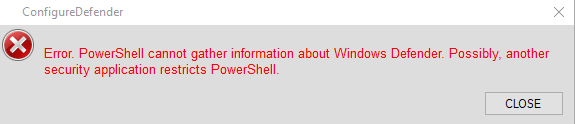
Reboot the computer and try again. If you will get the same error, then something still blocks PowerShell from doing the job.I get this error when I launch it, I have disabled all things that could possibly be blocking it, still the same error.
Last edited:
I rebooted twice, still the same error message, I can also launch powershell, I am going to load a restore point from 3 days ago and see if it helps.Reboot the computer and try again. If you will get the same error, then something still blocks PowerShell from doing the job.
Andy Ful
From Hard_Configurator Tools
Verified
Honorary Member
Top Poster
Developer
Well-known
Forum Veteran
Please, wait a moment.I rebooted twice, still the same error message, I can also launch powershell, I am going to load a restore point from 3 days ago and see if it helps.
You can also try to run as administrator PowerShell and use the command:
Get-MpPreference
If you get an error, then this is the sign that something still restricts PowerShell.
Get-MpPreference : Invalid class
At line:1 char:1
+ Get-MpPreference
+ ~~~~~~~~~~~~~~~~
+ CategoryInfo : MetadataError: (MSFT_MpPreference:root\Microsoft\...FT_MpPreference) [Get-MpPreference],
CimException
+ FullyQualifiedErrorId : HRESULT 0x80041010,Get-MpPreference
is the error I get when trying that command
At line:1 char:1
+ Get-MpPreference
+ ~~~~~~~~~~~~~~~~
+ CategoryInfo : MetadataError: (MSFT_MpPreference:root\Microsoft\...FT_MpPreference) [Get-MpPreference],
CimException
+ FullyQualifiedErrorId : HRESULT 0x80041010,Get-MpPreference
is the error I get when trying that command
Andy Ful
From Hard_Configurator Tools
Verified
Honorary Member
Top Poster
Developer
Well-known
Forum Veteran
As you can see, your PowerShell still cannot gather the information about WD settings. It is probably restricted by something.Get-MpPreference : Invalid class
At line:1 char:1
+ Get-MpPreference
+ ~~~~~~~~~~~~~~~~
+ CategoryInfo : MetadataError: (MSFT_MpPreference:root\Microsoft\...FT_MpPreference) [Get-MpPreference],
CimException
+ FullyQualifiedErrorId : HRESULT 0x80041010,Get-MpPreference
is the error I get when trying that command
Then I dont know what it could be, I have disabled all startup items(not windows ones of course) I have disabled windows defender, still the same powershell and install message..As you can see, your PowerShell still cannot gather the information about WD settings. It is probably restricted by something.
Edit: tested it on my latop which has the same antivirus programs, it worked, so theres something on my desktop thats not an antivirus thats blocking it.
Last edited:
Recently browsing
Members who viewed this thread in the last 5 minutes
You may also like...
-
-

-
 Serious Discussion Prepare for Windows Update certificate rotation in 2027
 -

-
