ConfigureDefender utility for Windows 10/11

Configuredefender ver. 3.1.1.1
In the app, the version number still shows: 3.0.1.1
cd.png
 
In the app, the version number still shows: 3.0.1.1
View attachment 267970
Yes. I used the executables from ver. 3.0.1.1 and added the new certificate to them.
So, the code in versions 3.1.1.1 and 3.0.1.1 is identical, only file hashes are different.
The ConfigureDefender version is hardcoded in the executables, so it is still visible as 3.0.1.1.
 
Yes. I used the executables from ver. 3.0.1.1 and added the new certificate to them.
So, the code in versions 3.1.1.1 and 3.0.1.1 is identical, only file hashes are different.
The ConfigureDefender version is hardcoded in the executables, so it is still visible as 3.0.1.1.
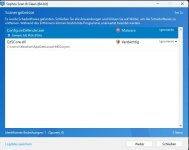
New version is detected by Sophos as ML PUA. What's causing this if you only added a new certificate?

Screenshot 2022-07-12 233726.jpg
 
New version is detected by Sophos as ML PUA. What's causing this if you only added a new certificate?

View attachment 267973
Sophos probably detects by ML all new ConfigureDefender versions as PUA, until it removes the false positive detection. The new ConfigureDefender files are also new to Sophos (different file hashes).
I submit my executables for whitelisting only to Microsoft, Avast, Bitdefender, and Norton.
 
Last edited:
Sophos probably detects by ML all new ConfigureDefender versions as PUA, until it removes the false positive detection. The new ConfigureDefender files are also new to Sophos (different file hashes).
I submit my executables for whitelisting only to Microsoft, Avast, Bitdefender, and Norton.
Submitted it as a FP but it will probably take a while as Sophos is quite slow at whitelisting
 
How NOT to make tests with ConfigureDefender.


The author did not read the ConfigureDefender help:


How to apply the settings.
Select a Protection Level or custom configuration, press the "Refresh" green button and let ConfigureDefender confirm the changes. ConfigureDefender will alert if any of your changes have been blocked. Reboot to apply chosen protection.

Without rebooting, most of the MAX settings were not applied which is also visible in this video. :)
 
Last edited:
It is crashing due to a longtime bug in Defender. Try clearing protection history.
It is not easy because of Tamper Protection. The events related to ASR rules and CFA require a complex treatment. There are some ways to do it, we talk about this on this thread here:
 
It is not easy because of Tamper Protection. The events related to ASR rules and CFA require a complex treatment. There are some ways to do it, we talk about this on this thread here:
Yes, I'm aware of that thread.

@Emanuel Tomasin One way around this is to reduce length of time to keep Protection History before auto-clearing either in GPO or via powershell.
 
Yes, I'm aware of that thread.

@Emanuel Tomasin One way around this is to reduce length of time to keep Protection History before auto-clearing either in GPO or via powershell.
The last time when I tested this setting it could not clear the advanced blocks. Reducing the time of keeping Protection History could clear the same entries as deleting manually the folder:
C:\ProgramData\Microsoft\Windows Defender\Scans\History\Service\DetectionHistory
This can be done easily via PowerShell with Administrator privileges:
Code:
del "C:\ProgramData\Microsoft\Windows Defender\Scans\History\Service\DetectionHistory"

I posted to Microsoft about this issue, but I did not test if it was solved.
 
Interesting changelog in the release preview channel build of Windows 11.
  • New! We enhanced Microsoft Defender for Endpoint’s ability to identify and intercept ransomware and advanced attacks.
I'm guessing this improvement is even coming to the stock Microsoft Defender. Maybe it has some similarity to the advanced ransomware ASR rule.
 
How NOT to make tests with ConfigureDefender.


The author did not read the ConfigureDefender help:


Without rebooting, most of the MAX settings were not applied which is also visible in this video. :)

They released a new video comparison
 
Last edited:
Interesting changelog in the release preview channel build of Windows 11.

I'm guessing this improvement is even coming to the stock Microsoft Defender. Maybe it has some similarity to the advanced ransomware ASR rule.
Maybe they're implementing that ASR rule knowing it is stable and suitable for the average user, i.e. it won't throw FPs.