

The MalwareTips app
Your community, one tap away.
Open MalwareTips from your Home Screen or desktop. Follow discussions, find answers and pick up where you left off.
- Home Screen access
- Optional push alerts
- Your community
You're ready to explore.Explore what's new
Installation instructions
iPhone & iPad
- Open MalwareTips in Safari and tap Share. You may need to open the Page Menu first.
- Choose Add to Home Screen. If it is not listed, use Edit Actions to add it.
- Keep Open as Web App enabled if shown, then tap Add.
Android
- Open MalwareTips in Chrome or another browser that supports app installation.
- Open the browser menu and look for Install app, Install and create shortcut, or Add to Home screen.
- Choose Install and confirm. Wording varies by browser.
Desktop
- Chrome: use the install icon in the address bar, or the menu under Cast, save and share.
- Edge: open the menu, then More tools, Apps and Install this site as an app.
- Safari on Mac: choose Share or File, then Add to Dock. Firefox on Windows: look for the web apps button in the address bar.
If you cannot find an install option, update your browser or use its bookmark option to keep MalwareTips close.
Keep up with your conversations
After installation, open the app and sign in. Enable push notifications in Preferences if you want alerts. On iPhone and iPad, push requires a Home Screen web app and iOS or iPadOS 16.4 or later.
Sign in to manage notificationsInstallation is optional. Your notification settings stay under your control.
You are using an out of date browser. It may not display this or other websites correctly.
You should upgrade or use an alternative browser.
You should upgrade or use an alternative browser.
Advice Request Configuring CFW and Zemana AntiLogger
-
 Thread starter
Emanuel.
- Start date
- 11 Replies
- 3,299 Views
Share practical recommendations that address the author's needs.
- Status
- Not open for further replies.


Hello people.
I have a problem with Comodo Firewall and Zemana. I can not update zemana real-time protection. If anyone knows any settings to avoid this thank you very much in advance.
Greetings.
Try to disable all off Comodo Protection and Update Zemana again to make sure that Comodo is not Blocking it.

I disabled the firewall and zemana updated its signature database.
If that worked, you might be able to add a single rule for the update that will allow it to work automatically. First, check to see if you have a rule for ZAM by typing ZAM in the Application header in Firewall->Application Rules (click on magnify symbol to type). If you have an allow rule already, probably something is blocking a temp file used during the update. If there isn't one there, you can try making the new allow rule for ZAM.exe and maybe that will do it for you.
I was just looking at the update process for ZAM by following it though with NVT ERP. It never has worked for me either, but I haven't taken the time to unblock it with NVT ERP yet. That's been the problem. It's kind of a complicated download and update process, and I have to add some allow settings to NVT for it to work.
I disabled the firewall and zemana updated its signature database.
Add Zemana Entire Folder to Application Rules in Comodo Firewall Settings. Set it to Allowed Application.
Source: Application Rules, Firewall Protection, Best Firewall | Internet Security

There must be some temporary file that escapes me.
See the Firewall Log to show what process' connection that have been blocked by Firewall.

Woops I see you have Zemana anti-logger not Zemana anti-malware  . I think the ZAM.exe MAC to MAC rule is going to be for monitoring the local network for some reason. No problem there and you should leave that one as is, but you need an IP rule for In or Out (All) set to Allow. Anyway, don't know what the ZAL process name is (ZAL.exe?), but you should be able to see it in Task Mgr. Search your rules for the ZAL process same as you did for ZAM.exe. See if you have another rule in there somewhere. Here's the rule I have for ZAM.exe:
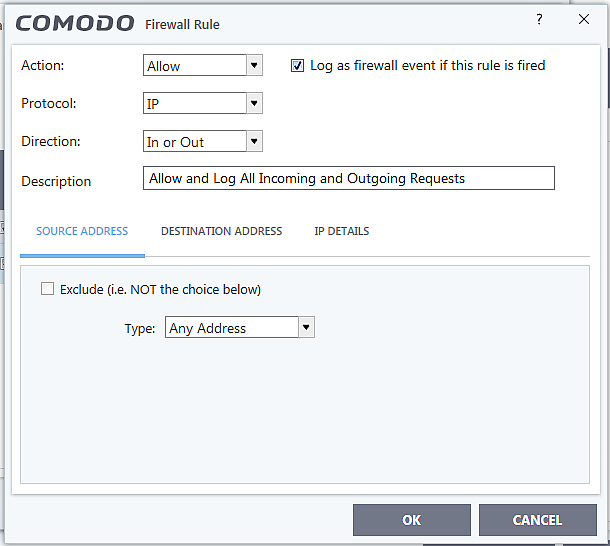
If you find a rule, click on the green checked rule like in your pic below (Allow IP Out...) to see the actual rule that you currently have. Don't edit the ZAM.exe one or any ZAL ones you find since those already govern some element of the program on your local network somehow. Clicking on the rule is just a way for you to see how to view a rule for a process so that you can edit it if necessary in the future or whatever:
Just focus on creating a new rule for the ZAL process of the Allow IP In or Out type like the one in my pic. @Maxwell Sien's way sounds like it will work fine too. That way you can create a rule for all executables in the program folder all at once.
. I think the ZAM.exe MAC to MAC rule is going to be for monitoring the local network for some reason. No problem there and you should leave that one as is, but you need an IP rule for In or Out (All) set to Allow. Anyway, don't know what the ZAL process name is (ZAL.exe?), but you should be able to see it in Task Mgr. Search your rules for the ZAL process same as you did for ZAM.exe. See if you have another rule in there somewhere. Here's the rule I have for ZAM.exe:If you find a rule, click on the green checked rule like in your pic below (Allow IP Out...) to see the actual rule that you currently have. Don't edit the ZAM.exe one or any ZAL ones you find since those already govern some element of the program on your local network somehow. Clicking on the rule is just a way for you to see how to view a rule for a process so that you can edit it if necessary in the future or whatever:
Just focus on creating a new rule for the ZAL process of the Allow IP In or Out type like the one in my pic. @Maxwell Sien's way sounds like it will work fine too. That way you can create a rule for all executables in the program folder all at once.
Glad you got it resolved. If you run into questions with Comodo, you can start a discussion here:
Comodo
Good threads in there to read too. You can also watch the Forum there (near the top right side "Watch Forum". @cruelsister does great Comodo videos in the video section. She is still undefeated and untied against malware using Comodo
Comodo
Good threads in there to read too. You can also watch the Forum there (near the top right side "Watch Forum". @cruelsister does great Comodo videos in the video section. She is still undefeated and untied against malware using Comodo
- Status
- Not open for further replies.
Recently browsing
Members and guests who viewed this thread in the last 5 minutes
You may also like...
-
 Advice Request COMODO blocks Windows Updates with error 0x80070005
-

-

-

-