Does MD follow the same pattern?I think I saw Avast doing this once a day also for their signatures, though sometimes not every day


Open MalwareTips from your Home Screen or desktop. Follow discussions, find answers and pick up where you left off.
If you cannot find an install option, update your browser or use its bookmark option to keep MalwareTips close.
After installation, open the app and sign in. Enable push notifications in Preferences if you want alerts. On iPhone and iPad, push requires a Home Screen web app and iOS or iPadOS 16.4 or later.
Sign in to manage notificationsInstallation is optional. Your notification settings stay under your control.
This test shows how an antivirus behaves with certain threats, in a specific environment and under certain conditions.
We encourage you to compare these results with others and take informed decisions on what security products to use.
Before buying an antivirus you should consider factors such as price, ease of use, compatibility, and support. Installing a free trial version allows an antivirus to be tested in everyday use before purchase.
Does MD follow the same pattern?I think I saw Avast doing this once a day also for their signatures, though sometimes not every day

No, MD doesn't write much. According to app like System Informer, it writes 200 MB on each update, but I have not found the proof of this 200 MB. Newly written data were only a few MBs when I checked. Like, 5 MB in total. So, it's unclear for me.Does MD follow the same pattern?
One more point in favor.No, MD doesn't write much. According to app like System Informer, it writes 200 MB on each update, but I have not found the proof of this 200 MB. Newly written data were only a few MBs when I checked. Like, 5 MB in total. So, it's unclear for me.
I thought about the database merging, but part of me hoped they'd found a way to minimize redundant disk activity.Yeah, I also have always disabled it. It doesn't have an impact on disk writes, the last time I checked. It only renames the old module folder after the new one is created with latest database update. So disk space is reduced by disabling this option but not disk writes.
What they described here represents the size of signature updates to be downloaded. So if there are many hours of gaps between the last update and the current update then it will download more. But as you know, ESET's daily signature update's download size is already one of the lowest in the industry. But the actual disk writes occurs when the old database is merged with the new database. So the new tiny updates that have just been downloaded are merged with the old database to create new database files. ESET calls them modules. Usually 2/3 module folders are updated on each signature update. Each folder usually has two files.
Bitdefender's process is somewhat similar, too. However, Bitdefender's download size is larger, typically several megabytes (still not huge). Their process of creating a new database is much slower. What ESET does in 3 seconds on a SSD, Bitdefender does in 10/15.
Bitdefender also seems to re-update their whole engine once a day. In that situation, their disk writes go over 1 GB. 1-1.5 or more probably. So, every day at least once, the BD user's C drive space reduces by at least 400-500 MB. After a system restart, the old engine folder is deleted and the size is regained. I think I saw Avast doing this once a day also for their signatures, though sometimes not every day, I thinkAvast runs their tiny 1-2 kb streaming updates 24/7 and usually once a day updates their whole base. It is a more efficient approach. But I'll have to check again to be sure.

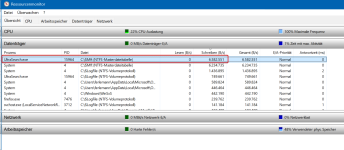
A bit off-topic, but regarding the disk write count, I noticed while testing UltraSearch that it writes about 330 MB with each disk scan. So, when I run it, it writes 330 MB, and if I scan again, it writes another 330 MB, which surprised me because the developer always stated that it runs and writes entirely in RAM.No, MD doesn't write much. According to app like System Informer, it writes 200 MB on each update, but I have not found the proof of this 200 MB. Newly written data were only a few MBs when I checked. Like, 5 MB in total. So, it's unclear for me.

I didn't understand anything from the replyUltraSearch indeed saves it index in the RAM instead of on the disk. The disk writing on your screenshot is likely going to be to “C:\$MFT” and “C:\$LogFile; you can confirm this by checking the disk usage within Windows Resource Monitor:
If this is the case, it is normal and expected. The reason is the following: when the MFT is read heavily, NTFS itself performs internal housekeeping, such as updating metadata and writing to C:\$MFT and C:\$LogFile.
These system writes are then attributed by the resource monitor (or similar applications) to UltraSearch, even though the program is not explicitly writing its own index to disk.
 , but perhaps this will help you understand MD writes.
It doesn't for me. It seems like searching for file attributes (names, etc.) for UltraSearch relies heavily on the MFT, and thus on the OS housekeeping rearrangements. If the AV updates (including MD) only work on a limited number of files (tens?), with no emphasis on looking up the file attributes, it doesn't seem like it should trigger the same kind of response from the OS.but perhaps this will help you understand MD writes.
This has almost no impact. Currently my two streaming update folders combined is only 1.01 MB. That's the size of streaming updates they have released so far today.It doesn't for me. It seems like searching for file attributes (names, etc.) for UltraSearch relies heavily on the MFT, and thus on the OS housekeeping rearrangements. If the AV updates (including MD) only work on a limited number of files (tens?), with no emphasis on looking up the file attributes, it doesn't seem like it should trigger the same kind of response from the OS.
I gave this to ChatGPT and Gemini and both said that even though it's indirect disk writes, it is actual disk writes happening on your drive.A bit off-topic, but regarding the disk write count, I noticed while testing UltraSearch that it writes about 330 MB with each disk scan. So, when I run it, it writes 330 MB, and if I scan again, it writes another 330 MB, which surprised me because the developer always stated that it runs and writes entirely in RAM.
View attachment 294716
So I contacted the developer and the response was as follows:
I didn't understand anything from the reply

I Change the av, go from Eset to NortonMy info about Avast updating full database once a day and writing very low amount of data on disk was incorrect.
Avast updates their database every 4 or every 6 (I'm not sure yet) and each time writes 400 MB+. 450+ MB, I think. But strangely almost half of this 400 comes from Avast copying some signature files from one folder to another one.
In "C:\Program Files\Avast Software" there is folder named, AvVps. When I last tested this folder didn't exist. They implemented it in a version released in October 2024. Before they had vps folder inside the Avast folder. I never took notice of that.
The files in this AvVps folders are basically a copy of their main signature files located in "C:\Program Files\Avast Software\Avast\defs". It has some fewer files but files that exist in this folder also exist in their main defs folder. I compared the hashes and they were identical.
I'm not fully sure but it seems when a signature update is performed, they process that in this AvVps folder. Once done, the required files are copied into the defs folder where signatures exist in a folder named like this "26011704" where first four letters are the date. 26 = year, 01 = month, 17 = day, 04 = The version of VPS update released on that day. So, 04 should mean that's the fourth VPS update released that day. Though my previous one was 02. I didn't receive 03.
Based on size alone, at least 344 MB was written in the last update. But downloading and processing causes some extra writes also. I don't know why they chose the approach of copying files from the VPS folder to the main database. Why don't just move them? They already keep a backup of the previous database always (Something that can be turned off ESET). So surely, they can do it without causing any disruption is protection. Like, 26011704 is the current version while I still have the previous 26011702 folder.
I don't know why they release streaming updates every minute or two and also release a signature update every 4/6 hours. They could've opted for releasing twice/once per day since streaming updates keep users protected.
So, Avast isn't too far away from Bitdefender, ESET, Avira and some other products when it comes to disk writes though Bitdefender remains the disk write champions. Maybe we shouldn't bother too much about it. Most of us are not running our PC 24/7. Our AV may update once or twice on average when we use it. Better move your browser cache folder to a different location like RamDisk or HDD or disable disk caching if using Firefox if you're sensitive about disk writes. My browser download folder is also in the HDD. So, I'm saving a lot anyway.
Bonus info about Avast:
If you are using a DNS service that blocks Avast domains like, "shepherd.avcdn.net", "analytics.avcdn.net" then Avast has a backup plan. They have hardcoded Cloudflare and Google DNS into their service to bypass your DNS based block. Some Avast domains are included into many DNS filters. Some even include domains that hampers Avast's protection. So maybe that's why they were forced to take this step. But these two mentioned domains are safe to block. They are not related to protection.
View attachment 294772
I have an app on my phone that bypass DNS blocking by sending requests directly to 1.1.1.1:443 and 8.8.8.8:443 to load ads. So even if you block cloudflare-dns.com and dns.google in your DNS, those blocks will be bypassed. So, you will have to block 1.1.1.1 and 8.8.8.8 in your firewall like in your PC/router/phone via something like AdGuard for Android/Rethink DNS.

The default is every 4 hours, but you can change it in geek area to any value you prefer.Avast updates their database every 4 or every 6 (I'm not sure yet)
But I have noticed only B leads to reduction of C drive space by 0.5 GB which are retrieved on restart of W; updating MD or Avast does not do the same.So, Avast isn't too far away from Bitdefender, ESET, Avira and some other products when it comes to disk writes though Bitdefender remains the disk write champions.
Nice! I forgot about geek:area. So, it checks for updates every 4 hours. But the amount of time they officially release an update is not provided anywhere I think. Since after 02, I got 04, it should mean 03 was released in between. ESET and Avira release their signature release info.The default is every 4 hours, but you can change it in geek area to any value you prefer.
On the default, Avast free updates 3 times daily (change of database ver no.); I have no idea if stream updates can change the ver no. or not.
Probably not though an Avast official would know the correct answer.This should happen for Avast also. I see it on my PC. But instead of 500 MB, would be 200+. As I said, it keeps a backup of the old version. I even saw two backups yesterday, so 400+ MB.But I have noticed only B leads to reduction of C drive space by 0.5 GB which are retrieved on restart of W; updating MD or Avast does not do the same.
Not to mention the update itself is much more faster than B which takes a while.
Keep using whichever you likeI Change the av, go from Eset to Norton

I am tempted to change the frequency to 24 h to avoid excessive disk writes which I was not aware of.What if we change update frequency to something big like 24 hours? Will we keep receiving streaming updates and remain protected?
Avast didn't respect my 24 hours settings after turning on the system. I mean, I booted my PC 13 hours later and it updated signatures automatically. But after that it didn't update for the next 5 hours at least. It was respecting my setting at that point. So, it will always update at system startup which is understandable. It respects the setting for a logged in session only. I can't tell what will happen if someone sets even a higher value and keep the PC running. There must be point when streaming update is not going to continue without needing a signature update at which point it will auto-update.I am tempted to change the frequency to 24 h to avoid excessive disk writes which I was not aware of.
I will give my feedback tomorrow morning (after 24+ h of applying the new setting).Avast didn't respect my 24 hours settings after turning on the system
Trend Micro and Panda also I assume for the same reason.It seems like the primarily cloud-based antiviruses could reduce disk writes better than their hybrid and more traditional colleagues. According to this thread, Microsoft Defender succeeds in minimizing writes, and it relies heavily on cloud protection.
@Trident, do you know if McAfee's signature updates keep disk writes low? It's one of the most cloud-dependent antiviruses out there now.
So Panda is the least disk-writing one.It seems like the primarily cloud-based antiviruses could reduce disk writes better than their hybrid and more traditional colleagues.

With McAfee they will be low for sure, as it only daily updates 1-2 databases. And that is once a day.It seems like the primarily cloud-based antiviruses could reduce disk writes better than their hybrid and more traditional colleagues. According to this thread, Microsoft Defender succeeds in minimizing writes relative to others, and it relies heavily on cloud protection.
@Trident, do you know if McAfee's signature updates keep disk writes low? It's one of the most cloud-dependent antiviruses out there now.
Members who viewed this thread in the last 5 minutes