AV-Comparatives Consumer Summary Report 2025

Disclaimer
  1. This test shows how an antivirus behaves with certain threats, in a specific environment and under certain conditions.
    We encourage you to compare these results with others and take informed decisions on what security products to use.
    Before buying an antivirus you should consider factors such as price, ease of use, compatibility, and support. Installing a free trial version allows an antivirus to be tested in everyday use before purchase.

because they do not issue their own certificates, the method applied by K and B?
Yeah, I think this is the reason. Avast uses SSLKEYLOGFILE which seems to cause extra disk writes compared to the other method. Avast can also use the other method; they use it in any other browser outside of Chrome, Edge and Firefox; for example, Brave.
 
Avast uses SSLKEYLOGFILE which seems to cause extra disk writes compared to the other method
I admired its method for not breaking the original certificate, but looks everything comes at a cost.
Let K & B break as much certificates as they need.
Tear Paper Tearing GIF by moodman
 
Yeah, I think this is the reason. Avast uses SSLKEYLOGFILE which seems to cause extra disk writes compared to the other method. Avast can also use the other method; they use it in any other browser outside of Chrome, Edge and Firefox; for example, Brave.
I assume McAfee does not perform HTTPS scanning either?
In the case of Eset, I noticed that the HTTPS check remains active on YouTube. I assume this is intentional?
 
Sad news about the cost of Avast's unique MITM implementation. They still excel in other areas for efficiency.

I assume McAfee does not perform HTTPS scanning either?
In the case of Eset, I noticed that the HTTPS check remains active on YouTube. I assume this is intentional?
McAfee does not use an MITM proxy to decrypt HTTPS. So, like Microsoft Defender, it will scan your downloads once they're completed.

WebAdvisor is a highly effective browser gatekeeper in other ways: you get reliable domain/IP reputation checks and safe browsing signals.
 
Sad news about the cost of Avast's unique MITM implementation. They still excel in other areas for efficiency.


McAfee does not use an MITM proxy to decrypt HTTPS. So, like Microsoft Defender, it will scan your downloads once they're completed.

WebAdvisor is a highly effective browser gatekeeper in other ways: you get reliable domain/IP reputation checks and safe browsing signals.
Thank you for your reply. That makes sense. And I like it, because I don't like it when a third-party AV slows down the browsing process. Kaspersky is my favorite product, but I don't like it for this reason, and I have other reasons too. It integrates too deeply into Windows. And I think the https scanning is noticeable while browsing.
 
In the case of Eset, I noticed that the HTTPS check remains active on YouTube. I assume this is intentional?
Do you mean ESET is doing HTTPS on YouTube for you? If yes then that's odd as it doesn't do on mine. If it's also not doing it for you then yeah it's intentional from ESET to whitelist YouTube.
WebAdvisor is a highly effective browser gatekeeper in other ways: you get reliable domain/IP reputation checks and safe browsing signals.
I really like the WebAdvisor extension. I usually use it even if I have a different third-party AV installed.
Thank you for your reply. That makes sense. And I like it, because I don't like it when a third-party AV slows down the browsing process. Kaspersky is my favorite product, but I don't like it for this reason, and I have other reasons too. It integrates too deeply into Windows. And I think the https scanning is noticeable while browsing.
Yeah, I like Kaspersky but I always felt and also proven by fact that on average Kaspersky has the most impact on web browsing speed among Avast, ESET, Bitdefender and Kaspersky. Usually, I disabled Kaspersky's HTTPS scanning when I used it.
 
Do you mean ESET is doing HTTPS on YouTube for you? If yes then that's odd as it doesn't do on mine. If it's also not doing it for you then yeah it's intentional from ESET to whitelist YouTube.

I really like the WebAdvisor extension. I usually use it even if I have a different third-party AV installed.

Yeah, I like Kaspersky but I always felt and also proven by fact that on average Kaspersky has the most impact on web browsing speed among Avast, ESET, Bitdefender and Kaspersky. Usually, I disabled Kaspersky's HTTPS scanning when I used it.
Ohhh...sorry, I wrote it down wrong. You're right that when using Eset, there is no HTTPS scanning for YouTube videos. I wrote it down wrong. And I've noticed this many times. This way, videos load faster in full resolution and there are no problems. The same is true for McAfee, because there is no HTTPS scanning there either. I don't know about you, but for me, the most important thing about third-party AV software is that I feel its presence on my computer as little as possible. It should protect me, but have a minimal impact on my computer experience.
 
Do you mean ESET is doing HTTPS on YouTube for you? If yes then that's odd as it doesn't do on mine. If it's also not doing it for you then yeah it's intentional from ESET to whitelist YouTube.
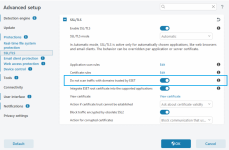
ESET uses their internal witelist for HTTPS scanning. You can also disable it if you wish to scan all traffic:

1771645890282.png
 
Ohhh...sorry, I wrote it down wrong. You're right that when using Eset, there is no HTTPS scanning for YouTube videos. I wrote it down wrong. And I've noticed this many times. This way, videos load faster in full resolution and there are no problems. The same is true for McAfee, because there is no HTTPS scanning there either. I don't know about you, but for me, the most important thing about third-party AV software is that I feel its presence on my computer as little as possible. It should protect me, but have a minimal impact on my computer experience.
Yeah, lightness is important. McAfee is probably the lightest AV at the moment. It only scans on execution, which also helps with performance.
ESET uses their internal witelist for HTTPS scanning. You can also disable it if you wish to scan all traffic:

View attachment 295817
Yeah, I'm aware of this. I even manually put some sites on the ignore list from the option above your marked one to disable HTTPS on some specific sites. But that option doesn't work as reliably anymore for me.
 
Yeah, lightness is important. McAfee is probably the lightest AV at the moment. It only scans on execution, which also helps with performance.

Yeah, I'm aware of this. I even manually put some sites on the ignore list from the option above your marked one to disable HTTPS on some specific sites. But that option doesn't work as reliably anymore for me.
The truth is that the situation is more nuanced for me. Let me give you an example: I run Kerish Doctor to clean up the system, and it runs very slowly alongside McAfee and Kaspersky. I guess it's because the two AV engines are monitoring its activity! With ESET, this happens lightning fast. And the cleanup itself is not just a check. So Kerish Doctor runs faster under ESET.
 
The truth is that the situation is more nuanced for me. Let me give you an example: I run Kerish Doctor to clean up the system, and it runs very slowly alongside McAfee and Kaspersky. I guess it's because the two AV engines are monitoring its activity! With ESET, this happens lightning fast. And the cleanup itself is not just a check. So Kerish Doctor runs faster under ESET.
Everything works faster with ESET.
 
The truth is that the situation is more nuanced for me. Let me give you an example: I run Kerish Doctor to clean up the system, and it runs very slowly alongside McAfee and Kaspersky. I guess it's because the two AV engines are monitoring its activity! With ESET, this happens lightning fast. And the cleanup itself is not just a check. So Kerish Doctor runs faster under ESET.
I see. So you found an area where McAfee is slow for you.
ESET is usually the speed champ as well as uses the lowest amount of CPU among the popular AV products, while Microsoft Defender is the highest (I haven't checked the latest McAfee on my PC yet).
ESET doesn't have a typical behavior blocker, which helps, but also the performance-critical component of the ESET engine is written in highly optimized assembly language, which also helps with speed and low CPU usage.
 
I realized that I was wrong about this analysis of mine. I mean writes are only being done in the browser cache, not by Avast is wrong. What System Informer's disk write column showed was double writes which is accurate. One by Browser, one by Avast. It seems System Informer's value is always accurate one way or another.

I noticed write activities from AVG in the temp folder while watching YouTube. So to properly measure, I opened a YouTube video and set Process Monitor to log activities of the AVG processes only. I played a video for 2-3 minutes. Saved the log as a CSV file and let Claude analyze it. I asked it to tell me about the disk writes.
View attachment 295759View attachment 295760
As you can see in the screenshot, AVG/Avast/Norton do their HTTPS scanning even on YouTube, and for doing so, they have to scan all the contents, including the video streams in real-time to look for malicious contents. This scanning cache for Avast is written in the temp folder, so in your SSD/HDD. Your browser already writes cache in its own cache folder, while this write from Avast is extra. So it seems, if you watch a 100 MB YouTube video, with Avast/AVG/Norton you will end up writing double the amount on your SSD.
I don't know why Avast thinks it's necessary to do HTTPS scanning on YouTube. ESET and Bitdefender, for example don't do it on YouTube, so they by default, avoid these excessive disk writes when you watch YouTube.
This is not just YouTube for Avast, any website you visit, anything that is loaded by your browser, is written temporarily in Avast's cache to be scanned by it. So this is the reason, Avast disk writes on System Informer always keeps increasing as you browse the web. I don't remember seeing this for other AV products with HTTPS scanning, like Bitdefender, ESET, and Kaspersky. Avast's HTTPS scanning method is different. It seems this method causes more disk writes than the methods used by Avast. Others may also cause writes when scanning a streamed content like a live sports match. I did a small test with ESET in a live sports streaming site where ESET was doing HTTPS scanning. ESET wrote 21 MB in 3-4 minutes in the Temp folder like Avast, but I thought I watched more than 21 MB worth of live streaming. So I need to test again.

I did a brief test with Bitdefender also, but Bitdefender doesn't do HTTPS scanning on 8/10 sites I visit, including my current go-to site for watching sports. So it not doing HTTPS scanning on most sites means they avoid these extra disk writes + faster web browsing in most cases.
I haven't tested Kaspersky. Kaspersky usually does HTTPS scanning on most websites, so it would be interesting for me to learn if it causes similar extra writes also.

Anyway, Avast is the biggest offender here. So if you're an Avast/AVG/Norton user, you may want to disable HTTPS scanning.

Avast support doc clearly states that there is a correlation between your internet speed, your HDD speed and Avast's webguard, impacting the speed.
Now I have done the same test with Bitdefender. Checked on two sports streaming sites where Bitdefender performs HTTPS scanning. There were no HTTPS scanning-related disk writes for Bitdefender in either case.
So Bitdefender processes it purely in memory. So even though Bitdefender uses more memory, it at least utilizes it properly (y)
bd.png
 
Now I have done the same test with Bitdefender. Checked on two sports streaming sites where Bitdefender performs HTTPS scanning. There were no HTTPS scanning-related disk writes for Bitdefender in either case.
So Bitdefender processes it purely in memory. So even though Bitdefender uses more memory, it at least utilizes it properly (y)
View attachment 295878
Do not make me love B again 💔
 
View attachment 294683
The above "Disclaimer" means:

1. The results apply only to the test environment.
2. The results apply only to the test system configuration(s) of both the OSes and security software tested.
3. The results apply only to the threats (e.g. the specific malware or other threats tested).
4. The results CANNOT be extrapolated beyond any of these "boundaries" or "specific limitations."

Yet, people will read and - very wrongly interpret - the "5 Stars and All Green Bars" and extrapolate that to protection that will keep them safe. The AV companies know this and exploit this people psychology and thinking failure. That is why AV companies pay huge amounts of money to have their software tested. It is marketing and propaganda. Combine that with people who have no understanding of the tests and that test result marketing generates revenue for the security software companies.
Bazang couldn't this problem you are addressing be solved by taking a vanilla PC, install Windows 11, also vanilla (keep everything default, and add no changes), and install the security software, also vanilla (plain simple default settings)
 
Do not make me love B again 💔
Here, let me help you come to your senses, go visit their forum for 20 minute. For me, it was like smelling salts reviving my past memories of it, BSOD during a scan, 1.51GB update that's been an on and off again issue for years (Vulnerability Scan). Of a member having webpage issues due to using Anti Tracker, what some of the helpers never used due to the various issues, read on, and on......Well "I'm healed" LOL