

The MalwareTips app
Your community, one tap away.
Open MalwareTips from your Home Screen or desktop. Follow discussions, find answers and pick up where you left off.
- Home Screen access
- Optional push alerts
- Your community
You're ready to explore.Explore what's new
Installation instructions
iPhone & iPad
- Open MalwareTips in Safari and tap Share. You may need to open the Page Menu first.
- Choose Add to Home Screen. If it is not listed, use Edit Actions to add it.
- Keep Open as Web App enabled if shown, then tap Add.
Android
- Open MalwareTips in Chrome or another browser that supports app installation.
- Open the browser menu and look for Install app, Install and create shortcut, or Add to Home screen.
- Choose Install and confirm. Wording varies by browser.
Desktop
- Chrome: use the install icon in the address bar, or the menu under Cast, save and share.
- Edge: open the menu, then More tools, Apps and Install this site as an app.
- Safari on Mac: choose Share or File, then Add to Dock. Firefox on Windows: look for the web apps button in the address bar.
If you cannot find an install option, update your browser or use its bookmark option to keep MalwareTips close.
Keep up with your conversations
After installation, open the app and sign in. Enable push notifications in Preferences if you want alerts. On iPhone and iPad, push requires a Home Screen web app and iOS or iPadOS 16.4 or later.
Sign in to manage notificationsInstallation is optional. Your notification settings stay under your control.
You are using an out of date browser. It may not display this or other websites correctly.
You should upgrade or use an alternative browser.
You should upgrade or use an alternative browser.
Crystal Security 3.5
-
 Thread starter
Kardo Kristal
Thread starter
Kardo Kristal
- Start date
- 1,165 Replies
- 286,342 Views
- Status
- Not open for further replies.

Oh good review
4/5 is a recommended product and a good score. Well done Kardo.
Maybe future versions will score a 5/5
@JakeXPMan Thanks.

Congrats bro
@Jo Man Thank you.
@Everyone Next version will be out very soon.
Regards,
Kardo
Hello,
Crystal Security 3.5.0.149 released
Changelog
Special Thanks to @LAGUN and @Malware1
Two different types of downloads
Download installer version of Crystal Security 3.5.0.149
Download portable version of Crystal Security 3.5.0.149
Looking forward to your feedback.
Regards,
Kardo
Crystal Security 3.5.0.149 released
Changelog
- Improved "Settings" section
- Improved search box
- Added "Rebuild Trusted items list" (Stealth Guard)
- Fixed minor bug in Password protection
Special Thanks to @LAGUN and @Malware1
Two different types of downloads
Download installer version of Crystal Security 3.5.0.149
Download portable version of Crystal Security 3.5.0.149
Looking forward to your feedback.
Regards,
Kardo

Very niceHello,
Crystal Security 3.5.0.149 released
Changelog
- Improved "Settings" section
- Improved search box
- Added "Rebuild Trusted items list" (Stealth Guard)
- Fixed minor bug in Password protection
Special Thanks to @LAGUN and @Malware1
Two different types of downloads
Download installer version of Crystal Security 3.5.0.149
Download portable version of Crystal Security 3.5.0.149
Looking forward to your feedback.
Regards,
Kardo
Can you say what you improved in the settings section?
Can you say what you improved in the settings section?
Thanks.
@Dani SantosImprovement is related with Password protection setting. @LAGUN reported that there was a lag when he canceled password creation in Password protection section. In latest build .149, there is no lag anymore.
Regards,
Kardo
Hi @everyone,
Tomorrow I'll go to the military. Development is inactive for next 8 months. When military is over then I have a plan to continue development.
I hope that I can visit MalwareTips from time-to-time.
Thanks for all the support.
Regards,
Kardo
Tomorrow I'll go to the military. Development is inactive for next 8 months. When military is over then I have a plan to continue development.
I hope that I can visit MalwareTips from time-to-time.
Thanks for all the support.
Regards,
Kardo
T
TheSuperGeek
Bye Kardo !
Good luck for your millitary !
Good luck for your millitary
!

Good luck and be strong.
We'll miss you :'(
We'll miss you :'(


Bye KardoHi @everyone,
Tomorrow I'll go to the military. Development is inactive for next 8 months. When military is over then I have a plan to continue development.
I hope that I can visit MalwareTips from time-to-time.
Thanks for all the support.
Regards,
Kardo
we will miss you I will anyway


Best of luck! Stay safe
L
LabZero
Military is always ... security, then it will be good, see you soon Kardo

Good luck @Kardo Kristal and see you soon, friend

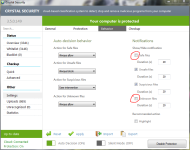
I tried Crystal Security Portable for the first time and found Add folder to whitelist not working properly i whitelisted folder but it still detects files in whitelisted folder, also found that it always detects rar archives files as unknown and every time i download archives files i get a lot of popups so i change settings in Auto-decision behavior selected "Action for Unknown files" to Allow once but i still getting more then one popups for the same file, maybe because i use Internet Download Manager and it splits downloaded file to multiple peaces and after merges to one file. So i had to disable notification for unknown files and disable upload unknown files. I think you should disable detection for archives like rar or zip.
with the popups if you uncheck the box with always allow and unknown files it won't notify you that is what I do because it got really annoying. maybe this might help your problem or you might have already done that.I tried Crystal Security Portable for the first time and found Add folder to whitelist not working properly i whitelisted folder but it still detects files in whitelisted folder, also found that it always detects rar archives files as unknown and every time i download archives files i get a lot of popups so i change settings in Auto-decision behavior selected "Action for Unknown files" to Allow once but i still getting more then one popups for the same file, maybe because i use Internet Download Manager and it splits downloaded file to multiple peaces and after merges to one file. So i had to disable notification for unknown files and disable upload unknown files. I think you should disable detection for archives like rar or zip.
- Status
- Not open for further replies.
Recently browsing
Members who viewed this thread in the last 5 minutes
You may also like...
-

-
 Advanced Plus Security harlan4096's PC Security Config
 -
 Advanced Security Spartan's PC Security Config
 -
 Software Review Avira Free Security 2026
 -
