CyberLock 9.0

  • Thread starter Thread starter danb
  • Start date Start date
  • Featured
I re-installed CyberLock 9.01 on top of 9.02 and all is back to normal. Both tray bar's icons are visible again and the last Sirius scan was completed in 24,81 seconds.

View attachment 296238
View attachment 296240
Hmm, that is very odd, thank you for letting me know! There were only minor changes from 9.01b to 9.02, with the exception of tweaking the updated command line feature, which should have had nothing to do with CyberLock startup. The only other thing I did was a small change to the LOCKED label on the shield, which should have had nothing to do with this bug... but you just never know with this stuff ;).

If anyone is having any issues at all please email your developer log to support at cyberlock.global. Here is the location of the log: C:\ProgramData\CyberLock\DeveloperLog.log
 
houston, we have a problem. first I downloaded SiriusLLM 1.02 (portable) and ran it and BOOM it was blocked by DeepInstinct - Behavioral Analysis - Reflective .Net Injection. Then I installed Cyberlock 9.02 over 9.01 and BOOM the install was blocked / aborted by DeepInstinct - Behavioral Analysis - Reflective .Net Injection. So yes 9.02 is different than 9.01 and all the earlier versions as this was never an issue before -- they've been running together for a few years. I can dig into DeepInstinct online console and see if there's an exclusion or work-a-round. PS MS Defender is the primary AV, DeepInstinct is riding shotgun. @danb You need log log for this?

EDIT emailed you the relevant section of dev log but doubt it will help with this issue... :unsure:
 
Last edited:
houston, we have a problem. first I downloaded SiriusLLM 1.02 (portable) and ran it and BOOM it was blocked by DeepInstinct - Behavioral Analysis - Reflective .Net Injection. Then I installed Cyberlock 9.02 over 9.01 and BOOM the install was blocked / aborted by DeepInstinct - Behavioral Analysis - Reflective .Net Injection. So yes 9.02 is different than 9.01 and all the earlier versions as this was never an issue before -- they've been running together for a few years. I can dig into DeepInstinct online console and see if there's an exclusion or work-a-round. PS MS Defender is the primary AV, DeepInstinct is riding shotgun. @danb You need log log for this?

EDIT emailed you the relevant section of dev log but doubt it will help with this issue... :unsure:
Thank you for letting me know! In SiriusLLM 1.02, the only changes were to the Snapshot Scan. And in CyberLock, there were only 2 changes... one change to the LOCKED label and the changes to the Command Line feature. None of these changes have anything at all to do with .NET Reflection. Our software utilizes .NET Reflection, but that code has not changed for a very long time, and in fact, almost all apps utilize .NET Reflection.

So my best guess is that the new DeepInstinct that was released yesterday has some false positive issues with our software. The reason I believe this to be the case is because there was only 1 change in SiriusLLM and only 2 in CyberLock, and the changes are completely unrelated, not to mention, very, very small changes.

The good news is that between SiriusLLM and CyberLock, there were a total of only 3 changes, so this will be easy to narrow down. I am quite sure the new Command Line code is not causing any of these issues.

So I reverted the code on the LOCKED label change, and hopefully this will fix the issue that @Avethil is experiencing, and who knows, maybe this is where DeepInstinct is getting its false positive. Edit: No, wait, SiriusLLM did not have this change... so I think the DeepInstinct false positive is completely unrelated to the 3 changes... see what I am saying? Either way, please try this version and let me know how it goes, it will be an easy fix either way. We do need to notify DeepInstinct of the false positives though.

Please try this version and let me know how it goes...

CyberLock 9.02b
SHA-256: 459056d272de95e01ef613ae1951c40dfb6eeb1d2eb80f37634c65d870b31d20
 
Last edited:
I thought about these issue and I think I know exactly what is going on.

@Avethil - do you have TONS of command lines in CyberLock Settings? The reason I ask is because with the new Command Line feature, after the new version is installed, CyberLock will update the C:\ProgramData\CyberLock\commandlines.db database to add the new columns it is now using. Then it will compute the hashes of the command lines and backfill all of these new columns, which would explain the high disk usage and the tray icons not appearing until the task was complete. On my system, I have 70 or so command lines, and the process took less than a second. But if you have an ungodly amount of command lines, I suppose it could take a couple of minutes. And once it is finished, it does not have to update the databases again.

So I would try the original 9.02 again and give it a couple of minutes. If that does not work, try 9.02b, but I doubt that the LOCKED label change broke anything.

As far as the errors @simmerskool was experiencing, I think these are just simple false positives from the new version of DeepInstinct. Believe me, I know all about how making changes to the models create false positives until you get it right ;).

So I am quite certain this is what is going on in both cases, and that the original 9.02 is perfectly stable and ready for release. The only question is if the LOCKED label change is causing an issue or not, but you have both versions, so we should know as soon as you try both versions.

BTW, the LOCKED label fix was simply a bug in Windows where when the user double clicks on a label, like the LOCKED / UNLOCKED label on the CyberLock Desktop Gadget, the Windows Clipboard will populate with the word LOCKED or UNLOCKED, so when the user pastes something the next time, it will paste the word LOCKED or UNLOCKED. I always wondered why that happened, and since I have been fixing all of the silly minor issues, I figured I would fix that issue as well. It turned out to be a known bug in Windows, and the fix is super simple, so I implemented the fix. But if it is going to cause issues, we can just leave it as it was.
 
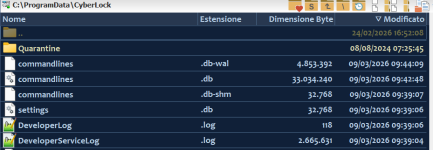
Same result as 9.02: no traybar icons, I waited for 5 minutes and nothing happened, so I close the processes. The content of C:\ProgramData\CyberLock\DeveloperLog.log is [03-09-2026 09:39:06] [INFO ] - *************************** User started CyberLock 9.02b ***************************
I have also attached a screenshot of the list of files in C:\ProgramData\CyberLock\ that were updated after I started 9.02b, if it can be useful.

CyberLock (3).png
CyberLock (4).png

About the command lines: after reverting to 9.01, I've checked the "Command lines" tab and I can say there are a lot of them but I can tell the precise number as there isn't a counter, unlike the "Whitelist" tab (1251 items). In "Whitelist" tab almost all items have the command line column's populated, but I don't know if its the same thing as the "Command lines" tab.
So it seems the "issue" depends on the number of command lines, like you wrote, but how many minutes should I wait before the process is completed ? Is there a way to speed up the process ?
 
Last edited:
Hello Dan,
I went from 9.01 to 9.02, I didn't install 9.01b. With 9.02 I waited for 4-5 minutes and nothing happened. I'm going to try 9.02b to see if it works better for my system.
Very cool, thank you for testing! I am convinced it is a corrupt C:\ProgramData\CyberLock\commandlines.db database. Can you please email the C:\ProgramData\CyberLock\commandlines.db database to support at cyberlock.global and I will figure out what is going on.

Once you send it to me, you can exit out of CyberLock and rename the commandlines.db to something like commadlines_old.db, and I bet any version of CyberLock will start immediately and run great. For example, if you start with 9.01 and then install 9.02, it will update the database instantly and work correctly. Or if you start with 9.02, it will create the full database with the 3 new columns, so it should work perfectly too.

To answer your questions... waiting 5 minutes should be more than sufficient, I am guessing that it should not take more than 10 seconds or so with a massive commandline database. There is no way to speed the database conversion up if the database is corrupt... it will basically just spin forever, which is why we really need to test with your corrupt commandline database, so we can trap and fix the error so that we have a permanent fix for users who have corrupt databases.
 
@danb

I'm curious, is it possible to start Sirius LLM without it remaining in the Notification Area Overflow.
TH.
I wish there was a way, but there is not. Windows treats the tray as a user‑owned space, not an app‑owned space, and has the user manually decide what is visible in the tray and what is in the overflow area. If anyone knows of any app where the tray icon is automatically visible (and not in the overflow area), please let me know. I can check to see exactly how they do this and see if it is something we can safely implement as well. Thank you!
 
@danb

After starting it up, I managed to get Sirius LLM to open directly in the taskbar.
But my goal is to start it in a window, so I created a shortcut on the desktop:

1.png


The problem with this approach is that Smart App Control blocks Sirus LLM exe:

2.png


I think it would be interesting for you to learn about this behavior.
Thank you for your attention.(y);)
 
Can you please email the C:\ProgramData\CyberLock\commandlines.db database to support at cyberlock.global and I will figure out what is going on.
Hello Dan,
I've just sent you a e-mail. OOPS, some problems with GMail.
*edited* Sent it now with Outlook.
 
Last edited:
if you start with 9.01 and then install 9.02, it will update the database instantly and work correctly. Or if you start with 9.02, it will create the full database with the 3 new columns, so it should work perfectly too.
You were absolutely right. I followed your instructions and CyberLock 9.02, installed on top of 9.01, started in 2-3 seconds, both tray bar's icons are visible, I didn't have that constant SSD disk access and C:\ProgramData\CyberLock\commandlines.db was re-created, much smaller in size than before (16384 bytes vs. 33435648) Well done !
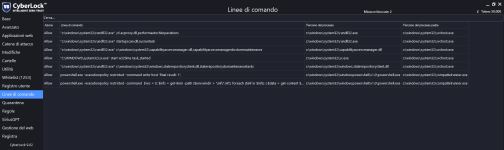
I don't know if it's normal but currently the "Command line" tab is empty. Should I do something ?
 
@danb

After starting it up, I managed to get Sirius LLM to open directly in the taskbar.
But my goal is to start it in a window, so I created a shortcut on the desktop:

View attachment 296251

The problem with this approach is that Smart App Control blocks Sirus LLM exe:

View attachment 296252

I think it would be interesting for you to learn about this behavior.
Thank you for your attention.(y);)
Interesting, thank you for letting me know! What do you mean by "my goal is to start it in a window"? BTW, are you saying that SAC does not flag SiriusLLM unless you make that modification?
 
You were absolutely right. I followed your instructions and CyberLock 9.02, installed on top of 9.01, started in 2-3 seconds, both tray bar's icons are visible, I didn't have that constant SSD disk access and C:\ProgramData\CyberLock\commandlines.db was re-created, much smaller in size than before (16384 bytes vs. 33435648) Well done !
I don't know if it's normal but currently the "Command line" tab is empty. Should I do something ?
Very cool, yeah, the issue is not so much a corrupt database, the issue is that you have almost 70,000 command lines ;). I am running the database update on your commandlines.db as we speak, and there are no errors, it is just taking forever for it to go through each of the 70k command lines ;).

I am happy we found out about this before we release 9.02 to the public., so thank you for bringing this to my attention! Probably what we will do is first check if the commandline.db has more than 500 command lines, and if it does, then just create a new commandline.db database. The new Command Line feature works a lot different than the old one, so most users will benefit from having a new commandline.db. Besides, there are far less command line blocks now then there were in previous versions of CyberLock, so I think it will all work out great.

Thanks again for helping me fix this issue, especially before the public release ;).
 
Thank you for letting me know! In SiriusLLM 1.02, the only changes were to the Snapshot Scan. And in CyberLock, there were only 2 changes... one change to the LOCKED label and the changes to the Command Line feature. None of these changes have anything at all to do with .NET Reflection. Our software utilizes .NET Reflection, but that code has not changed for a very long time, and in fact, almost all apps utilize .NET Reflection.

So my best guess is that the new DeepInstinct that was released yesterday has some false positive issues with our software.

Please try this version and let me know how it goes...

CyberLock 9.02b
SHA-256: 459056d272de95e01ef613ae1951c40dfb6eeb1d2eb80f37634c65d870b31d20
will try 9.02b this afternoon (after coffee establishes itself in my brain) & yes DeepInstinct just updated to 5.2.0000.2 and its updates are some infrequent.
 
  • Like
Reactions: Kongo and danb
It started to populate with some items

View attachment 296255
Very cool, thank you for letting me know! FYI, the cleanup test on the 70k command lines is still going after 30 minutes, so that was certainly the issue.

If you get a chance, I would be curious about how many command lines you have a week from now. With the new Command Line feature, hopefully it will be super small, like 200 or less.
 
@danb I downloaded CL 9.02b and... alas DeepInstinct AGAIN blocked the install with Reflective .Net Injection so seems to be the DI updated version on steroids -- I'll dig around in the DI console, I think I can set a bypass / exclusion in there, or should I just wait for official 9.03...?
 
  • Like
Reactions: Kongo and danb
If you get a chance, I would be curious about how many command lines you have a week from now. With the new Command Line feature, hopefully it will be super small, like 200 or less.
Sure, I'll keep you informed.
 
  • Like
Reactions: danb
@danb I downloaded CL 9.02b and... alas DeepInstinct AGAIN blocked the install with Reflective .Net Injection so seems to be the DI updated version on steroids -- I'll dig around in the DI console, I think I can set a bypass / exclusion in there, or should I just wait for official 9.03...?
Thank you for letting me know! Well, the only thing that is going to change in 9.03 is the commandline.db check to see if there are over x amount of rows, so either way is fine. BTW, once you figure out how to allow Sirius or CyberLock, can you please scan the DI binaries and post the results? If you get a chance, I would be super curious. If memory serves, don't they have one .exe binary that is not signed? If so, I would be especially curious of that result ;).