


Thank you. Will it still auto update?
I assume so, I'm almost certain, but I've learned from forums that one must be cautious when making such statements.
Keep in mind that I haven't downloaded PC Manager... so...

Thank you. Will it still auto update?


It also writes huge amounts of data to the solid-state drive (SSD).Web wrapper; heavy and slow.
I am in the Middle East, but my device settings are set to the United States.Where do you live? It isnt available in most countries.

I can confirm. The trick @Sampei.Nihira told me is working.I am in the Middle East, but my device settings are set to the United States.
Please share your experience after testing MS PC Manager.I can confirm. The trick @Sampei.Nihira told me is working.
Thank you. I’ll do the needful after getting back home from work.@devjitdutta2025
Hi, I noticed you switched from Ghostery to uBlock Origin.
May I suggest the simplest mode that uses dynamic filtering?
"Enhaced Easy Mode"
These are the advantages:
Dynamic filtering: Benefits of blocking 3rd party iframe tags
As you can see, you need to set third-party frames to red (block) when you encounter a website that malfunctions and you don't want to bother finding the blocked domain that should be allowed. You can also click with the mouse in the right-hand column (local exception) until it turns gray. This way, that specific website is entrusted to the static filtering of the filter lists you have subscribed to.
You have then reverted that specific website to the default uBo mode (Easy Mode).
Nothing could be simpler.
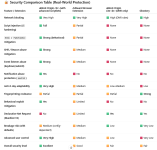
In the image below, you can see the differences between uBo vs Ghostery:
View attachment 295182
Good work.
I ditched it again as the features are not really needed on my pc at least. The boost option clears temporary files and cleans up memory. You can clean your temp files with the Windows built in feature. I personally use Process Lasso with it's "SmartTrim" feature, so the memory boost also isn't needed on my side. Other than that it offers "Deep Clean" which can clean your system more effectively but I won't use the tool just for that case. Other than that the other features are just the same features that Windows has already integrated. They are just easier to navigate through the app.Please share your experience after testing MS PC Manager.


Thanks for posting this since it's important for users to know that blocks by SAC do not automatically lead to malfunctioning apps.Only one thing I’ve noticed is that SAC is blocking some components of Hasleo Backup Suite but since the software is functioning properly I’m not having any problem.

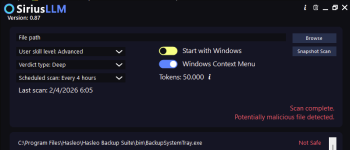
Why is it being classified as malware? The AI needs to be trained properly.View attachment 295377
View attachment 295378
Hasleo has an unsigned exe, but not the main executable.

7-Zip is not signed too, but not blocked by SAC!View attachment 295377
View attachment 295378
Hasleo has an unsigned exe, but not the main executable.
Maybe because the software has been around for such a long time. I use Winrar and SAC had never blocked it so far.7-Zip is not signed too, but not blocked by SAC!
Sometimes SAC block installer or exe after install if less prevalent, unsigned, and recently released; after waiting for days or week and retrying install or launch, it permits.I don't know if SAC blocking that exe from Hasleo, I just posted that as a possible speculation reason.
Prevalence is one important factor, but SAC/WDAC blocked 7-Zip and MPC installers before when freshly released.Maybe because the software has been around for such a long time. I use Winrar and SAC had never blocked it so far.


