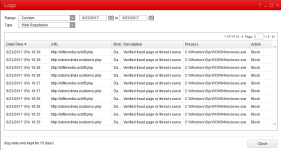
fRzzy New Member Thread author Jun 22, 2017 1 0 1 Vietnam Jun 22, 2017 #1 Hello. I started getting popups from TrendMicro Officescan athey haven't stopped. Thank you for help. Attachments Untitled.png 43 KB · Views: 5 Addition.txt Addition.txt 23.1 KB · Views: 1 FRST.txt FRST.txt 29.3 KB · Views: 1
Hello. I started getting popups from TrendMicro Officescan athey haven't stopped. Thank you for help.
TwinHeadedEagle Level 41 Verified Mar 8, 2013 22,627 2,906 3,979 Jun 24, 2017 #2 Hello, Scan with Malwarebytes' Anti-Malware Please download Malwarebytes Anti-Malware and save it to your desktop. Install the progam and select update. Once updated, click the Settings tab, in the left panel choose Protection and tick Scan for rootkits. Click the Scan tab, choose Threat Scan is checked and click Start Scan. If threats are detected, click the Apply Actions button. You will now be prompted to reboot. Click Yes. Upon completion of the scan (or after the reboot), click the Reports tab. Double-click the Scan Log. At the bottom click Export and choose Text file. Save the file to your desktop and include its content in your next reply.
Hello, Scan with Malwarebytes' Anti-Malware Please download Malwarebytes Anti-Malware and save it to your desktop. Install the progam and select update. Once updated, click the Settings tab, in the left panel choose Protection and tick Scan for rootkits. Click the Scan tab, choose Threat Scan is checked and click Start Scan. If threats are detected, click the Apply Actions button. You will now be prompted to reboot. Click Yes. Upon completion of the scan (or after the reboot), click the Reports tab. Double-click the Scan Log. At the bottom click Export and choose Text file. Save the file to your desktop and include its content in your next reply.