Question Mullvad VPN & Defender ASR question

Please provide comments and solutions that are helpful to the author of this topic.

simmerskool

Level 48
Thread author
Verified
Top Poster
Well-known
Forum Veteran
Apr 16, 2017
3,785
12,541
4,670
USA
MS Defender is primary AV also DefenderUI. DUI has "recommended profile" and most ASR rules are ON (block), 2 are off, and one is Warn= Block abuse of exploited vulnerable signed drivers. Apparently Mullvad driver is an "exploited vulnerable signed driver" -- every time I open and connect Mullvad I get blocked popup "your admin (aka me) is not allowing you to access content from \Windows\Temp\UDD*.tmp (I get about 5 variations in a row). ChatGPT5 says that's how ASR Warn works... Anyone else seeing this? Saw same with Proton VPN... :unsure:
 
Yes, this is a common issue. ASR (Attack Surface Reduction) rules in Defender are designed to block potentially harmful actions, and sometimes, they can flag VPN drivers as "exploited vulnerable signed drivers". You can add an exclusion for Mullvad in Defender settings, but be aware that this might slightly reduce your security. Alternatively, you could contact Mullvad support and ask them about this issue. They might have a solution or workaround.
 
MS Defender is primary AV also DefenderUI. DUI has "recommended profile" and most ASR rules are ON (block), 2 are off, and one is Warn= Block abuse of exploited vulnerable signed drivers. Apparently Mullvad driver is an "exploited vulnerable signed driver" -- every time I open and connect Mullvad I get blocked popup "your admin (aka me) is not allowing you to access content from \Windows\Temp\UDD*.tmp (I get about 5 variations in a row). ChatGPT5 says that's how ASR Warn works... Anyone else seeing this? Saw same with Proton VPN... :unsure:
I don't use a VPN, but that's how the rule works when configured this way. Fully enable the rule, then you'll know if it's problematic with your VPN.
 
MS Defender is primary AV also DefenderUI. DUI has "recommended profile" and most ASR rules are ON (block), 2 are off, and one is Warn= Block abuse of exploited vulnerable signed drivers. Apparently Mullvad driver is an "exploited vulnerable signed driver" -- every time I open and connect Mullvad I get blocked popup "your admin (aka me) is not allowing you to access content from \Windows\Temp\UDD*.tmp (I get about 5 variations in a row). ChatGPT5 says that's how ASR Warn works... Anyone else seeing this? Saw same with Proton VPN... :unsure:
This is new. I don't doubt the veracity of your reporting. I've seen those WARN rules for "exploitable vulnerable drivers" and "abuse of valid Windows processes" result in blocking of the ThrottleStop .sys and .tmp files when opening the GUI.

Honestly, I think the ASR functionality on Windows 11 is flaky with quite a bit of weird one-off experiences for various users. As in random, intermittent blocks that cannot be reproduced by all users at-will every single time.

I know users with your same ASR configuration with Mullvad VPN and they don't get the same blocks.

Nowhere to really report this nonsense to Microsoft except via the Feedback app. Good luck to anyone that attempts that. They have a better chance of winning the US $1 Billion PowerBall lotto than their report reaching the team at Microsoft that can investigate, figure out, and provide a fix to what is being reported.
 
Have you contacted Mullvad support? That would be my first step. Yeah they are slow but they do reply.
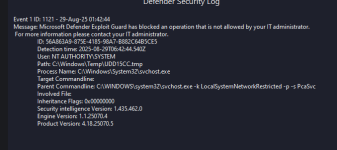
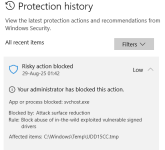
no, not reported yet, as I had asked chatgpt5 and we narrowed it down to Defender ASR doing what it is supposed to do. @oldschool quickly confirmed same above. I checked DefenderUI Security Log and Windows Security | Virus & Threat protection | History and it clearly lists that ASR Rule with \Windows\Temp Block and process cli
\svchost.exe -k LocalSystemNetworkRestricted -p -s PcaSvc I was sua in win10. I changed Rule to Audit and popups stopped, but I returned it to Warn and now ignore since Mullvad connected anyway. We did check to see if its driver was update-to-date and it seems to be. (something to do with svchost changing the network adapters at request of mullvad signed driver...?? :unsure: )
 
On my computer, I enable all most every Windows security features (Core Isolation, all ASR rules, Smart App Control, Controlled Folder Access,...), I'm using Mullvad without any issues. I don't use any third-party software to enable hidden security features, I just use Microsoft security baseline and Group policy.
 
Why don’t you just disable the ASR rule related to blocking vulnerable drivers?

That’s always the risk with these ASR rules and super generic blocks.

This rule is designed to block malware from entering kernel mode but it seems to be causing issues.
However malware that abuses BYOVD doesn’t just come from the sky, other ASR rules that prevent malicious/suspicious/unonown code executions can stop the user mode dropper/loader before it enters the kernel space. So this is a supplementary, but not critical rule.

Furthermore, with ELAM, kernel mode malware is not *that* big of a deal, as it was before. Secure boot here is irrelevant because this is an approved driver.

Unless this is a very critical business machine, I would not enable this rule.
 
Last edited:
I changed Rule to Audit and popups stopped, but I returned it to Warn and now ignore since Mullvad connected anyway.
Indeed, my experience is that ASR rules may result in block alerts but not block the program completely, i.e. app works in spite of the block(s). Same experience with Smart App Control and Controlled Folder Access.
Unless this is a very critical business machine, I would not enable this rule.
Agree with @Trident .
 
Last edited:
Have you contacted Mullvad support? That would be my first step. Yeah they are slow but they do reply.
Mullvad Support is universally terrible. My basis of judgment is 15 years of experience with it.

Mullvad Support has stated to me many times "We are not capable of investigating issues in-depth. But we can help you with account issues."

For one, Mullvad openly states on its own GitHub on various past submitted Issue reports that it is a 100% Linux shop with people from the Linux community. It focuses almost 100% on supporting Linux and Windows support is an afterthought. This is true of the vast majority of the boutique VPN houses.

Mullvad does not even have a dedicated QA/QC teams. On its GitHub it stated (paraphrase) that "We don't have the resources to do anything except perform very limited unit tests and isolated testing - almost all on Linux. We do not routinely test our code." IVPN, OVPN, others of the same ilk are the same as Mullvad.

Even reporting bugs and other serious issues or defects on the Mullvad Github is a futile enterprise.
 
Last edited by a moderator:
MS Defender is primary AV also DefenderUI. DUI has "recommended profile" and most ASR rules are ON (block), 2 are off, and one is Warn= Block abuse of exploited vulnerable signed drivers. Apparently Mullvad driver is an "exploited vulnerable signed driver" -- every time I open and connect Mullvad I get blocked popup "your admin (aka me) is not allowing you to access content from \Windows\Temp\UDD*.tmp (I get about 5 variations in a row). ChatGPT5 says that's how ASR Warn works... Anyone else seeing this? Saw same with Proton VPN... :unsure:

What is concrete information about this block in the Windows Defender Protection History?
 
What is concrete information about this block in the Windows Defender Protection History?
@Andy Ful If I understand your question: on win10 with MS Defender as primary registered AV > Windows Security | Virus & Threat protection | Protection history > all the notifications are there and time-stamped "Risky action blocked" click on it for more info. Also @danb DefenderUI | Settings | Home > Defender Security Log. If you're asking for snips, I'd have to login to MT from that computer as I'm using VM today, tonight... I can if you need it, sometime tomorrow. The screens with the info do not copy and paste.
 
@Andy Ful If I understand your question: on win10 with MS Defender as primary registered AV > Windows Security | Virus & Threat protection | Protection history > all the notifications are there and time-stamped "Risky action blocked" click on it for more info. Also @danb DefenderUI | Settings | Home > Defender Security Log. If you're asking for snips, I'd have to login to MT from that computer as I'm using VM today, tonight... I can if you need it, sometime tomorrow. The screens with the info do not copy and paste.
What tool you are using to configure Windows security is not relevant. Supplying logs to that Windows Security tool publisher will not be able to enable them to fix the issue.

The type of ASR rule blocking that you are reporting is expeienced widely. It is by intent on Microsoft's part and is not considered a known issue. This is an ASR matter which is entirely the domain of Microsoft. You have to report it directly to Microsoft Support or using the Microsoft Feedback app. Don't have any high expectations. In fact, expect no fix.

Want ASR to stop blocking it/stuff, then disable the ASR rules that are blocking it/the stuff.

One potential alternative with a probability less likely than you launching yourself into orbit around Pluto is going to the Category: Microsoft Security | Microsoft Community Hub, but again, don't have high expectations. It's a bunch of big brains that need big brain outlets with Little Big Man attitudes worse than those on a Linux forum. That Microsoft Tech Community Channel is intended for Enterprise configuration and related discussions - not unmanaged systems used by consumers.

A better reporting or support option is the Microsoft Security issue submission page: However, don't be surprised if that division directs you to general Windows 11 support.


The most "direct" method to report your issue is using the Feeback App - but it is filtered by Microsoft AI and it is extremely unlikely that hooman eyes shall ever see your report. The way the Feedback App works is there is a report submission threshold that must be met for a topic to trigger a hooman review of reports. And that takes carefully written reports so that the filtering AI can figure out what is being reported and summarize it accurately to the Microsoft hoomans.
 
What tool you are using to configure Windows security is not relevant. Supplying logs to that Windows Security tool publisher will not be able to enable them to fix the issue.

The type of ASR rule blocking that you are reporting is expeienced widely. It is by intent on Microsoft's part and is not considered a known issue. This is an ASR matter which is entirely the domain of Microsoft. You have to report it directly to Microsoft Support or using the Microsoft Feedback app. Don't have any high expectations. In fact, expect no fix.

Want ASR to stop blocking it/stuff, then disable the ASR rules that are blocking it/the stuff.

One potential alternative with a probability less likely than you launching yourself into orbit around Pluto is going to the Category: Microsoft Security | Microsoft Community Hub, but again, don't have high expectations. It's a bunch of big brains that need big brain outlets with Little Big Man attitudes worse than those on a Linux forum. That Microsoft Tech Community Channel is intended for Enterprise configuration and related discussions - not unmanaged systems used by consumers.

A better reporting or support option is the Microsoft Security issue submission page: However, don't be surprised if that division directs you to general Windows 11 support.


The most "direct" method to report your issue is using the Feeback App - but it is filtered by Microsoft AI and it is extremely unlikely that hooman eyes shall ever see your report. The way the Feedback App works is there is a report submission threshold that must be met for a topic to trigger a hooman review of reports. And that takes carefully written reports so that the filtering AI can figure out what is being reported and summarize it accurately to the Microsoft hoomans.

I was merely replying to @Andy Ful -- if he is interested ie wants to see what I saw, I will send it. As for reporting it, my current understanding is this is not a bug, confirmed by several posts and by chatGPT5. And I understand that I can disable that specific rule, or ignore it.
 
  • Like
Reactions: Sorrento
@Andy Ful is this what you were asking about?
 

Attachments

  • DUI.PNG
    DUI.PNG
    17.1 KB · Views: 83
  • MSD.PNG
    MSD.PNG
    20.2 KB · Views: 85
@Andy Ful is this what you were asking about?
The answer to your "problem" (solution) is provided in the Windows Security Protection History. Disable this ASR rule.

1756617944883.png


But still, what is being blocked does not happen to 99.999% of other users that have the same rule enabled using Mullvad and Protonmail. To address that issue, you have to decide how you will report to Microsoft - or decide you'll not go through that effort.
 
@Andy Ful is this what you were asking about?

Yes, it is that rule for drivers. Did you try the below?
Disable the rule >> Restart Windows >> Run Mullvad VPN >> Enable the rule >> Restart Windows

This ASR rule does not block already installed drivers. But still, installing a vulnerable driver extends the attack surface area. However, it is not as dangerous as in Enterprises.