

Advice Request Disable pop up

Please provide comments and solutions that are helpful to the author of this topic.
Status
Not open for further replies.

legendcampos

Level 6
Thread author
Verified
Aug 22, 2014
282
612
468
45
Brazil
Hello guys, recently installed the Voodoo Shield free and I'm enjoying, I did some tests and really prevents access of some programs. The question I have is how to turn off the advertisement at startup, every time I turn on or restart the computer opens a window of the Voodoo Shield, makes it annoying.
voodoo.jpg
 
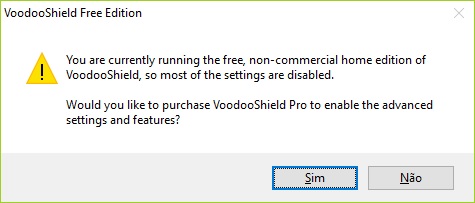
This is not the advertisment you get at startup, but the one you get when opening the settings. This one can't be disabled.
The one you get at startup is "VoodooShield has blocked 1 threat. Would you like to purchase the pro version?" (or something similar). You should get this one when VoodooShield blocked one or more threats, and only on Fridays. There is a trick to remove this one: just uninstall and reinstall VoodooShield. The threat count will go back to 0 and you won't see that ad again
 
  • Like
Reactions: legendcampos
This is not the advertisment you get at startup, but the one you get when opening the settings. This one can't be disabled.
The one you get at startup is "VoodooShield has blocked 1 threat. Would you like to purchase the pro version?" (or something similar). You should get this one when VoodooShield blocked one or more threats, and only on Fridays. There is a trick to remove this one: just uninstall and reinstall VoodooShield. The threat count will go back to 0 and you won't see that ad again

The bad is that going to have to do this every time I detect a pup. My country is infested with this, and the consequence is computers full of junk.

Thanx!
 
Status
Not open for further replies.