

The MalwareTips app
Your community, one tap away.
Open MalwareTips from your Home Screen or desktop. Follow discussions, find answers and pick up where you left off.
- Home Screen access
- Optional push alerts
- Your community
You're ready to explore.Explore what's new
Installation instructions
iPhone & iPad
- Open MalwareTips in Safari and tap Share. You may need to open the Page Menu first.
- Choose Add to Home Screen. If it is not listed, use Edit Actions to add it.
- Keep Open as Web App enabled if shown, then tap Add.
Android
- Open MalwareTips in Chrome or another browser that supports app installation.
- Open the browser menu and look for Install app, Install and create shortcut, or Add to Home screen.
- Choose Install and confirm. Wording varies by browser.
Desktop
- Chrome: use the install icon in the address bar, or the menu under Cast, save and share.
- Edge: open the menu, then More tools, Apps and Install this site as an app.
- Safari on Mac: choose Share or File, then Add to Dock. Firefox on Windows: look for the web apps button in the address bar.
If you cannot find an install option, update your browser or use its bookmark option to keep MalwareTips close.
Keep up with your conversations
After installation, open the app and sign in. Enable push notifications in Preferences if you want alerts. On iPhone and iPad, push requires a Home Screen web app and iOS or iPadOS 16.4 or later.
Sign in to manage notificationsInstallation is optional. Your notification settings stay under your control.
You are using an out of date browser. It may not display this or other websites correctly.
You should upgrade or use an alternative browser.
You should upgrade or use an alternative browser.
Advice Request Disabling these in Kaspersky Standard.
-
 Thread starter
amirr
Thread starter
amirr
- Start date
- 24 Replies
- 5,096 Views
Share practical recommendations that address the author's needs.
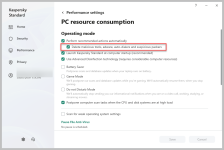
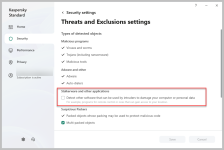

I get the other two but why disable "System Watcher"?

Because I never get my system infected with malware. I mean I am always careful. So, what are the reasons not to disable system watcher? Thank you.I get the other two but why disable "System Watcher"?

Setup PCPC setup
There is no reason to disable these settings.
P.S Kaspersky's system watcher is a critical component; it must be enabled.
P.S Kaspersky's system watcher is a critical component; it must be enabled.
Last edited:
It's the part of Kaspersky that protects against malware that doesn't have signatures available in it's database aka the Behavior Blocker (BB).what are the reasons not to disable system watcher? Thank you.
From Kaspersky Support:
System Watcher protects against ransomware and file-encrypting malware and rolls back actions performed by malicious programs.
The System Watcher component includes:
- Automatic Exploit Prevention, the technology which prevents and blocks the actions of exploits.
- Protection against screen lockers, which detects and removes ad banners when you press the keyboard combination specified in the component settings.
- Application Activity Control, which performs an action specified in the component settings when it detects suspicious application behavior.
- Rollback of application actions, which rolls back the actions performed by a malicious application. Information about suspicious actions performed by applications is collected continuously unless you disable the component.
F
ForgottenSeer 93786
If you supposedly cant get infected, then why use Kaspersky? By disabling system watcher you greatly decrease the protection against zero day malware as System Watcher is Kaspersky's Behavior blocker and now Kaspersky has to rely completely on its cloud and signatures for detection, and you no longer receive protection against exploitation of vulnerabilities. I also wouldnt disable Stalkerware and other applications as RAT's generally fall under this category.Because I never get my system infected with malware. I mean I am always careful. So, what are the reasons not to disable system watcher? Thank you.

Shadowra
Level 42
Verified
Top Poster
Content Creator
Malware Tester
Well-known
High Reputation
Forum Veteran
System Watcher is a critical component of Kaspersky. It must remain activated.
It's like driving a car without insurance.... Highly risky. Keep activate this shield
The other 2 rules must also be enabled. This allows the detection of adware, keyloggers, PUPs, riskware etc.
It's like driving a car without insurance.... Highly risky. Keep activate this shield
The other 2 rules must also be enabled. This allows the detection of adware, keyloggers, PUPs, riskware etc.

I agree with all of previous posts, don't know the reason you want to disable those K. modules 

In my opinion option 1 could be disabled. I don't want Kaspersky to perform automatically a task but i want to be asked first. I hate full automatism in security. We must use our brain sometimes.  They might have FP and i don't want things deleted automatically as it could bring more pain than gain but this is only my opinion. Where Kaspersky fails it's my brain intervening (wishful thinking). I will choose what to delete/quarantine, etc. The options 2 and 3 i keep them enabled but amirr is asking us an opinion on disabling them. For 2 and 3 my advice is to leave them enabled.
They might have FP and i don't want things deleted automatically as it could bring more pain than gain but this is only my opinion. Where Kaspersky fails it's my brain intervening (wishful thinking). I will choose what to delete/quarantine, etc. The options 2 and 3 i keep them enabled but amirr is asking us an opinion on disabling them. For 2 and 3 my advice is to leave them enabled.
SW does not create a system restore point...

I agree with all. Thank you. But reading description for System Watcher, when it said Roll back, I thought it automatically creates system restore point. And I didn't want that happen, in order to boost performance of my 2016 made PC.
You may would feel better when you select the option "Ask user" related to rollback by System Watcher:
- Ask user. If System Watcher, File Anti-Virus, or the results of a scan task confirm that it is necessary to perform a rollback, System Watcher prompts the user for action. This option is available if the Perform recommended actions automatically check box is cleared under Settings → Performance settings → PC resource consumption.
System Watcher settings
 support.kaspersky.com
Thank you very much. I did not know that.You may would feel better when you select the option "Ask user" related to rollback by System Watcher:
System Watcher settings
But when you uncheck the first checkbox, the second done also gets disabled? (Because it becomes gray.)
Yes, because You get Your K. into Interactive Mode 


If you trust the FP you can restore the quarantine and add the object to the exclusions …I will choose what to delete/quarantine
True but what happens if they delete/quarantine an important Windows file and I cannot boot?If you trust the FP you can restore the quarantine and add the object to the exclusions …
@dinosaur07
Kaspersky is protecting your system against viruses that infects the boot sector of hard disks.
Kaspersky is protecting your system against viruses that infects the boot sector of hard disks.
Recently browsing
Members who viewed this thread in the last 5 minutes
