Advanced Plus Security Divine_Barakah's PC Security Config 2026

Last updated
Aug 23, 2026
How it's used?
For work or educational use
Operating system
Windows 11
Other operating system
Windows 11 Enterprise IOT LTSC
On-device encryption
Cryptomator
Log-in security
    • Biometrics (Windows Hello PIN, TouchID, Face, Iris, Fingerprint)
Security updates
Allow security updates
Update channels
Allow stable updates only
User Access Control
Always notify
Smart App Control
Evaluation mode
Network firewall
Enabled
About WiFi router
ISP-provided router.
Real-time security
MD (default settings)
NVT OSArmor Personal
Adguard for Windows
Firewall security
Microsoft Defender Firewall
About custom security
*OSArmor
- added my rules
Periodic malware scanners
EEK
Malware sample testing
I do not participate in malware testing
Environment for malware testing
I don't do malware testing.
Browser(s) and extensions
Browsers
1- Vivaldi with multiple profile
2- Waterfox

Extensions
Webroot
Secure DNS
Adguard Windows with my personal Adguard DNS
Desktop VPN
Adguard VPN
Password manager
Sticky Password
Maintenance tools
Uninstalr
Kerish Doctor
Dell Command Update Universal

Hard Disk Sentinel Pro Portable
Bleachbit
Hibit Uninstaller
File and Photo backup
Koofr (Cryptomator)
Filejump (Cryptomator)
Cyberduck
Subscriptions
    • Google One AI Premium 2TB
System recovery
O&o Diskimage 21 Premium
Risk factors
    • Browsing to popular websites
    • Browsing to unknown / untrusted / shady sites
    • Working from home
    • Making audio/video calls
    • Opening email attachments
    • Buying from online stores, entering banks card details
    • Logging into my bank account
    • Downloading software and files from reputable sites
Computer specs
Dell Latitude 7450
Ultra 7 155U
16 GB DDR5 Ram 6400
1TB Micron nVMe Gen4
Notable changes
The inclusion of OSArmor.
Changed main password manager
Ditched Kerish Doctor
Managing Windows updates through GP.
What I'm looking for?

Looking for maximum feedback.

It was a nightmare. The latest Windows build caused major issues. First, the Control Vault Firmware driver got stuck and kept asking for a system restart and no matter how many times I restarted the system it never worked.

The fingerprint sensor and facial recognition broke as a result.

I resetted bios settings and cleared tpm and then reinstalled Windows. This time I created a local Windows account. I downloaded my drivers from Dell Supoort on my second laptop and manually installed them one by one.

Now everything seems to be running well. I created a full system backup using Diskimage and I will configure my system.
 
Currently running MD on default settings.
OSArmor with my own rules
Installed WFC and sat the profile to medium and applied WFC recommended rules. I enabled notifications and enabled secure boot to block internet access at startup.

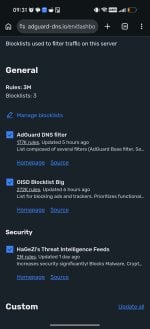
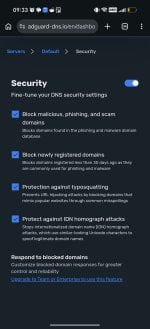
Now I am using Adguard DNS over HTTPS systemwide and in browser settings.

Using Password Boss web app in an isolated user-defined Vivaldi profile with a desktop shortcut. The isolated profile is store in Appdata and clearing vivaldi data does not clear the isolated profile data (to avoid having to sign in each time I use Password Boss.

Installed Nanazip using winget. I ditched Peazip and it drives OSA crazy. I could have whitelisted it, but chose Nanazip as it is signed.

Installed my copy of Microsoft Office 2024 Standard LTSC.

------------------------------------------------------------------------------------

I still have not decided what protection extension to install.

Currently running Vivaldi as my default browser, Waterfox as a secondary browser, and Helium as a playground.
 
Adguard DNS settings.
Screenshot_20260819_093128_com_android_chrome_ChromeTabbedActivity.jpgScreenshot_20260819_093341_com_android_chrome_ChromeTabbedActivity.jpg
 
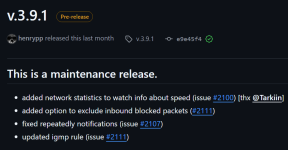
Simplewall has notifications.
I have used Simplewall before, but it seems it is dead.


There are 141 open issues.

Edit:

Tinywall, on the contrary, is actively maintained and the developer responded to each of the open 31 issues on Github
 
Last edited:

You may also like...