What are "carded keys" ?carded keys
What are "carded keys" ?carded keys


But the pop ups promote already included features. So I believe if the feature is available in your country, you receive pop ups?I have never had a single popup with McAfee in a couple of years, thats with Total or Internet Security McAfee is not on this PC but was up to a week ago, but several other PC's I care for have it on only one had a popup, I'm coming to the conclusion it might be geographic? I have never delved into the protection score myself, if you do that it may be a cause of issues.


Yes I have similar experience. And I also have 4K screen and it's interface is truly not developed for that resolution.I would not have continued to use OR install it on others PC's as that would result in phone calls from people, if I had popups I would have dumped it long ago thats a certainty with huge bells on as nothing annoys me more that up-sell - The GUI on a 4k screen is the worst in the entire world but thats really the only negative (here) it looks like @Minimalist has a similar experience to myself others don't

I believe that location has something to do we it.But the pop ups promote already included features. So I believe if the feature is available in your country, you receive pop ups?
Your experience confirms it. Thanks for sharing this.I believe that location has something to do we it.
When I started using McAfee I got 2 notification from it, but different than shown in previous posts. Both time I got them the moment I connected to VPN in Switzerland. And both times notification was in German language.
So it seems that your location can affect if you see notifications and also which ones.
I turned on my laptop and after a fews seconds OSA went crazy and kept blocking schtasks.exe
I have checked OSA logs and it was Adguard updating to the newly released version 8.
I added C:\ProgramData\Adguard\* to OSA exclusions. And now everything is working as Intended.
Now another problem, every now and then I receive a notification from Windows Security informing me that Virus Protection is off, but it is not really off. Maybe this is related to the latest Windows updates that broke Defender?
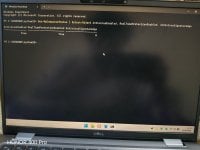
No. Right after logging in to my Windows, after exactly 5 mins I get a notification from Windows Security that real time protection is not running.Do you get " Threat service has stopped. Restart it now. " ?
Get-MpComputerStatus | Select AMProductVersion, AMEngineVersion, AntivirusSignatureVersion, AntivirusEnabled, RealTimeProtectionEnabled
If AntivirusSignatureVersion is 1.457.236.0 or newer, you should have Microsoft's fix.
I know about wine, but moving all my devices to Linux is not wise. I need Windows as a backup.You know, you can run Linux and use wine to run your Windows program ?
Then I don't think it is the Windows Update problem.No. Right after logging in to my Windows, after exactly 5 mins I get a notification from Windows Security that real time protection is not running.
Then treat it as an emergency backup. For things like fixing NTFS USB sticks. I too have a windows system, and that is what I use it for: chkdsk NTFS USB sticks. I hardly touch my Windows system anymore.I know about wine, but moving all my devices to Linux is not wise. I need Windows as a backup

Try to update to the latest platform version 4.18.26080.3. Run as admin and restart.Maybe this is related to the latest Windows updates that broke Defender?
https://download.windowsupdate.com/c/msdownload/update/software/defu/2026/08/updateplatform.amd64fre_99b71e4d3a498fec8b527f4dc0cf4a74169de128.exehttps://catalog.update.microsoft.com/ScopedViewInline.aspx?updateid=a32ca1d0-ddd4-486b-b708-d941db4f1141#OverviewMy system was installed offline. I did not connect to WiFi. I created a local user account and installed the drivers (stored on my USB drive). Then I connected to the Internet and installed OSA and imported my rules.Then I don't think it is Windows Update problem.
Suspicious me will think towards compromise attempt.
I think the installation phase of a system is the best time for attackers - one uses admin a lot, and one downloads stuff.
I try to download offline installers using Linux, and do the installation phase offline. But sometimes there are only stupid online installers.
Then treat it as an emergency backup. For things like fixing NTFS USB sticks. I too have a windows system, and that is what I use it for: chkdsk NTFS USB sticks. I hardly touch my Windows system anymore.
Yes I checked the logs of OSA. The block happened when Adguard was updating to V8. Adguard was trying to add its xml fileWhat does the notification say exactly?
My suspicious mind says: first you get OSA complaining about scheduler. Now you have something happening at a scheduled time ? Did the OSA logs say specifically that Adguard touched scheduler ?
For 5 minutes after login, choose Begin the task: At log on, select either Any user or a specific account, and set Delay task for: 5 minutes.
Scheduler is used by attackers to gain persistence all the time.
Does OSA have an online installer? I remember a long time ago it can be installed offline.
To be more precise: While offline, I install windows, do hardening, restore group policy with firewall rules, restore WDAC rules, install whatever security possible, install pre-downloaded patches from ms update catalog, make drive image. Then I go online to do whatever is left.