Advanced Plus Security Divine_Barakah's PC Security Config 2026

Last updated
Aug 20, 2026
How it's used?
For work or educational use
Operating system
Windows 11
On-device encryption
Cryptomator
Log-in security
    • Biometrics (Windows Hello PIN, TouchID, Face, Iris, Fingerprint)
Security updates
Allow security updates
Update channels
Allow stable updates only
User Access Control
Always notify
Smart App Control
Evaluation mode
Network firewall
Enabled
About WiFi router
ISP-provided router.
Real-time security
MD (default settings)
NVT OSArmor Personal
Firewall security
Microsoft Defender Firewall
About custom security
*OSArmor
- added my rules
Periodic malware scanners
EEK
Malware sample testing
I do not participate in malware testing
Environment for malware testing
I don't do malware testing.
Browser(s) and extensions
Browsers
1- Vivaldi with multiple profile
2- Helium
3- Waterfox

Extensions
None
Secure DNS
Adguard Windows with my personal Adguard DNS
Desktop VPN
Adguard VPN
Password manager
Sticky Password
Maintenance tools
Uninstalr
Kerish Doctor
Dell Command Update Universal

Hard Disk Sentinel Pro Portable
Bleachbit
Hibit Uninstaller
File and Photo backup
Koofr (Cryptomator)
Filejump (Cryptomator)
Cyberduck
Subscriptions
    • Google One AI Premium 2TB
System recovery
O&o Diskimage 21 Premium
Risk factors
    • Browsing to popular websites
    • Browsing to unknown / untrusted / shady sites
    • Working from home
    • Making audio/video calls
    • Opening email attachments
    • Buying from online stores, entering banks card details
    • Logging into my bank account
    • Downloading software and files from reputable sites
Computer specs
Dell Latitude 7450
Ultra 7 155U
16 GB DDR5 Ram 6400
1TB Micron nVMe Gen4
Notable changes
The inclusion of OSArmor.
Changed main password manager
Ditched Kerish Doctor
Managing Windows updates through GP.
What I'm looking for?

Looking for maximum feedback.

I have never had a single popup with McAfee in a couple of years, thats with Total or Internet Security McAfee is not on this PC but was up to a week ago, but several other PC's I care for have it on only one had a popup, I'm coming to the conclusion it might be geographic? I have never delved into the protection score myself, if you do that it may be a cause of issues. 😀😀
But the pop ups promote already included features. So I believe if the feature is available in your country, you receive pop ups?
 
I never did honestly, that is since @Trident recommended it some time ago, it was a program I would always remove if bundled, it does ask to do a smart scan that I've set to do weekly, tracker remover did that, I ran that occasionally, I realise popup happens for some not here or on others, my sis-in-law had one many popup months ago & she phoned me to check it out & as I remember I did post that on here, McAfee is on her lappy & my late brothers Desk that she still uses, nothing ever.

I would not have continued to use OR install it on others PC's as that would result in phone calls from people, if I had popups I would have dumped it long ago thats a certainty with huge bells on as nothing annoys me more that up-sell - The GUI on a 4k screen is the worst in the entire world but thats really the only negative (here) it looks like @Minimalist has a similar experience to myself others don't :D
 
Last edited:
I would not have continued to use OR install it on others PC's as that would result in phone calls from people, if I had popups I would have dumped it long ago thats a certainty with huge bells on as nothing annoys me more that up-sell - The GUI on a 4k screen is the worst in the entire world but thats really the only negative (here) it looks like @Minimalist has a similar experience to myself others don't :D
Yes I have similar experience. And I also have 4K screen and it's interface is truly not developed for that resolution.
Maybe pop-ups are also not 4K compatible that's why we both don't see them :)
 
But the pop ups promote already included features. So I believe if the feature is available in your country, you receive pop ups?
I believe that location has something to do we it.
When I started using McAfee I got 2 notification from it, but different than shown in previous posts. Both time I got them the moment I connected to VPN in Switzerland. And both times notification was in German language.
So it seems that your location can affect if you see notifications and also which ones.
 
I believe that location has something to do we it.
When I started using McAfee I got 2 notification from it, but different than shown in previous posts. Both time I got them the moment I connected to VPN in Switzerland. And both times notification was in German language.
So it seems that your location can affect if you see notifications and also which ones.
Your experience confirms it. Thanks for sharing this.
 
  • Like
Reactions: Jonny Quest
I turned on my laptop and after a fews seconds OSA went crazy and kept blocking schtasks.exe

I have checked OSA logs and it was Adguard updating to the newly released version 8.

I added C:\ProgramData\Adguard\* to OSA exclusions. And now everything is working as Intended.

Now another problem, every now and then I receive a notification from Windows Security informing me that Virus Protection is off, but it is not really off. Maybe this is related to the latest Windows updates that broke Defender?
 
  • Like
Reactions: Parkinsond
I turned on my laptop and after a fews seconds OSA went crazy and kept blocking schtasks.exe

I have checked OSA logs and it was Adguard updating to the newly released version 8.

I added C:\ProgramData\Adguard\* to OSA exclusions. And now everything is working as Intended.

Now another problem, every now and then I receive a notification from Windows Security informing me that Virus Protection is off, but it is not really off. Maybe this is related to the latest Windows updates that broke Defender?
IMG_20260822_071658.jpg

Everything is working. It seems the notification is a delay in sync?
 
Do you get " Threat service has stopped. Restart it now. " ?


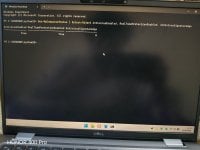
Get-MpComputerStatus | Select AMProductVersion, AMEngineVersion, AntivirusSignatureVersion, AntivirusEnabled, RealTimeProtectionEnabled


If AntivirusSignatureVersion is 1.457.236.0 or newer, you should have Microsoft's fix.
 
  • Like
Reactions: Divine_Barakah
Do you get " Threat service has stopped. Restart it now. " ?


Get-MpComputerStatus | Select AMProductVersion, AMEngineVersion, AntivirusSignatureVersion, AntivirusEnabled, RealTimeProtectionEnabled


If AntivirusSignatureVersion is 1.457.236.0 or newer, you should have Microsoft's fix.
No. Right after logging in to my Windows, after exactly 5 mins I get a notification from Windows Security that real time protection is not running.
You know, you can run Linux and use wine to run your Windows program ?
I know about wine, but moving all my devices to Linux is not wise. I need Windows as a backup.
 
No. Right after logging in to my Windows, after exactly 5 mins I get a notification from Windows Security that real time protection is not running.
Then I don't think it is the Windows Update problem.

Suspicious me will think towards compromise attempt.

I think the installation phase of a system is the best time for attackers - one uses admin a lot, and one downloads stuff.

I try to download offline installers using Linux, and do the installation phase offline. But sometimes there are only stupid online installers.

I know about wine, but moving all my devices to Linux is not wise. I need Windows as a backup
Then treat it as an emergency backup. For things like fixing NTFS USB sticks. I too have a windows system, and that is what I use it for: chkdsk NTFS USB sticks. I hardly touch my Windows system anymore.
 
Last edited:
  • Like
Reactions: Khushal
Maybe this is related to the latest Windows updates that broke Defender?
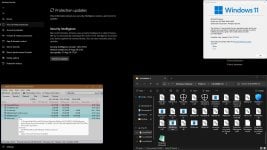
Try to update to the latest platform version 4.18.26080.3. Run as admin and restart.
Code:
https://download.windowsupdate.com/c/msdownload/update/software/defu/2026/08/updateplatform.amd64fre_99b71e4d3a498fec8b527f4dc0cf4a74169de128.exe
Optionally Update for Windows Security platform - KB5007651 (Version 10.0.29628.1000)
Code:
https://catalog.update.microsoft.com/ScopedViewInline.aspx?updateid=a32ca1d0-ddd4-486b-b708-d941db4f1141#Overview
 

Attachments

  • capture-08212026-180600.jpg
    capture-08212026-180600.jpg
    233 KB · Views: 8
  • Thanks
Reactions: Divine_Barakah
Then I don't think it is Windows Update problem.

Suspicious me will think towards compromise attempt.

I think the installation phase of a system is the best time for attackers - one uses admin a lot, and one downloads stuff.

I try to download offline installers using Linux, and do the installation phase offline. But sometimes there are only stupid online installers.


Then treat it as an emergency backup. For things like fixing NTFS USB sticks. I too have a windows system, and that is what I use it for: chkdsk NTFS USB sticks. I hardly touch my Windows system anymore.
My system was installed offline. I did not connect to WiFi. I created a local user account and installed the drivers (stored on my USB drive). Then I connected to the Internet and installed OSA and imported my rules.

Microsoft Defender is running, confirmed by a power shell command. Even clicking on the notification shows that everything is running. I get the notification once when I login to my windows. Exactly after 5 mins.
 
  • Like
Reactions: Parkinsond
What does the notification say exactly?

My suspicious mind says: first you get OSA complaining about scheduler. Now you have something happening at a scheduled time ? Did the OSA logs say specifically that Adguard touched scheduler ?

For 5 minutes after login, choose Begin the task: At log on, select either Any user or a specific account, and set Delay task for: 5 minutes.

Scheduler is used by attackers to gain persistence all the time.

Does OSA have an online installer? I remember a long time ago it can be installed offline.

To be more precise: While offline, I install windows, do hardening, restore group policy with firewall rules, restore WDAC rules, install whatever security possible, install pre-downloaded patches from ms update catalog, make drive image. Then I go online to do whatever is left.
 
Last edited:
  • Like
Reactions: Divine_Barakah
What does the notification say exactly?

My suspicious mind says: first you get OSA complaining about scheduler. Now you have something happening at a scheduled time ? Did the OSA logs say specifically that Adguard touched scheduler ?

For 5 minutes after login, choose Begin the task: At log on, select either Any user or a specific account, and set Delay task for: 5 minutes.

Scheduler is used by attackers to gain persistence all the time.

Does OSA have an online installer? I remember a long time ago it can be installed offline.

To be more precise: While offline, I install windows, do hardening, restore group policy with firewall rules, restore WDAC rules, install whatever security possible, install pre-downloaded patches from ms update catalog, make drive image. Then I go online to do whatever is left.
Yes I checked the logs of OSA. The block happened when Adguard was updating to V8. Adguard was trying to add its xml file
 

You may also like...