DNS Server

  • Thread starter Thread starter Deleted member 2913
  • Start date Start date
I use OpenDNS, but I think Norton's secure DNS is well regarded by some MT users.

Comodo's Secure DNS is not so good...at least not in my experience.

Just a suggestion ... if you are expecting DNS to block malicious websites, then you are better off using an AV with strong web/content filtering.
 
  • Like
Reactions: bitbizket
Any purpose of using DNS? As much as possible stay with your default ISP DNS because sometimes browsing up may take a bit waiting time due to selected server to catch on. ;)
 
  • Like
Reactions: scot and bitbizket
Here this is good tool for best dns for your area.
https://www.grc.com/dns/benchmark.htm

Until you run this, the best dns for you is only opinion.
I ran that & after completion it shows my ISP DNS on top.
Does that mean my ISP DNS are fastest for me?

When I click Nameserver, my ISP DNS are on top (ISP 2 DNS Server) but when I click Run Benchmark the order of my ISP DNS is changed.
For ex- When click on Nameserver
1.2.3.4
5.6.7.8
& when click on Run Benchmark
5.6.7.8
1.2.3.4

So whats my ISP Preferred & Alternate DNS?

How is Norton DNS?
Any other DNS that blocks pornography too?

I am from India, dont know if the location helps in suggesting DNS.
 
For the fastest has always been the one from your ISP and Google DNS.
As for myself using DNSCrypt and from VPN's own DNS alternately.
 
I ran benchmark.
After analysis-
1st was my ISP
2nd was Google
3rd was Google

I also ran custom list & then benchmark
After analysis-
1st was Reliance
2nd was my ISP
3rd was Google
4th was Google

Google seems to be good.

Norton was not in the list. I actually performed custom list for Norton.

I set Reliance as my preferred & ISP as alternative.
But I felt slight slowdown compared to my ISP.

My ISP DNS are
ISP preferred
Google alternative
Yes my ISP uses Google for alternative DNS.
And I find this DNS the best for me.

I tried Norton too & it was good too like my ISP.
May be I wil try Norton as I am looking for a good, reliable DNS with pornography blocking.


I tried namebench too.
Damn, its too slow. Took 2 Hours.
But still I tried 2 times.
And both times, the results were different.

Benchmark's results were consistent with just top 3 changing position.

I tried DNSjumper too.
It just analyzed 8-10 DNS.
Rest it showed query failed or couldn't reach or something like this.

So conclusion-
Either my ISP
or
Norton

Thanxx frds for the support & time.
 
Hi there I use OpenDNS and find it very good especially if you set it up in your router if your the boss of your network it will help protect all connected devices. with the exception of any devices that use there own dns settings ie "I think Androids default to google dns". I could be wrong on that.
Here is a link to where OpenDNS have there servers around the world https://www.opendns.com/data-center-locations/

With OpenDns you can also set up a free account to give you more insight and control of the service.
For my network the closest location is Sydney Australia and there was a time when they didn't have servers in Australia and the network was a lot slower in some things but now it is very good . I am really impressed with there system as they keep making it stronger and have the ability to detect Botnets and Command Control networks

Some of there new developments in this link https://labs.opendns.com/2015/03/05/nlp-apt-dns/

I know my reply is a bit long

Android users can change dns settings on there device if they want. I found out in a less than amused way from my kids when I blocked google dns protocol tcp/udp port 53 in my router their tablets etc had problems connecting.

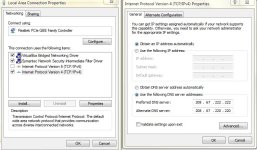
Here is my minimal setup
setup.JPG


The image to the right is what you would do to use there basic services

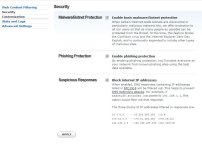
If you open a free account you get access to all sorts of settings as the second pic shows part of the options available to you
setup.JPG setup2.JPG

Hope this is a bit of insight :eek::D
 
  • Like
Reactions: bitbizket
I am confused now.
Network adapter are set to obtain dsn automatically.
ipconfig /all shows 2 dns.
203.115.71.66
8.8.8.8

I called service provider customer care & they mention dns
8.8.8.8
8.8.4.4

Now I am confused what preferred & alternate dns my isp use?
 
They must use three. If it were my machine, I would just use google since it is probably more reliable and it is listed with the benhmark tool.
 
They must use three. If it were my machine, I would just use google since it is probably more reliable and it is listed with the benhmark tool.
There is 1 more dns mentioned in ipconfig /all but its something like fec0 ffff somthing like this.
 

You may also like...