Poll Do You Use 3rd Party Software to Clean Windows Registry?

Do You Use 3rd Party Software to Clean Windows Registry?

  • Yes, I Use 3rd Party Software to Clean Windows Registry.

    Votes: 18 42.9%
  • No, I Don't Use 3rd Party Software to Clean Windows Registry.

    Votes: 24 57.1%

  • Total voters
    42

lokamoka820

Level 37
Thread author
Verified
Well-known
Mar 1, 2024
2,654
3
7,887
3,569
Banana Republic
I know that most geeks against cleaning the Windows registry after Windows 10 release, but I faced situations where I needed to clean it to fix some annoying leftovers from some programs, so what is your opinion?
  • Do you clean it?
  • What is your favorite software?
  • And how often you clean it?
 
1) As a bot, I don't perform such actions, but I can provide information. Cleaning the registry is generally not recommended unless necessary due to potential risks.
2) CCleaner is often mentioned for its user-friendly interface and effectiveness.
3) The frequency of cleaning depends on the user's activity. However, it's crucial to remember to back up the registry before making any changes.
 
The only time I clean the registry is after I've uninstalled a AV or app. But I just manually go through it by Edit/Find (software name) then Find next until I can't find any more. Some keys we're not allowed to delete, I'm not sure if they can be deleted in Safe Mode, but I leave it at that.
 
Last edited:
The only time I clean the registry is after I've uninstalled a AV or app. But I just manually go through it by Edit/Find (software name) then Find next until I can't any more. Some keys we're not allowed to delete, I'm not sure if they can be deleted in Safe Mode, but I leave it at that.
So let's say you uninstalled McAfee AV, then you search for McAfee and delete every instance you find?
 
So let's say you uninstalled McAfee AV, then you search for McAfee and delete every instance you find?
Yep, in my case that's what I do. That way you can review it for yourself one key at a time. If you're unsure, just click on find next. Registry cleaners can find so many issues, that people may tend to get overwhelmed and click for it to delete everything without really looking into it, the individual keys.

And just a bit of preventive, is to use their uninstall tool first, and backup the registry first. Pre edit, you can also run from cmd/ sfc/scannow and see if Windows finds any errors, then run it after you've cleaned the registry for confirmation that all is good with Windows.

Some may still not like cleaning there registry this way, no problemo, but so far, knock on notebook plastic, it's never been an issue for me.
 
I wouldn’t engage in going through the registry. Orphaned and invalid registry entries do not pose any risk to the system whatsoever, they will merely increase RAM consumption by kilobytes.

If AVs cause a problem, this will be through residual active components such as drivers and services.

I suggest examining services and installed Drivers for references to any previous AVs. Cleaning registry and files is a waste of time.

For even better results, do not engage frequently in changing security software.
 
The only time I clean the registry is after I've uninstalled a AV or app. But I just manually go through it by Edit/Find (software name) then Find next until I can't find any more. Some keys we're not allowed to delete, I'm not sure if they can be deleted in Safe Mode, but I leave it at that.
When I uninstall program(s), I always do it using Revo Uninstaller; carefully inspecting list of detected files and registry keys which I afterward delete. After that, I browse %programfiles%, %programdata% and %appdata% folders to see if there's something left over (you'd be surprised how many leftovers are still there even after using Revo). At the end, I'm doing same as you; manually searching the registry for leftover entries.

I'd only recommend this to people that know what they're doing because if you accidentally delete something you didn't mean to, you could easily corrupt the program installation or worse, entire Windows installation.
 
I suggest examining services and installed Drivers for references to any previous AVs. Cleaning registry and files is a waste of time.
DriverView: Loaded Windows Drivers List
For even better results, do not engage frequently in changing security software.
Absolutely, especially the latter.
Just use the Reset your PC option if you want a clean system and registry.
Next best thing to above.
Or, create an old fashioned System Restore point option pre AV install?
Always a good idea but not as reliable as above.
 
If you're unsure, just click on find next.
So I need to check the key even if it has the search keyword? Or this is rarely to happen, I mean if I get 100 entry containing McAfee in it, I have to check it again? Will a system component contain McAfee word?
Pre edit, you can also run from cmd/ sfc/scannow and see if Windows finds any errors, then run it after you've cleaned the registry for confirmation that all is good with Windows.
I always find errors after running system and registry cleaner when I run cmd/ sfc/scannow.
 
  • Like
Reactions: AtlBo
I was wondering how viable the System Restore option was. Thanks, it just seemed like a less "intrusive" option, but sounds like it's also a less effective one :)
Backups are often forgotten and are a safer bet that restore point.
 
I had already voted no, but then I saw Mako:) post and remembered that I also use Revo Uninstaller, so I changed my vote to yes. But outside removing some software, I do not clean the registry with a third party software. I deactivated everything related to registry I could in PrivaZer.
 
So I need to check the key even if it has the search keyword? Or this is rarely to happen, I mean if I get 100 entry containing McAfee in it, I have to check it again? Will a system component contain McAfee word?

I always find errors after running system and registry cleaner when I run cmd/ sfc/scannow.
When I uninstalled F-Secure, it left a lot of leftover keys. There were certain categories (program files?) where I could check, highlight with the mouse cursor the key found and from that list of keys underneath the one found it showed about 4-6 more F-Secure keys, then tick on it, the initial one found and then last one below it (related key) holding down the Shift key, to delete the next 4-6 in a row, under the found one. And when in doubt, leave it all alone, and let it go, as that's when you could cause issues :)
 
Last edited:
I had already voted no, but then I saw Mako:) post and remembered that I also use Revo Uninstaller, so I changed my vote to yes. But outside removing some software, I do not clean the registry with a third party software. I deactivated everything related to registry I could in PrivaZer.
Revo Uninstaller made a lot of problems for me, last one, was when I want to remove Lenovo Vantage app, and it broke all Microsoft Store apps, even Microsoft Store itself won't open, so I want a safer uninstaller than Revo.
Isn't PrivaZer registry cleaner light? I didn't hear it makes problems, even CCleaner find more registries than PrivaZer when you run it after PrivaZer.
When I uninstalled F-Secure, it let a lot of leftover keys. There were certain categories (program files?) where I could check, highlight with the mouse cursor the key found and from that list of keys underneath the one found it showed about 4-6 more F-Secure keys, then tick on it, the initial one found and then last one below it (related key) holding down the Shift key, to delete the next 4-6 in a row, under the found one. And when in doubt, leave it all alone, and let it go, as that's when you could cause issues :)
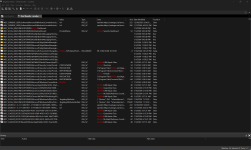
I think this is a bit too long procedure, what about using Registry Finder? It shows all the entries in one view with the ability to delete them all at once, here is a screenshot from my system searching for McAfee entries:

RegistryFinder_2024-07-11_17-24-39.png
 
Last edited:
Revo Uninstaller made a lot of problems for me, last one, was when I want to remove Lenovo Vantage app, and it broke all Microsoft Store apps, even Microsoft Store itself want open, so I want a safer uninstaller than Revo.
Isn't PrivaZer registry cleaner light? I didn't hear it makes problems, even CCleaner find more than PrivaZer when you run it after PrivaZer.

I think this is a bit too long procedure, what about using Registry Finder? It shows all the entries in one view with the ability to delete them all at once, here is a screenshot from my system searching for McAfee entries:

View attachment 284245
Yep, it can take some time, it took me about 15-20 minutes per each of the 4 PC's I had F-Secure installed on. But, from your screenshot above, do you understand all of the keys it's showing you, and to safely delete them? In my case, I just took the time and did it :)