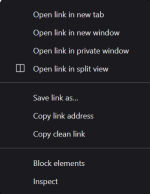
DuckDuckGo has introduced a "Copy Clean Link" feature in its iOS app that removes tracking parameters from URLs before sharing. The feature deletes everything in a URL after the "?" character, which usually holds tracking data, and creates a clean link without those details.
This option is only available on iPhone for now. Users need to choose "Copy Clean Link" directly, as using the standard copy method still includes the tracking information. The feature is not available through the usual copy or share options.
Availability, and a Brave Alternative
Copy Clean Link is only available in DuckDuckGo's iOS app for now. On other platforms, users can get the same result by manually deleting everything in a URL after the "?" character. ZDNet notes this is usually easier to do on desktop than on mobile devices.
Brave has a similar "Copy Clean Link" feature. In Brave, users can long-press the address bar on a page or long-press any link in the browser to access the option. DuckDuckGo does not currently support cleaning links directly from the link itself.
DuckDuckGo has not said if Copy Clean Link will come to its Android or desktop apps. It is also unclear if the feature will be added to the share sheet, so users could clean links without opening them in the browser first.

DuckDuckGo Adds "Copy Clean Link" to Strip Trackers From URLs on iPhone - gHacks Tech News
DuckDuckGo's iOS app can now strip tracking parameters from URLs with a "Copy Clean Link" option before sharing.
 www.ghacks.net