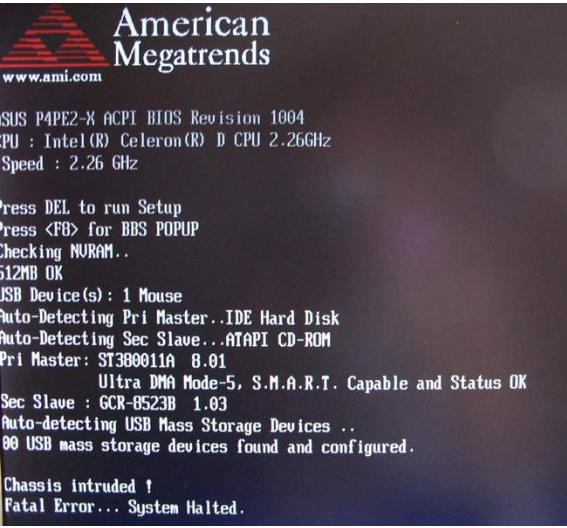
donotcrack Level 1 Thread author Verified Oct 14, 2011 308 26 34 38 donotcrack.com May 2, 2012 #1 How to fix ??? Main: ASUS P5KPL-AM Error: Chassis intruded Error... System Halted Help me, How to fix it ?
How to fix ??? Main: ASUS P5KPL-AM Error: Chassis intruded Error... System Halted Help me, How to fix it ?
I iScream New Member Dec 7, 2011 118 0 9 35 May 2, 2012 #2 Try things that they mention here (Google...): http://vip.asus.com/forum/view.aspx?id=20081024173658250&board_id=1&model=P5K-E%2FWiFi-AP&page=1&SLanguage=en-us Upvote 0
Try things that they mention here (Google...): http://vip.asus.com/forum/view.aspx?id=20081024173658250&board_id=1&model=P5K-E%2FWiFi-AP&page=1&SLanguage=en-us
jamescv7 Level 85 Verified Honorary Member Forum Veteran Mar 15, 2011 13,070 17,982 8,379 29 Philippines May 2, 2012 #3 That something to go from the Chassis component which may cause failure perhaps on being an old and malfunction. If it still not work you need to buy a new one on that last resort option. Upvote 0
That something to go from the Chassis component which may cause failure perhaps on being an old and malfunction. If it still not work you need to buy a new one on that last resort option.
Detection Level 1 Feb 25, 2011 247 40 33 47 Home May 2, 2012 #4 You should be able to disable Chassis Intrusion in teh BIOS Upvote 0
donotcrack Level 1 Thread author Verified Oct 14, 2011 308 26 34 38 donotcrack.com Jun 28, 2012 #5 Don't see the config on main board Fix manual Step 1. Turn off power Step 2. Clear safe-mode Step 3. Turn on + F2 (Set default ) When you shutdown.... return Step 2 ( http://www.youtube.com/watch?v=fMS3KkJZ8nA Upvote 0
Don't see the config on main board Fix manual Step 1. Turn off power Step 2. Clear safe-mode Step 3. Turn on + F2 (Set default ) When you shutdown.... return Step 2 ( http://www.youtube.com/watch?v=fMS3KkJZ8nA
R ranget New Member Dec 8, 2011 232 2 9 45 Jul 2, 2012 #6 there should be a sensor in the computer case connected to the motherboard check that if there is nothing just disable the function from the bios Upvote 0
there should be a sensor in the computer case connected to the motherboard check that if there is nothing just disable the function from the bios
pcjunklist Level 1 Dec 28, 2011 523 11 31 46 Boston Jul 2, 2012 #7 If you can't find it in bios or you can't enter bios, reset the bios (take the battery out). Upvote 0