Advanced Plus Security ErzCrz Security Config 2026

Last updated
Mar 15, 2026
How it's used?
For home and private use
Operating system
Windows 11
Other operating system
N/A
On-device encryption
BitLocker Device Encryption for Windows
Log-in security
    • Biometrics (Windows Hello PIN, TouchID, Face, Iris, Fingerprint)
Security updates
Allow security updates and latest features
Update channels
Allow stable updates only
User Access Control
Always notify
Smart App Control
Off
Network firewall
Enabled
About WiFi router
Sky Router with built-in IPV4/IPv6 Firewall
Real-time security
ESET Security Premium
CyberLock
Firewall security
Other - Internet Security (3rd-party)
About custom security
ESET Security Essentials - Default Settings
Cyberlock - ON - Firewall Rules for Unsafe Items. SmartFirewall Recommended, Require Captcha to exit.
RansomwareGuard
Periodic malware scanners
Malwarebytes
Emsisoft
Malware sample testing
I do not participate in malware testing
Environment for malware testing
N/A
Browser(s) and extensions
Primary: Edge with Osprey, uBlock Origin Lite & ESET
Secondary: Firefox with uBlock Origin & Osprey Browser Extension & ESET
Secure DNS
EU4DNS DNS. My ISP Sky DNS isn't secure enough.
Desktop VPN
ESET VPN Unlimited with ESET Premium
Password manager
Keepass 2.x
Maintenance tools
Windows built-in Disk Clean-up and Storage Sense.
File and Photo backup
AOMEI Backupper Pro - Monthly Full Backups & Weekly Differential Backups
Subscriptions
    • None
System recovery
Lenovo Built in Recovery, AOMEI Backupper Pro Recovering Environment & Bootable USB
Risk factors
    • Browsing to popular websites
    • Working from home
    • Making audio/video calls
    • Opening email attachments
    • Buying from online stores, entering banks card details
    • Downloading software and files from reputable sites
    • Gaming
    • Streaming audio/video content from trusted sites or paid subscriptions
Computer specs
Notable changes
See First Post Spoilers
08.02.2026 - 2026 setup - ESET Security Essentials, CyberLock, RansomwareGuard
11.03.2026 - Just minor tweak to DNS to DNS4EU servers.
15.03.2026 - Upgraded ESET to Premium
----------------------------------------
Disclaimer we use date format DD/MM/YYYY here in the UK
What I'm looking for?

Looking for minimum feedback.

Thinking about doing a Fresh Install and see if that fixes the screen flicker issue I have. Seems to happen after some reboots and then a few minutes later it's gone as I mention in my topic here. I know I will loose OEM Asus software which I could always just re download and install. Something I'm considering so if I end up afk for a day or two, that's why. It's the updates that take forever.

Just considering it. Reinstalling display driver seems not to be doing the trick so doing some troubleshooting first to see if I can't figure this out.
 
  • Like
Reactions: Nevi and oldschool
Did a factory reset, issue still exists though nice to get rid of clutter and start a fresh again. I just need to create a fresh image once all updated etc.

Update keeps failing but these things eventually sort themselves out. Running the troubleshooter and will clear update cache etc later.

EDIT: Update successful. I had to refresh as I believed a MSVC Redistributable installation to resolve KeepassXC crashing might have been a factor. Using Keepass regular now that I figured out where built-in TOTP is (Password Managers post ).

1738364485001.png

Anyway, more than likely a hardware issue with the cable. I'm not great at dealing with hardware issues so IT at work have offered to have an initial look and we'll go from there. :/

P.S. I should have remembered that AOMEI Backupper licence wouldn't transfer so just using Seagate Toolkit for backups for now and it works fine.
 
Last edited:
Just a slight change. I removed WFC, just not needed right now with CL - Smart Firewall and creating block rules for unsafe items. I got a cheap deal on Adguard Lifetime Licence on StackSocial and used an Edge Coupon meaning I got it for $11. Kind of prompted because wife's Mac uses old Adblock Plus which doesn't always work and with the lifetime licence I get it with 3 devices ;) So in turn, replaced uBOL / uBO for Adguard. Hope it all goes well but so far so good.
 
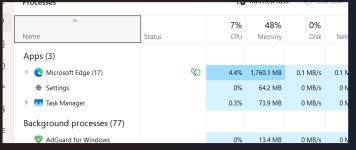
I'm finding Edge sometimes unresponsive, particularly with webpage videos paying or youtube when I pause it and want to, for example, share the video. It doesn't happen in Firefox. Just a bit annoying and not found the root cause. It uses less ram/cpu than firefox but only by one or two hundred megabytes.

Anyway, I might have to consider switching if I've not found the cause.
 

Attachments

  • 1746355713087.png
    1746355713087.png
    36.5 KB · Views: 120
  • Like
Reactions: piquiteco
Try Edge without AdGuard Desktop filtering to see if it solves the issue.
Not come across another site typically but in a speed test comparing Adguard browser assistant and UBOL in Complete. I get 14mbps with adguard and nearly 18mbps with UBOL but that's variable and these speed tests change all the time and testing again a bit later, got the same score for both.

Anyway, still not identified the freezing again yet but will check when I do.
 
Last edited:
  • Like
Reactions: piquiteco
@ErzCrz Are you still using CF? With MD? Which firewall are you using at the moment? BTW I'm sorry for asking too many questions, it's because I haven't used CF for a while so I wanted to know how it is at the moment. Thanks! :)
 
  • Like
Reactions: rashmi
@ErzCrz Are you still using CF? With MD? Which firewall are you using at the moment? BTW I'm sorry for asking too many questions, it's because I haven't used CF for a while so I wanted to know how it is at the moment. Thanks! :)
CFW hasn't changed at all. Some reported an issue with Windows Update but I've yet to test that myself. I've used it off and on. Usually when someone needs help with it. I have a lifetime CyberLock licence so that's my primary default deny but CFW runs along side it without any real issue when I tested it out though overkill and CL with throw an Exploit altert when CFW tries to run a file in containment.
Anyway, nothing further has changed and under the hood it's still the same as old version .8012. MD now detects Killswitch installer as a Trojan so the only way to install that would be to disable MD temporarily and then re-enable it after installing KillSwitch. It's unknown whether there will be any acutal updates this year but we'll see. In the meantime CL can create firewall rules for unsafe apps and has it's own Smart Firewall feature which is just a set of block rules like Andy Ful's Windows Firewall Hardening. If I'm feeling paranoid, WFC is still a great tool if I want more control of what's allowed to connect ;)

1746732616003.png
 
MD now detects Killswitch installer as a Trojan so the only way to install that would be to disable MD temporarily and then re-enable it after installing KillSwitch.
Yeah, I like CF. And no one has reported Microsoft to check on KillSwitch if it's a false positive? Maybe so, I think Microsoft wants people to use Process Explorer. CF's firewall and sandbox is amazing. I liked its 2025 security configuration. (y)
 
  • Like
Reactions: ErzCrz and rashmi