

Advanced Plus Security ErzCrz Security Config 2026
- Thread starter ErzCrz
- Start date
You are using an out of date browser. It may not display this or other websites correctly.
You should upgrade or use an alternative browser.
You should upgrade or use an alternative browser.
- Last updated
- Mar 15, 2026
- How it's used?
- For home and private use
- Operating system
- Windows 11
- Other operating system
- N/A
- On-device encryption
- BitLocker Device Encryption for Windows
- Log-in security
- Biometrics (Windows Hello PIN, TouchID, Face, Iris, Fingerprint)
- Security updates
- Allow security updates and latest features
- Update channels
- Allow stable updates only
- User Access Control
- Always notify
- Smart App Control
- Off
- Network firewall
- Enabled
- About WiFi router
- Sky Router with built-in IPV4/IPv6 Firewall
- Real-time security
- Comodo Internet Security 2027
CyberLock
- Firewall security
- Other - Internet Security (3rd-party)
- About custom security
- Comodo Internet Security 2027 - Proactive, autocontainment to Untrusted
Cyberlock - ON - Firewall Rules for Unsafe Items. SmartFirewall Recommended, Require Captcha to exit.
RansomwareGuard
- Periodic malware scanners
- Malwarebytes
Emsisoft
- Malware sample testing
- I do not participate in malware testing
- Environment for malware testing
- N/A
- Browser(s) and extensions
- Primary: Edge with Osprey, uBlock Origin Lite & ESET
Secondary: Firefox with uBlock Origin & Osprey Browser Extension & ESET
- Secure DNS
- Currently Sky DNS (Sky Shield) or occsionally EU4DNS DNS
Using Osprey Browser Protection for additional DNS protection
- Desktop VPN
- Firefox Free Built-In.
- Password manager
- Keepass 2.x
- Maintenance tools
- Windows built-in Disk Clean-up and Storage Sense.
- File and Photo backup
- AOMEI Backupper Pro - Monthly Full Backups & Weekly Differential Backups
- Subscriptions
- None
- System recovery
- Lenovo Built in Recovery, AOMEI Backupper Pro Recovering Environment & Bootable USB
- Risk factors
- Browsing to popular websites
- Working from home
- Making audio/video calls
- Opening email attachments
- Buying from online stores, entering banks card details
- Downloading software and files from reputable sites
- Gaming
- Streaming audio/video content from trusted sites or paid subscriptions
- Computer specs
- Notable changes
- 08.02.2026 - 2026 setup - ESET Security Essentials, CyberLock, RansomwareGuardSee First Post Spoilers
11.03.2026 - Just minor tweak to DNS to DNS4EU servers.
15.03.2026 - Upgraded ESET to Premium
24.06.2026 - Switched DNS back to Sky DNS (Sky Shield)
23.07.2026 - Switched to Comodo Internet Security 2027
----------------------------------------
Disclaimer we use date format DD/MM/YYYY here in the UK
- What I'm looking for?
Not looking for any feedback.


Any AV with HTTPS scanning slows down browsing speed to some extent but ESET is the second fastest among the ones I tested (Avast/AVG the fastest for me), Kaspersky was the slowest, but the difference is not huge. Kaspersky even uses more CPU for analyzing files even in idle conditions as well as browsing the web. Laptop batteries will run out faster with Kaspersky than some other popular AVs. MD is still the CPU usage king (except while browsing). It also slows down the launching of some apps. Two days ago, I had to put my ShareX portable (stored in HDD) into its exclusion as it was taking 5 seconds to load it. Only putting ShareX exe didn't solve this. I had to put the whole folder into exclusions. I have to put many apps like this that I often use to Defender's exclusion that I never needed for ESET, Kaspersky, etc. products. It has nothing to do with HDD either. Cloudflaware Warp is installed in SSD yet takes 4-5 seconds to load if not put into exclusions.
If you want Microsoft Defender to be fast or even faster than ESET and Kaspersky, then unplug internet. When internet is off, MD turns from a turtle to Barry Allen.
If you want Microsoft Defender to be fast or even faster than ESET and Kaspersky, then unplug internet. When internet is off, MD turns from a turtle to Barry Allen.


MD is CPU friendly for me regarding browsing, followed by Avast-AVG, K, and finally B.MD is still the CPU usage king (except while browsing)


Just changing topic to reflect returning to MD & CL. Debating between ConfigureDefender and DefenderUI and whether WFC would be needed with CL creating block rules for unsafe items.
Just re-checked SAC and it's now in Off mode though it was in evaluation mode initially, it's turned itself off and I'd have to do a reinstall to enable it. Not planning to use it anyway but that's odd.
Also, just noticed I don't have encryption enabled. Does enabling it affect performance in things like gaming etc? Getting mixed information from web searches.
Also, just noticed I don't have encryption enabled. Does enabling it affect performance in things like gaming etc? Getting mixed information from web searches.

Just re-checked SAC and it's now in Off mode though it was in evaluation mode initially, it's turned itself off and I'd have to do a reinstall to enable it. Not planning to use it anyway but that's odd.
Also, just noticed I don't have encryption enabled. Does enabling it affect performance in things like gaming etc? Getting mixed information from web searches.
The slowdown depends on your hardware from what I've gathered and seen. I barely see a minor performance loss on my gaming laptop with an AMD Ryzen 9 8945HS, 96GB RAM Nvidia 4070 and two WD Black M.2 SSDs. Looking at your specs, I don't think your laptop would be affected much, but I think the question I would ask is, do you really need bitlocker encryption enabled?
Thanks! It's not something really needed given that it's full time at home, kept in a drawer overnight in my locked house so not really in any risk but will think on it. Thanks for the infoThe slowdown depends on your hardware from what I've gathered and seen. I barely see a minor performance loss on my gaming laptop with an AMD Ryzen 9 8945HS, 96GB RAM Nvidia 4070 and two WD Black M.2 SSDs. Looking at your specs, I don't think your laptop would be affected much, but I think the question I would ask is, do you really need bitlocker encryption enabled?

Thats fair. No problem.Thanks! It's not something really needed given that it's full time at home, kept in a drawer overnight in my locked house so not really in any risk but will think on it. Thanks for the info
Did a image backup of my system with Rescuezilla following having to do a windows repair . The 1TB drive took 90 minutes. It probably would have taken an hour or less with AOMEI Backupper. I have lifetime AB on spare laptop, maybe I should get it for this one as it at least allows differential backups which I think might be better. Still a decent deal on @SerialCart for £24 for a lifetime licence which is a good deal. I'll have to grab it
Purchased AOMEI Backupper Pro Lifetime Licence scheduled with weekly incremental backups. Using uBlock Origin Lite with Edge and uBlock Origina with Firefox. Still testing out Osprey Browser Extension. DefenderUI used for MD tweak.
Just a few small changes. Changed Backup Scheme to Full backup weekly, implemented @oldschool 's Anti-Exploit Tweaks again and enabled CFA.
Anti-Exploit Tweaks
SYSTEM SETTINGS - All ON
Control Flow Guard
Data Execution Prevention
Force Randomization of Images - Mandatory ASLR
Randomize Memory Allocations - Bottom Up ASLR
High Entropy ASLR
Validate Exception Chains - SEHOP
Validate Heap Integrity
-----------------------------------
Firefox
Block Low Integrity Images
Block Remote Images
Block Untrusted Fonts
Disable Extension Points
Validate Handle Usage
Validate Image Dependency Integrity
Edge
Block Low Integrity Images
Block Remote Images
Block Untrusted Fonts
Code Integrity Guard
Data Execution Prevention - Enable ATL thunk emulation
Force Randomization of Images - Mandatory ASLR Do not allow stripped images
Validate Handle Usage
Validate Image Dependency Integrity
SYSTEM SETTINGS - All ON
Control Flow Guard
Data Execution Prevention
Force Randomization of Images - Mandatory ASLR
Randomize Memory Allocations - Bottom Up ASLR
High Entropy ASLR
Validate Exception Chains - SEHOP
Validate Heap Integrity
-----------------------------------
Firefox
Block Low Integrity Images
Block Remote Images
Block Untrusted Fonts
Disable Extension Points
Validate Handle Usage
Validate Image Dependency Integrity
Edge
Block Low Integrity Images
Block Remote Images
Block Untrusted Fonts
Code Integrity Guard
Data Execution Prevention - Enable ATL thunk emulation
Force Randomization of Images - Mandatory ASLR Do not allow stripped images
Validate Handle Usage
Validate Image Dependency Integrity
Although overkill now using Comodo Firewall - Cruelsister Setup with IPv6 and Anti-ARP Spoofing enabled. It runs well with CyberLock and DefenderUI though I have to temporarily disable Anti-Exploit for powershell in CFW to adjust any DefenderUI settings.
No feedback needed.
No feedback needed.
Just a couple tweaks, moved to ConfigureDefender as more of a set and forget and altered backup plan.
Last change for the year. Primary Browser now Firefox with uBlock Origin
"01.09.2025 Purchased ESET Smart Security Premium"Do you no longer use ESET? Could you tell me why? Thank you. Happy New Year 2026Just changing topic to reflect returning to MD & CL. Debating between ConfigureDefender and DefenderUI and whether WFC would be needed with CL creating block rules for unsafe items.
I wanted to block some sites I don't want to use anymore. So, I started using LeechBlock NG to block sites and redirect. Actually, you can do it with BlockSite as well but Leechblock is more flexible and stricter. I then wanted it to redirect to a mindful site o something with positive messages. Anyway, I ended up asking Copilot to recommend some after quite a few searches and not finding what I was after. Sometimes AI is helpful for specific stuff.
Anyway, in the end, I got Copilot to create a local html page for me with the specifics I was looking for. Actually, works great and I can schedule what days to block the pages in Leechblock and specific times
The message at the bottom shows when I click on Make a cup of tea. Just something tailored for what I was after.

Anyway, in the end, I got Copilot to create a local html page for me with the specifics I was looking for. Actually, works great and I can schedule what days to block the pages in Leechblock and specific times
The message at the bottom shows when I click on Make a cup of tea. Just something tailored for what I was after.

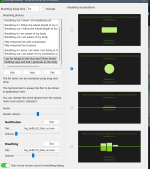
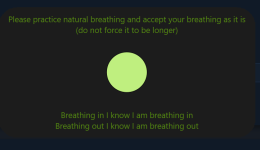
Try this instead. Mindfulness at the Computer *. You can set it to notify as often as you prefer. You can also change phrases. Use it interactively to watch the breath, or not.I wanted to block some sites I don't want to use anymore. So, I started using LeechBlock NG to block sites and redirect. Actually, you can do it with BlockSite as well but Leechblock is more flexible and stricter. I then wanted it to redirect to a mindful site o something with positive messages. Anyway, I ended up asking Copilot to recommend some after quite a few searches and not finding what I was after. Sometimes AI is helpful for specific stuff.
Anyway, in the end, I got Copilot to create a local html page for me with the specifics I was looking for. Actually, works great and I can schedule what days to block the pages in Leechblock and specific times
The message at the bottom shows when I click on Make a cup of tea. Just something tailored for what I was after.
It may be flagged by AV but it's a FP.
Settings page
Notification splash screen
Interesting, thanks. Might look at it. The purpose of the local html redirect is that it pops up when old habits creep in but looks to be a useful toolTry this instead. Mindfulness at the Computer *. You can set it to notify as often as you prefer. You can also change phrases. Use it interactively to watch the breath, or not.
It may be flagged by AV but it's a FP.
Maybe I misunderstood and that you use LeechBlock to block some sites take you to your chosen HTML page. Right?
Yes. I can block keywords in urls and with wildcards etc. I won't get into it here but it's time I stopped wasting my time on such content and do something healthier and be better to myself etc. So yeah, and old habit I want to move on from and this is first step sheduled blocking those pages every other day during the week and the whole weekend but if I find the mindfulness stuff helpful then something like your program will help take that side of things to the step afterMaybe I misunderstood and that you use LeechBlock to block some sites take you to your chosen HTML page. Right?
You may also like...
-

-
 New Update uBlock0rigin in Medium mode for Lighter and Stronger Protection, with Less websites breakage and hassle
- Started by Windows_Security
- Replies: 129
-
4Reverse Engineering Rogue Kaspersky browser extension
- Started by 436880927
- Replies: 12
-
-
 Announcing Windows 10 Insider Preview Build 16288 for PC & Build 15250 for Mobile
- Started by Bot
- Replies: 0