Chrome Web Store
Add new features to your browser and personalize your browsing experience.
 chromewebstore.google.com


Open MalwareTips from your Home Screen or desktop. Follow discussions, find answers and pick up where you left off.
If you cannot find an install option, update your browser or use its bookmark option to keep MalwareTips close.
After installation, open the app and sign in. Enable push notifications in Preferences if you want alerts. On iPhone and iPad, push requires a Home Screen web app and iOS or iPadOS 16.4 or later.
Sign in to manage notificationsInstallation is optional. Your notification settings stay under your control.
chromewebstore.google.com
Technical Analysis & Remediation
Evidence of Compromise
Source
browser_extensions_list.txt
Entry N/A,*pjbgfifennfhnbkhoidkdchbflppjncb*,pjbgfifennfhnbkhoidkdchbflppjncb,malware,malicious...
Threat Intel Link
Matches the "June 8, 2023 Cluster" of malicious extensions.
MITRE ATT&CK Mapping
T1176 (Browser Extensions)
The adversary uses the extension mechanism to maintain persistence in the browser.
T1566.002 (Spearphishing Link)
Users are lured via "Clean" ratings on third-party download sites.
T1056.004 (Input Capture: Credential API Hooking) This malware cluster is known to inject code into web pages to intercept search queries and potentially other form data.
Operational Behavior
The "Sleeper" Tactic
The malicious code is often obfuscated and set to activate only 24+ hours after installation, allowing it to bypass automated scans by Google or Softpedia.
Payload
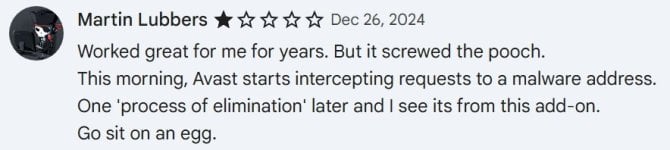
Instead of a simple theme, the extension acts as a "Search Hijacker," redirecting user queries through affiliate networks to generate revenue for the attacker.
Remediation - THE ENTERPRISE TRACK (NIST SP 800-61r3)
DETECT (DE)
Command
Run a fleet-wide query for Extension ID pjbgfifennfhnbkhoidkdchbflppjncb.
Command
Block the domain darktheme.tab or any C2 domains associated with the "Triplex Media" developer group if visible in DNS logs.
RESPOND (RS)
Command
Force-Remove the extension via Google Workspace Admin Console (Devices > Chrome > Apps & extensions > Users & browsers).
Command
Reset all active web sessions (cookies) for affected users, as the extension had read/write access to all visited websites.
PROTECT (PR)
Command
Implement a "Blocklist by default" policy for extensions, allowing only those vetted by IT.
Remediation - THE HOME USER TRACK
Priority 1: Eradication
Command
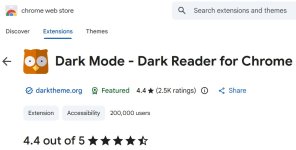
Open Chrome/Edge, go to chrome://extensions, find "Dark Mode" (ID ending in ...jncb), and click Remove.
Command
Do not interact with any "Goodbye" surveys that open after removal.
Priority 2: Sanitization
Command
Clear your browser cache and cookies (Ctrl+Shift+Delete -> Select "All time"). This removes any tracking beacons left by the hijacker.
Command
Change passwords for sensitive sites (Banking, Email) if you logged into them while the extension was active, as a precaution against data scraping.
Priority 3: Verification
Command
Verify your default search engine has not been changed. Go to chrome://settings/search and ensure it is set to Google, Bing, or your preferred provider, not a generic "Secure Search".
Hardening & References
Primary Evidence
Found in( browser_extensions_list.txt )pointing to Palant's "Another cluster of potentially malicious Chrome extensions".
Lesson Learned
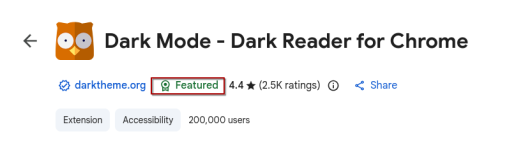
"Clean" ratings on software download sites (like Softpedia) are static and often fail to detect dynamic, obfuscated JavaScript malware found in browser extensions. Always verify the Extension ID against community threat lists.


I think it's also a little deceptive on their part to include Dark Reader in the description name, as some users may get confused and think it's that trusted version and install it?
There is another one with the exact same nameI think it's also a little deceptive on their part to include Dark Reader in the description name, as some users may get confused and think it's that trusted version and install it?
 chromewebstore.google.com
Members who viewed this thread in the last 5 minutes