- Dec 19, 2012
- 1,266
- 2,661
- 2,168
- 59
ok Thks just what i thought ,wondering if avira engine is reallt needed to install?
ok Thks just what i thought ,wondering if avira engine is reallt needed to install?
Thank you Evgeny and the others commenting on the question by blueblackwow65, am still @ a Party, mobile only. I employ Avira and BD additionally as Qihoo (Cloud only?) seldom does not catch files (until some Update cloud or Signature), also I don't feel no impact even on weaker systems. Also with no Internet you still have Protection by Signatures.QVM it is Qihoo engines.. so Qihoo detected 4/4 in their only technology.
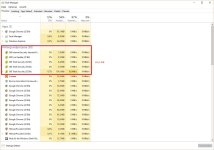
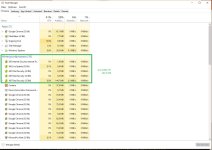
That's a great difference indeed. Might use similar RAM on both Laptop (4 GB RAM, no Gaming possible) and PC (old, but can still handle some Games). However, i don't notice the impact and having had a look to the Task Manager, Qihoo was not the most resource hungry (but Top 5/10 indeed). I spend the extra RAM for security.If I use avira ram spikes a bit, right now I have just qihoo engines with about 60meg ram used, with avira add another 20-30, but with bitdefender also it then goes to about 160-180meg used.
If I use avira ram spikes a bit, right now I have just qihoo engines with about 60meg ram used, with avira add another 20-30, but with bitdefender also it then goes to about 160-180meg used.
When I disabled both Avira + BD engine, RAM usage went up?Avira + Bit will eat alot of memory, if they are both enabled.
Qihoo itself do no impact on system.

When I disabled both Avira + BD engine, RAM usage went up?
I have to admit I did no restart / logout, just pulled those switches within the GUI to off.
This is for quite idle system, just some office work, surfing the net, but not scanning.
It is weird indeed, thanks for confirmingI have to agree seems it works better in ram usage with at least avira or Bitdefender enabled,very weird.

Thats because you didnt restarted your system, i had this problem too.. if you have enough ram you can use bit plus avira, if you have less than 4gb dont use other engines..When I disabled both Avira + BD engine, RAM usage went up?
I have to admit I did no restart / logout, just pulled those switches within the GUI to off.
This is for quite idle system, just some office work, surfing the net, but not scanning.
Thank you Evgeny for enlightening meThats because you didnt restarted your system, i had this problem too.. if you have enough ram you can use bit plus avira, if you have less than 4gb dont use other engines..
 Both Systems are equipped with enough RAM that might be the reason for the not noticeable impact However, 360 Cloud is mighty enough (Avira+BD will help when there's no Internet)